Обзор сервиса Psiphon VPN
 Алексей Уматов

Psiphon VPN позиционируют как инструмент для доступа в интернет из стран с жесткой цензурой. По заявлению разработчиков, это один из немногих сервисов, способных обеспечить доступ к глобальной сети из Поднебесной, обходя ограничения «Великого китайского файрволла».
Основали проект в 2004 году, первая релизная версия появилась в 2006 году. В странах СНГ о Psiphon узнали в 2020 году, во время массовых блокировок интернета в Беларуси.
Основные характеристики
| Характеристики | Подробная информация |
|---|---|
| Количество серверов и стран | 26 |
| Страна расположения | Канада |
| Одновременных подключений | 1 |
| Поддержка P2P | Нет |
| Протоколы шифрования | L2TP/ IPSec, SSH, HTTP |
| Встроенный блокировщик рекламы | Нет |
| Хранит журналы активности | Да |
| Максимальный тариф | 360 дней в клиенте для смартфонов |
| Возврат денег за подписку | Нет |
Конфиденциальность и безопасность
Psiphon зарегистрирован в Канаде, стране, которая входит в альянс 5 глаз с 1941 года. Это значит, что при утечке личных данных пользователя, ее могут передать другим 13 странам, состоящим в альянсе 14 глаз. Противостоят распространению любой информации посредством необычной политики конфиденциальности.
Журналы активности
Начнем с того, что компания не предоставляет важные или идентифицирующие данные пользователей третьим лицам. При этом, вендор сохраняет данные активности, к которым относится:
- используемый протокол;
- продолжительность подключения;
- общий объем переданного трафика;
- из какой страны и через какого провайдера пользователь выходил в сеть;
- некоторые домены передают информацию об объеме скачанного через сервис трафика.

Все эти данные хранятся у компании на протяжении 90 дней, после чего обобщаются и удаляются или поддаются резервному копированию. Под обобщением подразумевают удаление любой информации о конкретном пользователе, отчего она выглядит примерно так:
- в определенный день из Великобритании подключилось к сети 200 человек;
- они использовали определенного провайдера;
- за время их общей сессии, было скачано 1 ТБ данных, из которых 100 ГБ пришлись на YouTube.
Звучит подобное достаточно безопасно, но все это касается только VPN-трафика. Если для подключения использовать прокси-сети, то ни о какой анонимности не идет и речи. Для пользователей, беспокоящихся о своей конфиденциальности, мы рекомендуем попробовать NordVPN первые 30 дней бесплатно.
Алгоритмы и протоколы шифрования
Разработчики используют несколько способов подключения к сети:
- Через прокси с использованием слабых протоколов SSL и HTTP. Они подключаются к серверам, способным проводить обфускацию трафика, делая его неотличимым от обычного. Именно такая схема позволяет сервису миновать любые гео-ограничения, включая китайский файрволл.
- Путем создания защищенного VPN-клиента. В клиенте для Windows используют L2TP/IPSec. В других версиях протокол не уточняют, но, вероятнее всего, применяют IKEv2, также работающий в сочетании с IPSec.
В качестве алгоритма шифрования используют AES-256.
Дополнительный функционал
Скачав Psiphon, пользователи смогут воспользоваться:
- Раздельным туннелированием для разделения трафика на зашифрованный и обычный.
- Отключить лимит времени подключения для медленных сетей – это предотвратит частые разрывы связи при выходе в интернет через 3G.
- Ручной настройкой локальных и внешних прокси-серверов.
Разработчики предупреждают об использовании cookie-файлов для показа рекламных объявлений внутри клиента.
Платформы и скорость работы

Клиент Psiphon VPN бесплатно скачивают на:
- Windows – есть варианты для XP и Vista; – включая решения для ПК на базе фирменных чипсетов Apple;
- Android, начиная с ОС версии 4.0; 8.0 и старше.
Бесплатная версия ограничивает скорость до 2 МБ/с. Обходят этот показатель оформлением платной подписки.
Стоимость
Psiphon VPN уникален тем, что предлагает несколько способов потратить свои деньги. На Android и iOS пользователям предоставляют 7-дневный пробный период, после чего можно оформить подписку на:
- 7 дней – $2,99;
- 30 дней –$9,99;
- 360 дней – $74,99.
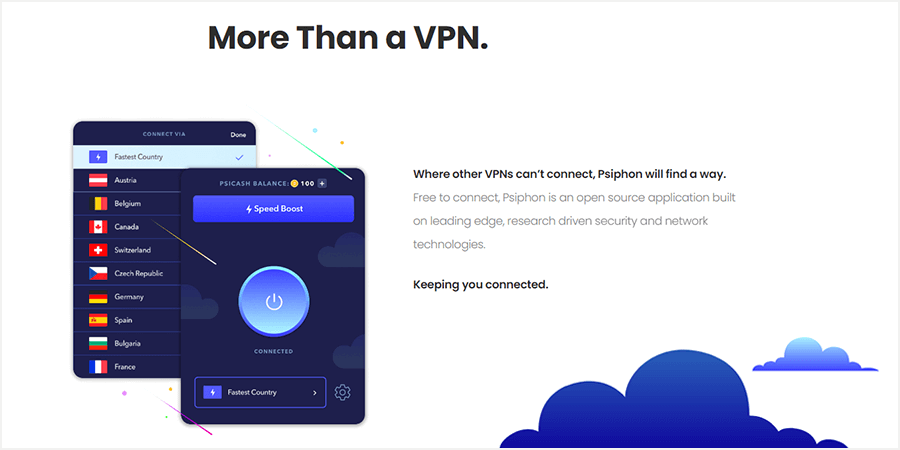
Другой способ поддержать разработчиков – купить валюту PsiCash и обменять ее на турбо-скорость. Курс обмена 1000 к 1, то есть, за 1000 просят $1, а за 100 000 – $100. 1 час турбо-скорости обойдется в 100 монет. Чтобы разблокировать ее на 1 месяц, придется отдать 13 000 PsiCash. Оплата производится через кредитную карту или PayPal.
Возврат денег за оформление подписки отсутствует.
За $6.67 вы можете приобрести ExpressVPN, а за $2.30 — Surfshark. Эти два VPN, не считая Nord, являются лидерами рынка, и подписка выходит дешевле Psiphone. Рекомендуем попробовать их.
-
— самый быстрый в мире, не прерывает соединение. — VPN с неограниченным кол-вом устройств, русифицирован. — максимальная защита всех устройств, сканер утечек личных данных, встроенный антивирус.
Каждый из этих VPN гарантирует возврат средств в течении 30 дней.
Подводим итоги
Psiphon – это уникальный сервис для доступа в интернет из стран, откуда выйти во всемирную сеть с обычным VPN невозможно. За это приходится платить низким уровнем конфиденциальности, высокой стоимостью подписки и одновременным подключением к аккаунту всего 1 устройства.
Лучшие бесплатные VPN-приложения для iOS и Android
В нелегкое время блокировок и неработающих вечерами соцсетей Esquire рассказывает о VPN-сервисах, которые продлят удовольствие пользования интернетом и сделают это бесплатно.
Psiphon

Качественный интерфейс, отсутствие регистрации и неограниченный доступ к любому сайту. Из неудобств – только всплывающий рекламный баннер. Разработчики предупреждают, что скорость серфинга будет зависеть от выбора страны, но даже наиболее близкий к вам сервер не гарантирует успех. Впрочем, Psiphon предполагает «систему лояльности» для постоянных пользователей: частая активация приложения приносит специальный PsiCash – баланс, который в дальнейшем можно обменять на максимальную скорость соединения.
Скачать Psiphon для iOS, для Android
TunnelBear
TunnelBear находится в числе самых любимых VPN-сервисов благодаря простоте управления, скорости и, конечно, «медвежьему» дизайну. Чтобы подключиться к одной из 20 доступных стран, достаточно зарегистрироваться на сайте приложения и установить его. Регистрировать каждый девайс не нужно – один аккаунт рассчитан на вход с пяти различных устройств. Минус «медведя» в трафике – всего 500 МБ на месяц. Для фильмов и стримов маловато, но вполне хватит на пролистывание вечерней ленты в соцсетях.
Скачать TunnelBear для iOS, для Android
Hotspot Shield
Лимит Hotspot Shield тоже 500 МБ – но не в месяц, а в день. По заверениям создателей приложения и отзывам его пользователей, это один из самых быстрых VPN-сервисов. При бесплатном режиме работы он дает доступ только к серверу в США, но для контента, заблокированного локально, это как раз то, что надо. Также сервис будет полезен, если вы часто подключаетесь к гостевым WiFi: Hotspot Shield защитит устройство автоматически, когда вы подсоединитесь к «небезопасной» беспроводной сети.
Скачать Hotspot Shield для iOS, для Android
ProtonVPN

В отличие от многих других сервисов Proton готов предоставить трафик безо всяких ограничений. Использование приложения предполагает ограничение по скорости, но, как отмечают пользователи из СНГ, на руку идет разница во времени – в пик интернет-активности в нашем часовом поясе бесплатные каналы этого VPN заметно разгружаются.
Скачать Proton VPN для iOS, для Android
Минималистичный дизайн и умеренное количество рекламы делают это приложение приятным визуально, а возможность выборы региона для подключения – удобным с технической стороны. Для использования сервиса не предусмотрена регистрация, а соединение происходит в одно нажатие. Впрочем, порой его придется подождать – популярность приложения может тормозить скорость работы. Тут как повезет.
Скачать VPN для iOS
Windscribe VPN

Этот сервис предоставит выбор между бесплатными пакетами в 2 и 10 ГБ в месяц, а также возможность подключения к точкам в 10 странах. Для шифрования через это приложение нужно пройти процедуру регистрации: создать имя пользователя и пароль. Если вы часто забываете пароли и планируете пользоваться этим сервисом долго, то стоит прикрепить аккаунт к электронной почте, что, впрочем, не является обязательным пунктом. Windscribe утверждает, что не хранит историю подключений, сохраняя только ваше имя, сервер и количество переданных данных, но и это стирается в ближайшие минуты после завершения сеанса.
PsiCash FAQ
PsiCash is Psiphon’s in-app currency that allows you to upgrade your Psiphon experience. It can be spent on a SpeedBoost, allowing you to experience Psiphon with maximum speed.
PsiCash and Speed Boost are available in the Psiphon App on every supported platform: Android, iOS, Apple Silicon MacOS, and Windows.
Visit https://my.psi.cash to create a PsiCash account.
With an account, your PsiCash balance is kept safe and can be shared between your devices. If you don’t have a PsiCash account, your balance is specific to each device, and losing a device means losing your balance on that device.
When you have an account, all you need to do is log in to restore your balance.
SpeedBoost allows you to get faster network speeds while connected to the Psiphon network.
This is perfect for streaming video, gaming, Voice-over-IP calling, or other content-rich sites and services.
SpeedBoost can be purchased in-app in 1-hour increments for 100 PsiCash per hour.
If you require unlimited Speed Boost, please subscribe to Psiphon so that Speed Boost is always enabled during the subscription period. Subscriptions are only available on iOS, Apple Silicon MacOS and Android.
Note: Currently when you activate a SpeedBoost it will work in real time, so it does not pause if you disconnect or quit Psiphon while it is active.
More About PsiCash
If you do not have a PsiCash Account, your PsiCash data is associated with an anonymous ID generated by your Psiphon app when it connects to a Psiphon server. PsiCash transactions and balances are associated with this anonymous ID and stored on our server. The Psiphon app can then use this ID to check the PsiCash balance, earn more PsiCash, and buy a Speed Boost with PsiCash.
If you have a PsiCash Account, your PsiCash data is associated with your username and email address that you have used to sign up with. To learn more about how Psiphon protects users’ privacy please see our Privacy Policy.
You will lose your PsiCash balance if you are not logged into your PsiCash account and have uninstalled the app or cleared your app data.
Create an account to save your PsiCash and access your PsiCash across all your devices.
Earning PsiCash depends on the ongoing promotions in your region. When applicable, you will be able to earn PsiCash by engaging with the landing pages that open when you are connected to Psiphon in addition to other earning mechanisms such as PsiCash Airdrops. Stay tuned for future promotions and earning opportunities!
No, while you can’t buy a subscription with PsiCash, you can still increase your speed by spending it on a Speed Boost.
PsiCash is an alternative option to subscribing, where you can pay only for the speedboosting you need, when you need it.
Alternatively, you can subscribe to Psiphon to ensure you have SpeedBoost enabled by default every time you use Psiphon
We want every customer of Psiphon to have a positive experience. If you are not satisfied with your PsiCash purchase, or Speed Boost, learn more about refunds here.
Note:Refunds are only provided for PsiCash that is purchased, not for PsiCash earned from the app.
Currently PsiCash is non-transferable as it is tied directly to your app data.
In some landing page URLs and in buy.psi.cash URLs you will see a parameter like #!psicash=abcd1234. or buy.psi.cash URLs you will see a parameter like ?psicash=abcd1234. This contains information necessary to give you a PsiCash reward for visiting some landing pages or for making a purchase of PsiCash.
The ‘token’ you will see in the decoded base-64 of the parameter is your PsiCash ‘earner’ token, and can only be used for crediting your account with PsiCash — not for spending your PsiCash, viewing your balance, etc. This token also cannot be used to reveal your identity or anything else about your account.
More About PsiCash Accounts
A pseudonym is an alias or handle that you use to identify yourself that is different from your real name.
Using a pseudonym for your PsiCash account username helps prevent your real identity from being linked with your Psiphon or PsiCash usage. If revealing yourself to be a Psiphon user is dangerous or otherwise undesirable, then you should choose a username that cannot be linked to you, and instead you should use a pseudonym that you have not used with any other site or service.
When signing up for a new PsiCash account, it is possible for someone to check for the existence of a username by trying to create an account with it. If the attempt is successful, the username did not already exist. If the attempt failed, the username did already exist. Having your username discovered does not put your PsiCash account at risk, but your status as a Psiphon user may be revealed in this way.
If you wish to avoid the link to your real identity, it is important to note that using a pseudonym that you use on other sites or services is almost the same as using your real name. If that pseudonym has already been linked to your identity elsewhere, then very little anonymity is gained by using it.
Also note that your email address is not discoverable in this way. Even if you use a pseudonym, you can still provide an email address on your PsiCash account and it will not be discoverable in any way.
No, providing an email address is optional, but allows you to recover your account if you forget your password. Your email address will not be discoverable and will never be disclosed to any individual or entity. We will never send you spam.
For more information on privacy please visit our Privacy Policy
You can recover your account via your email address.
Visit https://my.psi.cash/forgot to reset your password
To avoid abuse, we allow the pre-existing PsiCash balance and Speed Boost to be added from only a few devices to your PsiCash account when logging in. If you have more devices that you would like to keep the balances from, please email us at [email protected].
You must include your PsiCash username and provide a description of the amount of PsiCash you need transferred, where you need it to be transferred and why.
How to Boost your Internet Speed on Psiphon Using Psicash

The web has increased visits everyday with many people in search of free data and how to have access to the internet for free. There are a lot of methods whereby one will use this Psiphon VPN application, and so, we decided to show you guys how you could boost your internet speed using Psicash on Psiphon.
Having access to the internet for free is one thing and having that free access with a very good connection speed is also another thing.
In this article, we will show you how to get unlimited Psicash for free without having to pay a anything online or anyhow for a better internet speed.
Table of Contents
How to Increase Internet Speed on Psiphon Using Psicash
What is Psicash?
First of all what is Psicash? Psicash is Psiphon’s in-app currency that allows you to upgrade your Psiphon experience. It can be spent on a Speedboost, allowing you to experience Psiphon with maximum speed.
Speed boost allows you to get faster network speeds while connected to the Psiphon network. This is a perfect aspect for streaming video, gaming, Voice-over-IP calling, or other content-rich sites and services that deal with a lot of internet data and access.
If you are a Psiphon user and you experience connection problems or slow connection and internet speed with Psiphon, then that is probable due to lack of Psicash. But don’t bother, from today onwards you should not have any problems with your Psiphon browsing anymore.
Speed boost your Psiphon internet connection with Psicash
Psiphon built in Psicash to help it’s users get a better experience when using their services and the developer in return gets paid for the increase in server speed by every Psicash you purchase.
Psicash is a built-in currency within the Psiphon VPN application that permits its users to get a better speed and experience when using Psiphon Pro VPN.
Various subscription plans are offered by the Psiphon developer for a specific amount of Psicash. So the more the Psicash you got, the longer and faster will your internet connection be even better.
How can I use Psicash?
We have some of these three methods available in our sleeves for you today. But, you will need some basic requirements to get these methods fully available to you. These requirements are;
Requirements
- An Android Phone
- Psiphon Pro VPN Client ( Make sure its not a moded version of Psiphon)
- An internet connection
Procedure
Method I
Download Psiphon Pro
If you find it difficult if you don’t have enough data to download this application, Check out some of these our free internet tricks for all countries and know how to browse for free in your country.
The first thing to do will be to connect to the internet using Psiphon pro. You will just have to open to your Psiphon pro app downloaded from playstore and tap on start shown at the bottom left of your android or apple phone as shown below.
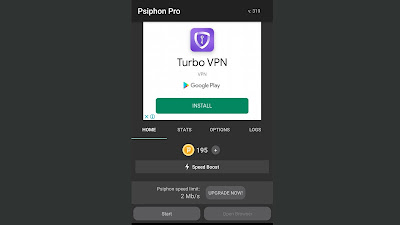
When you tap on the start button, after a short while, you will be connected to the internet on Psiphon pro but your browsing won’t be swift as wished especially with a congested network. So to boost your connection, you’ll have to tap on the speed boost shown in the middle of your screen.
Since this process is not free, you will boost it with your Psicash. And your Psicash can be added due the original 100 provided by the app.
How do I get Psicash
- You can either buy it from the app,
- Watch a video and earn it more,
- Or change your account. Change accounts because every new account is credited automatically with a certain number of Psicash.
Note that the video cannot be watched with Psiphon pro connected to the internet. That is you will have to disconnect from your Psiphon pro and watch your video with mobile data to earn the Psicash.
The video last for approximately 5seconds and your reward is given to you. Though a limited number of time per day. You can also buy the Psicash. All as shown on the picture below.
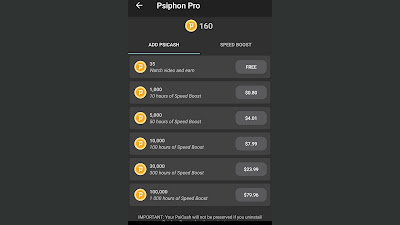
After you have your Psicash ready, all you have to do now is to boost your connection speed using Speed boost. After you have the Psicash tap on the Speedboost and it will be as shown below.
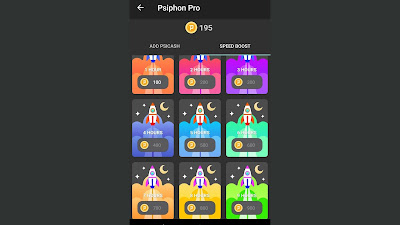
This is what we got for you on this. I will inform you in case of any new method discovered. We have two other methods available in our pockets for you. Continue reading and learn how to speedboost your internet connection on Psiphon.
Method II:
Download Psiphon Pro VPN on Google Play store if you haven’t yet done so using the link we provided above.
Now check and add the BIN on Playstore. The BIN provided below. If you want to know how you can use this BIN very well, you can read this article below.
Getting the BIN
BIN For Psicash and Other Premium Playstore Subscriptions
This BIN can equally be used for other subscriptions such as CyberGhost VPN, HBO Go, and many more subscriptions. So you can go wide with your BIN we provided above.
Make sure you use a good VPN such as Nord, IP Vanish, Express VPN, VyPr VPN etc. This is in the IP and country section. Use any of the above VPNs that can be best to be used. But if you do not feel like using these VPN apps, you can use your own IP for the method, it will equally work.
Unlimited Psiphon Psicash?
I know most of you reading this post were expecting a method that might may be permit you to load unlimited Psicash in the application.
First let me inform you that this is a reliable method and yes it might not last long just for the trial period.
But as a matter of fact, this will help you during a trial period and after that trial period, that will be all.
But you can still have the choice to make your speed last longer. If you want your Speedboost last longer, continue reading below.
How to make the method last long
To make this last long, all you need to do is to consume your trial period. After you must have finished your trial period, clear the Psiphon data and cache files, then go to Play store, change the account you are using and reapply for subscription.
This method is very efficient but for those that have several google accounts. So just login with a new account and re-do the steps above and continue your free browsing with great speed.
I will inform you in case of any new method discovered. But for now, you have to manage this one. Half a bread is better than nothing.
How to get free internet connection on Psiphon without Psicash
You can also use the free moded VPN app of Psiphon and get connected to the internet. Many people get connected with the normal application but not for free. And with the modded application of this VPN app, you will enjoy connection for free.
Download the application using the link below;
And don’t forget to share and help others boost their internet speed by sharing this article and subscribing to our telegram channel for more tutorials as such.
Never Miss Anything From Us, Follow this Blog to Receive our Latest Updates