Как открыть бот deephub
We are thrilled to announce the release of our latest major version: DeepHub 2022 R1 – 2.0.0.
The DeepHub is the first, premier implementation of an omlox hub, a software middleware that acts as the core of the omlox standard. It bridges the gap between locating technologies and applications – independent of the underlying technology or manufacturer.
As a co-founder of the omlox standard and through our extensive involvement in various solutions, uses cases, and implementations in the omlox ecosystem, we continue to fine-tune our expertise and perfect the DeepHub to meet current and future requirements of our partners, customers, and the market at large.
With this DeepHub release, we emphasized flexibility, stability, and ease of use. We’d like to take this opportunity to highlight a few new features and enhancements. For the full changelog (including bug fixes), please refer to our documentation.
Where to Get Latest DeepHub, Example Configurations, & Code Snippets
To make our users feel more at home and to further build up our developer and user community, we have changed our distribution channel for the DeepHub.
Starting with this version, the binary is now available at Docker Hub. This is not only true for the latest stable release, but for beta versions of the DeepHub that will be published there as well. Check out our repository at Flowcate@docker and get the latest Docker images of the DeepHub and the DeepHub UI.
Additionally, you can find example configurations for running the DeepHub and the DeepHub UI orchestrated through Docker Compose, source code examples on how to use the REST API of the DeepHub, and much more at Github! Check out Flowcate@github and download/clone the “deephub-basic-setup” repository to begin experimenting and test driving the hub.
New Features & Enhancements
DeepHub® Rule Engine
With this release, we have introduced our new rule engine feature that significantly extends the capabilities and flexibility of the DeepHub. This makes the DeepHub the only locating middleware with a rule engine that can be applied across all locating technologies and providers.
In certain environments, such as smart factories, multiple locating technologies may be installed that simultaneously track individual objects. For example, an automated guided vehicle could be tracked using ultra-wide band and Wi-Fi, where each technology sends location updates to the DeepHub at the same time. This makes it challenging to determine which location update is more accurate.
The DeepHub rule engine circumvents this issue by enabling greater control of your data. You can apply rules that dictate the prioritization of location information in relation to trackables. For example, you can define that location data from an ultra-wide band system should take precedence if the data is not older than the location information from a different tracking technology. The reasoning behind this is that an ultra-wide band system is considered to be the most accurate.
Through the DeepHub API or the DeepHub UI, you may define either a ruleset that applies to all trackables, or specific rules for individual trackables.
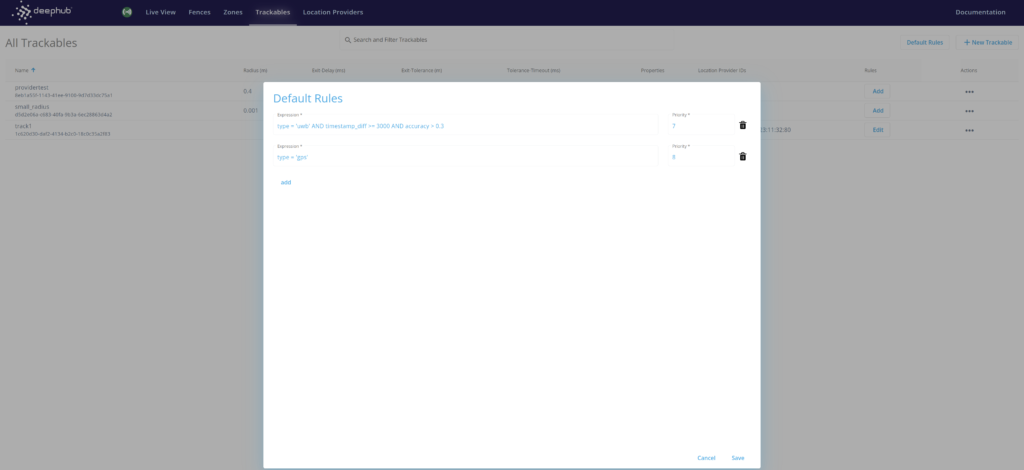
For more information on this feature, and to learn how to implement it in your own DeepHub instance, refer to our documentation.
Support for ISO/IEC 24730 Interface
To extend flexibility and promote interoperability, the DeepHub now supports the ISO/IEC 24730 standard RTLS interface, and may be configured to connect to RTLS that are compliant with this interface. By supporting this well-established interface, the hub streamlines connections to many more RTLS products on the market, thereby reducing integration and development time.
For more information on this, and to learn how to implement it in your own DeepHub instance, refer to our documentation.
Support for Eventually Consistent Databases
Previously, only an embedded SQlite database could be used for the DeepHub to store configuration information and usage statistics. This is great for performance when the hub is deployed on-premise or on the edge, but greater flexibility is sometimes needed. To address this, it is now possible to stick with SQlite, or to operate the DeepHub with a separate, dedicated database, such as Apache Cassandra. This ensures the DeepHub can be deployed in cloud setups that require scalability, high availability, and exceptional performance. No matter what your IT setup looks like, the DeepHub has got you covered.
Location Providers Added to UI
In the past, a criticism from our users was the inability to modify location providers using the DeepHub UI. This was a fair point, so we gave location providers their own dedicated tab in the UI!
The user experience when working with location providers in the UI will feel familiar and intuitive – it’s very similar to that of trackables, zones, and fences. This new tab makes it easy to create, delete, and manage location providers from the UI – instead of having to use the REST API.

Extended Monitoring of DeepHub Health
As a DeepHub operator, you need to thoroughly understand and monitor the health of your hub instance to ensure your system is functioning correctly.
We’ve extended our /health endpoints of the REST API to provide much more information on different components of your hub instance – enabling you to easily identify any irregularities or issues.
Docker Containers Usable in Read-Only Mode
When Docker containers are run in production, you do not want the processes inside of them to be able to modify the contents from the image. Therefore, for security reasons, it is best practice to run Docker containers in read-only mode and to move persistent data into a separate volume, mounted host filesystem, or database.
To conform with this best practice, and to make the DeepHub better-suited for OpenShift and Kubernetes deployments, the default configuration of the DeepHub has been changed to run in read-only mode.
Fence Events More Intuitive in UI
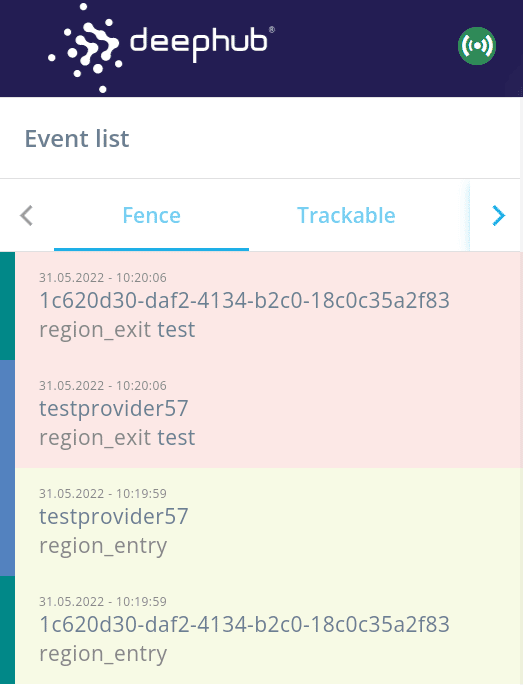
If a trackable is linked to a location provider and it enters/exits a fence, you will get fence enter/exit event notifications in the Live View for both the trackable and location provider. The DeepHub UI has been updated so that these notifications are more clear and intuitive – trackables and location providers are now distinguished with a vertical coloured bar. In the example illustrated below, the trackable has a vertical green bar, and the location provider (testprovider57) has a vertical blue bar.
What’s Next?
This is our first DeepHub release under our new Flowcate banner! The focus this time was on flexibility, stability, ease of use, and furthering our developer/user community by moving to Docker Hub and Github. This version comes with a plethora of new features and improvements, so make sure to upgrade today.
If you have any questions, or would like more information, don’t hesitate to get in touch with us. Our Partner Management team would be happy to help.
This year is full of exciting, new developments from our team. Make sure to follow us on LinkedIn to stay up-to-date on everything that’s upcoming!
Как открыть бот deephub

Это резервный Бот от канал сети каналов DeepHub ��
Для доступа к сливу с OnlyFans, Patreon и Boosty
@reset_power — связь
Running the DeepHub® Locally
This tutorial is designed for partners and customers as a step-by-step guide when working with the DeepHub®. It includes the following sections:
- System Prerequisites for the DeepHub® — This section provides information on prerequisites of the system in terms of the software tools and technical knowledge needed for the DeepHub® installation.
- Install the DeepHub® — This section provides step-by-step instructions on how to install the DeepHub®.
- User Instructions for the DeepHub® — This section provides essential information on how to operate the DeepHub® from the end user perspective.
System Prerequisites
Docker
Docker is an open-source project for automating the deployment of applications as portable, self-sufficient containers that can run on the cloud or on-premises. Docker image containers can run natively on Linux and Windows. Developers can use development environments on Windows, Linux, or macOS. On the development computer, the developer may run a Docker host where Docker images are deployed.
Image: A Docker image is a file, comprised of multiple layers, that is used to execute code in a Docker container. It is a package that contains all necessary files for a containerized application to run. When the Docker user runs an image, it can become one or multiple instances of the container.
Container: An instance of a Docker image. A container represents the execution of a single application, process, or service. It consists of the contents of a Docker image, an execution environment, and a standard set of instructions.
Docker Compose: A tool for defining and running multi-container Docker applications.
Based on your operating system, you can download and install Docker Desktop here: Docker Desktop. While installing Docker on your machine, ensure you allow the installation to bypass any firewall settings (if prompted). Once the installation process is complete, your machine will restart.
When Docker Desktop is installed on Windows, the entire package is installed (including Docker Compose). With Ubuntu, the user needs to install Docker and the Docker Compose separately.
Windows PowerShell or Command Prompt
A shell is a user interface that gives you access to various services of an operating system. A shell can be command-line based, or it can include a graphical user interface (GUI). Windows PowerShell is a shell developed by Microsoft for task automation and configuration management. It is cross-platform and consists of a command-line shell and scripting language. PowerShell capabilities allow users to simplify and automate repetitive tasks by creating scripts and combining multiple commands. The Windows operating system comes with Windows PowerShell pre-installed. However, Windows PowerShell can be installed for other operating systems here: Windows PowerShell. Aside from Windows PowerShell, the classic Windows Command Prompt is also pre-installed and can be used for tasks at hand.
Terminal for Linux & macOS
A terminal is a program that allows the use of the command-line in a graphical environment. In a Linux system, the shell is a command-line interface that interprets a user’s commands and script files, and notifies the server’s operating system what to do with them. Terminal is pre-installed on Linux and macOS. For more information, please read Ubuntu Tutorials.
Docker and Docker Compose
Using Docker or Docker Compose on Windows and Linux is done via a command line shell and is almost identical on both platforms. You can use PowerShell or Command Prompt on Windows and a shell like bash or zsh on Linux. Refer to DeepHub System Prerequisites for details.
Using Docker or Docker Compose
We recommend using Docker Compose because this way you will get a completely configured "system" consisting of the DeepHub®, the DeepHub® UI and a containerized web server, acting as a reverse proxy, to simplify the overall usage and interaction of these components.
We provide a Docker Compose file that configures the necessary orchestration between these three containers. Refer to the next section in this documentation concerning more details on this.
Nevertheless, you are able to pull just the Docker container that you need instead of all three.
The DeepHub® itself, as well as the corresponding DeepHub® UI, are available at Docker Hub: Flowcate@docker.
Getting the Latest Docker Compose File
We provide a docker-compose.yml file and additional configuration files for orchestration of the DeepHub® itself, as well as the corresponding DeepHub® UI, in our Github repository: deephub-basic-setup by Flowcate@github.
We recommend creating a dedicated local directory on your filesystem where you store the docker-compose.yml and the aforementioned configuration files which is what happens if you use git clone to pull the complete repository.
The DeepHub® needs to create some additional files during operations and writes them to directories mounted from your host filesystem. This is done relative to the location of the docker-compose.yml file and will therefore happen within some of the directories that are part of the deephub-basic-setup repository.
Explanation of the Docker Compose File
Our Docker Compose file consists of four "services":
- "deephub"
- "deephub-admin-ui"
- "deephub-apache"
Each corresponds to one Docker container (indicated by the name). Within each service section, Docker specific details can be configured as well as environment variables for the processes running within a container. Let's pick an example section:
First of all, there is the service name. In this case, it is "deephub". Next are Docker specific parameters, such as the image name and tag, the name of the container that is built from it, the restart policy, and whether the container should run in read-only mode. If the latter is set to "true", no process running within the container is allowed to write to the Docker container's own filesystem. Next there are Docker parameters for logging.
The environment key begins the section containing the environment variables that are made available within the Docker container. You'll notice DeepHub-specific ones, of course, such as the port on which the DeepHub should listen. All DeepHub-specific environment variables start with DEEPHUB, an underscore, and the capital spelling of the parameter as specified in the "Server Configuration" section further down this documentation. Note the SQLITE_TMPDIR variable: it is necessary to specify a path to which the SQlite DB can write temporary information. The path has to be a known path from the point of view of the container and has to be writable.
Note concerning the port number specified: this is the port number within the docker container. It is not necessarily identical to the port on which the process is reachable from outside of the container though. It is the following section called ports that make this port available from the outside. In this case, it is the same port as the DeepHub process uses within the container. Instead of that simple entry, a "port mapping" could have been specified. The latter is nothing more than specifying the outside port number and the corresponding inside port number to which it should be mapped. For more details please refer to the Docker and Docker Compose documentation.
Складчина Полное руководство по работе в ChatGPT [DeepHub]
Вас ждут 6 основных модулей по работе с ChatGPT 2 дополнительных с лайфхаками и секретами, а также более 2000 примеров запросов для различных сфер деятельности, с помощью которых вы сможете выполнить большинство своих повседневных профессиональных и личных задач.
- Введение
- Регистрация в ChatGPT
- Интерфейс
- Основные советы при работе с ChatGPT
- Преимущества ChatGPT
- Запреты и Ограничения ChatGPT
- Проверка информации
- Структура запроса
- Типы запросов
- Форматы запросов
- Выбор эксперта
- Глаголы
- Архетипы аудитории
- Задаем стиль общения
- Контекст для запросов
- Резюме, сопроводительные письма, навыки проведения собеседований
- Профессиональные навыки коммуникации
- Исследования, разработка идей, анализ данных
- Создание контента
- Документация, формулы Excel, Базовое кодирование
- Юридическое письмо
- Личностный рост
- Психологическое здоровье
- Здоровье и самочувствие
- Заработок в Интернете, финансовая грамотность
- Отношения и личная жизнь
- Творческое саморазвитие
- Поиск идей через Twitter
- Поиск идей через Reddit
- Поиск идей через GitHub
- Поиск идей через YouTube
- Поиск идей через Hugging face
- Поиск идей через другие источники
- Что такое ChatGPT-4
- Как пользоваться ChatGPT-4 бесплатно?
- Формирование запросов и их примеры
- Идеи для заработка
- Ответы на вопросы
- Плагины для ChatGPT
- Запросы для разных сфер деятельности
- Для Маркетологов – Руководство по ChatGPT улучшит ваши знания в интернет-маркетинге. Нейросеть поможет с контентом для сайтов и соцсетей, построением маркетинговой стратегии, текстами для интернет-рекламы и многим другим.
- Для Копирайтеров – Наше руководство по ChatGPT поможет вам стать копирайтером мирового класса. Вы научитесь искать идеи, структурировать и форматировать тексты, проводить исследования и создавать материал для любых целей.
- Для Учащихся – Наше Руководство по ChatGPT — полезный ресурс для студентов и учащихся. В нем вы сможете найти советы экспертов по написанию курсовых, диссертаций, эссе, презентаций и оформлению работ с помощью нейросети.
- Для Cоискателей – С помощью ChatGPT вы повысите шансы на получение работы мечты. Наше руководство поможет вам улучшить резюме, писать сопроводительные письма и подготовиться к собеседованию с помощью ChatGPT.
- Для Специалистов – C помощью ChatGPT преподаватели смогут формировать планы обучения, гейм-дизайнеры — писать нарратив, врачи — ставить более корректные диагнозы и это далеко не все. В нашем руководстве есть все для профессионалов.
- Для Заработка – Уже сегодня благодаря ChatGPT люди без знания кода создают игры, сайты, приложения и зарабатывают на этом. В нашем руководстве есть много успешных примеров для тех, кто хочет зарабатывать с помощью нейросетей.
Пользователи, просматривающие эту тему
- Форумы
- Складчины / Рескладчины / Совместные покупки
- Курсы по бизнесу
- Elegance 2.2.8
- Russian (RU)
Привет, только у нас можно получить бесплатный доступ, и скачать большинство материалов без оплаты.