How to upgrade Innosilicon T2TZ-30T or T2TS to the latest firmware?
Upgrading the firmware of the Innosilicon miner will help improve the stability and optimize the miner's hash rate. Therefore, it is recommended that you update it. This time the firmware has optimized the upgrade process and the operation is more convenient.
Precautions
1. Please use the new version of the bulk tool InnoMonitor v1.0.4_special for a bulk upgrade. During the upgrade process and within 15 minutes after the tool prompts the operation to be successful, it is strictly forbidden to perform any operations on the mining machine, including power off, network disconnection, mining, etc.. Otherwise, it will cause physical damage to the power supply.
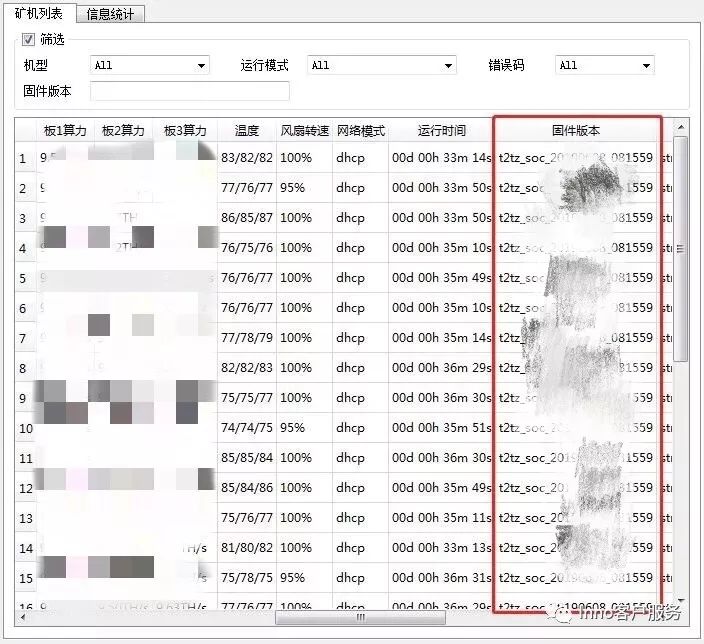
2. The bulk upgrade firmware of the miner needs to be checked and verified repeatedly. A column of the bulk upgrade software for the miner will display the version number. If the firmware version of the miner is still the old version after the upgrade, it means that the miner has not been upgraded successfully. The miners are upgraded again, until it is confirmed that each of them has been successfully upgraded. There can be no interruption or interference during the upgrade.
3. You should upgrade gradually: upgrade some miner first, and then perform mass upgrades after observation.
4. After the firmware upgrade is successful, wait 2 hours for the hash rate to reach the best value.
I.Please check which firmware the miner needs to upgrade.
If the power supply manufacturer is QB or HK miner, upgrade firmware B directly.
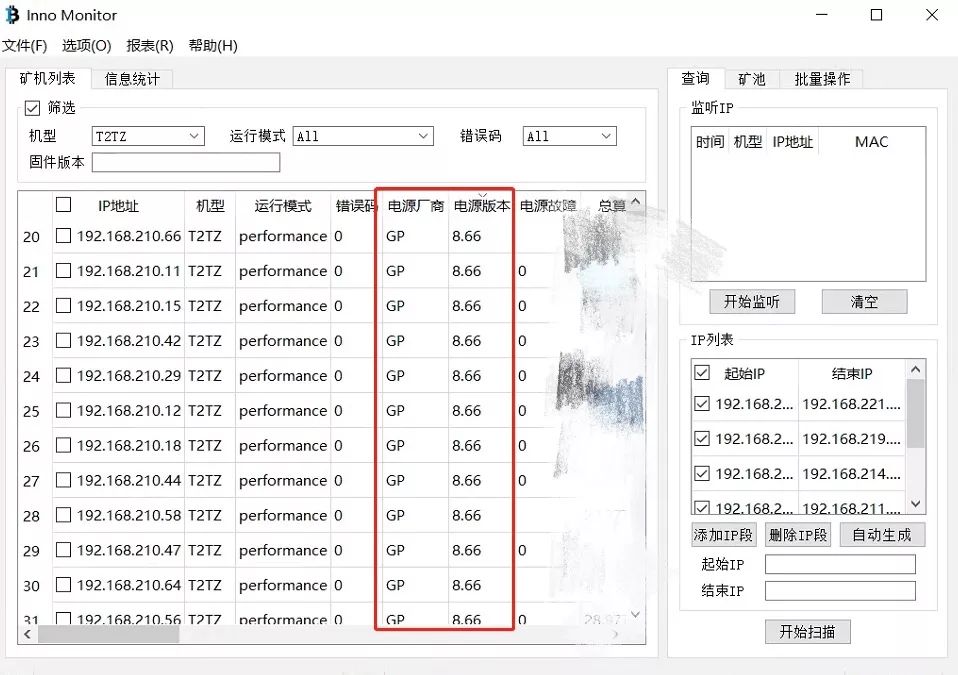
The miner whose power supply manufacturer is GP needs to confirm the power supply version first. If the power supply version is lower than 12.66, please upgrade firmware A; if the power supply version is equal to or higher On 12.66, please upgrade firmware B. It is strictly forbidden to perform any operations on the mining machine within 15 minutes after the upgrade is successful, including power off, network disconnection, mining, etc.. Otherwise, it will cause physical damage to the power supply.
Use bulk management tool V1.0.8 to scan miners:
Download and run the "Innomonitor" application. Bring up the three crucial information of "PSU Manufacturer," "PSU Version," and "PSU Error."
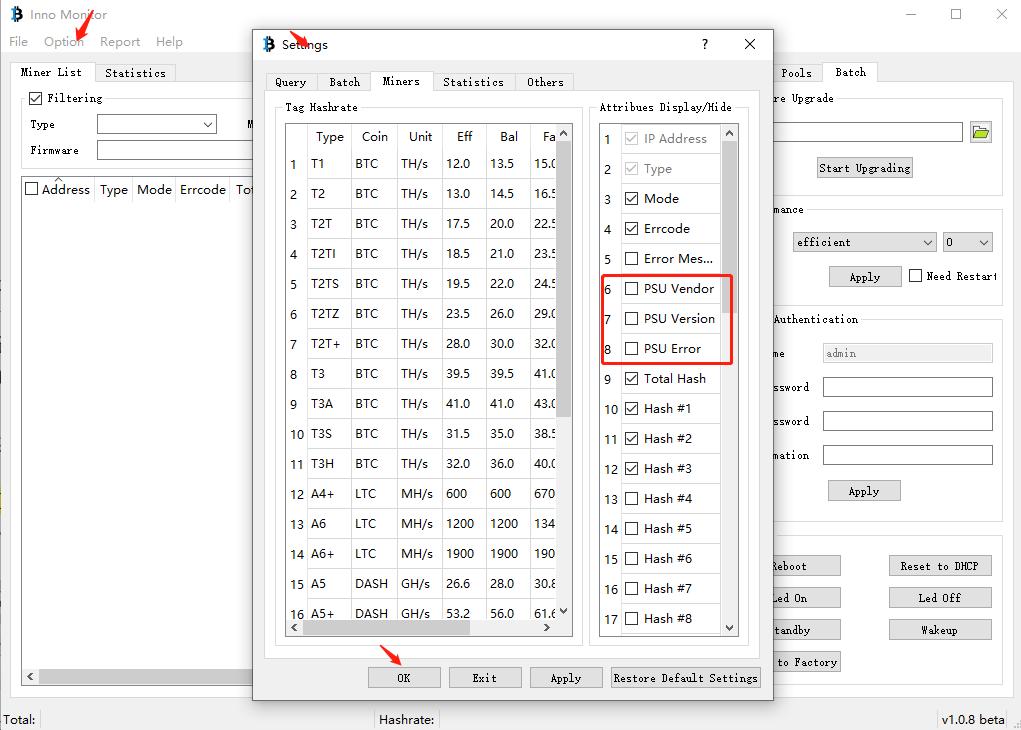
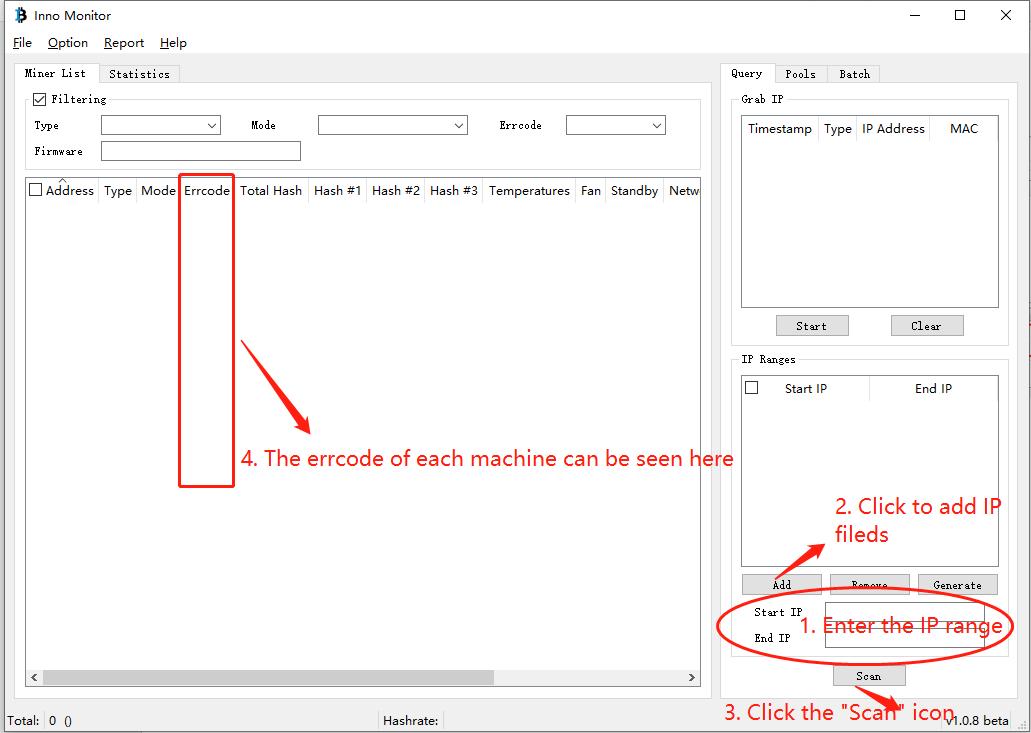
Follow the instructions in the figure below to configure the IP range, and then scan the miner:
The scanned PSU version is shown in the figure below:
T2TS-26T Firmware download link:
T2TZ-30T Firmware download link:
II. Use bulk management tool to upgrade firmware
1. Use bulk management tools to upgrade miners.
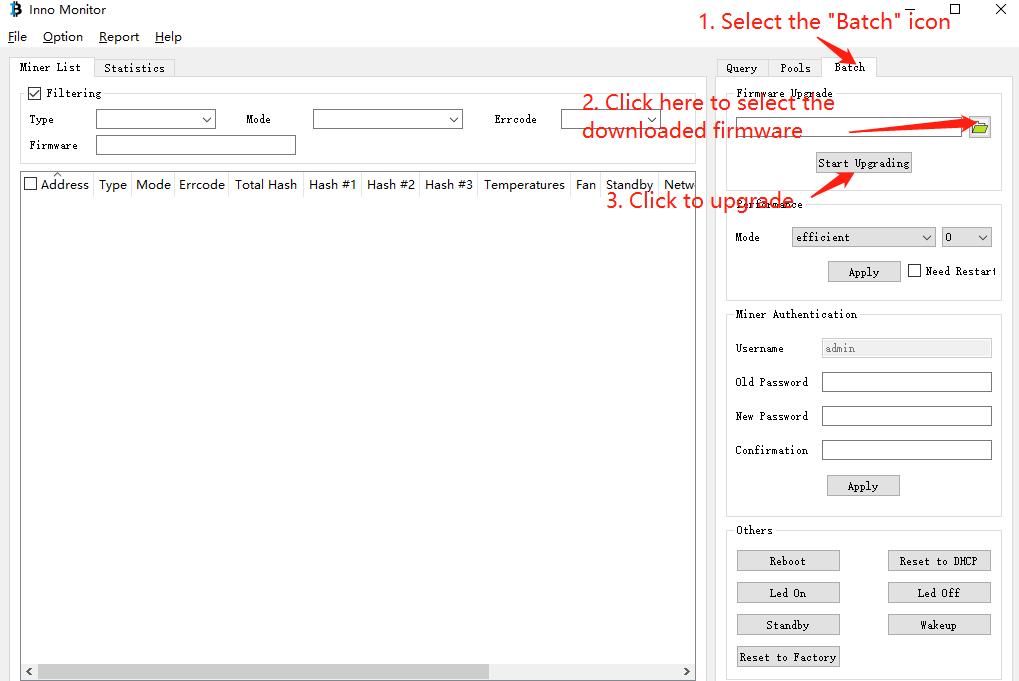
Note: Do not perform any operation on the miner within 15 minutes after firmware A is successfully upgraded to upgrade the power supply usually.
2. Rescan whether the miner is the latest version of the firmware, if not, please upgrade the miner again.
3. Check "Reboot," use the bulk management tool to select the performance mode, and then click "Apply" to modify the performance mode as shown in the figure below:
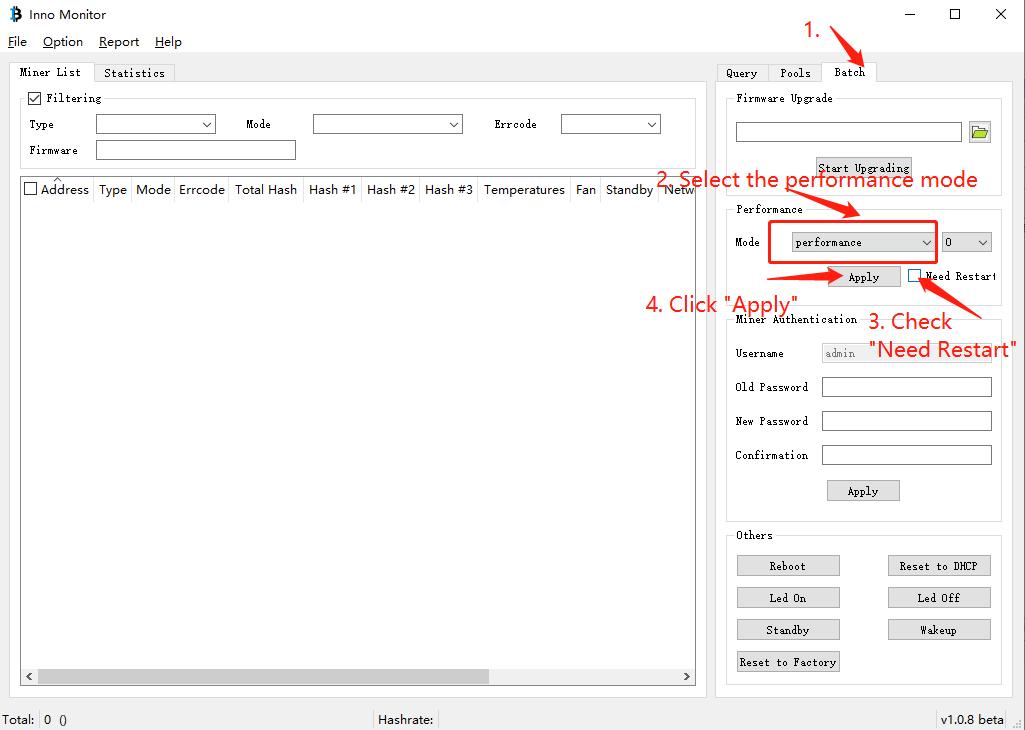
4. After completing all the above operations, the maximum hashrate miner can run stably for two hours.
Innosilicon T2T-25T, -29T, T2TH, T2TZ, 30-37 Th/s

Все полезные ссылки и FAQ можно найти в первом сообщении. Прежде чем задать вопрос, посмотрите там.
Рекомендуемые сообщения
Для публикации сообщений создайте учётную запись или авторизуйтесь
Вы должны быть пользователем, чтобы оставить комментарий
Создать учетную запись
Зарегистрируйте новую учётную запись в нашем сообществе. Это очень просто!
Войти
Уже есть аккаунт? Войти в систему.
Последние посетители 0 пользователей онлайн
- Ни одного зарегистрированного пользователя не просматривает данную страницу
Similar Topics
Ремонт innosilicon a4+/a6
Innosilicon A10,- pro, 500 Mh/s, Ethereum
Innosilicon A11
10 Jan 2022, 15:07 в Прошивки
Innosilicon A4+ LTC Master
Ремонт innosilicon a4+/a6
- Ответов 431
- Создана 11 Oct 2019, 09:20
- Последний ответ 27 Jun 2023, 14:01
Топ авторов темы
sansche 36 постов
scopus 26 постов
hustle88 26 постов
iln5317 22 постов
Популярные дни
Популярные посты

Комрад
11 Oct 2019, 10:10
хочешь загубить аппарат-подключи к найсу. Найс-это не пул, а агрегатор мощностей.
12 Jul 2021, 02:43
Ищи в телеграмм N0TScrooge или cubich они умеют это лечить.
Onoprienko Bogdan
24 Nov 2021, 05:33
Понимаю что поздно, но все же. Тоже столкнулся с такой проблемой. Купил 4 т2т 25тх. Как полагается разобрал, почистил, три собрал обратно. Включаю первый, а там вечный тюнинг. Через /error 0 информаци
Прошивка

ВНИМАНИЕ: Прошивка подходит только для T2Tz. Необходимо скачать файл, распаковать, прочитать инструкцию по установке.
Инструкция с анлокером T2Тz .
1) Качаем анлок unlock-t2tz.rar и распаковываем на компьютер.
2) В нем будет папка firmwares, в нее нужно закинуть файл кастомной прошивки предварительно переименовав ее в inno-t2t.tar.gz.
3) Далее открываем командную строку, в поиске в винде написать cmd.
4) В cmd нужно перейти в папку с анлоком например анлок лежит на рабочем столе cd Desktop.
5) Запускаем анлок командой cli-installer-t2tz.exe —ip-address=127.0.0.1 ( 127.0.0.1 заменить на нужный ип адрес).
6) Если меняли пароль на, то добавить опцию -http-pass=newpass
ВНИМАНИЕ: Для тех кто хочет откатить обратно на стоковую прошивку.
1) Качаем стоковую прошивку inno-t2tz-stock.tar.gz.
2) Кликаем на нижний левый угол в веб интерфейсе там где показана версия текущей прошивке и заливаем сток.
ПОПУЛЯРНЫЕ РЕЖИМЫ T2Tz:
26 TH/s 1900 watt (73 watt -TH/s)
30 TH/s 2350 watt (78 watt -TH/s)
S26 TH/s 2300 watt (88 watt -TH/s)
Release: 3.1.9
Скачан: 799
Дата сборки: 16.02.2022
Размер прошивки: 14.9 Mb
Размер SD образа: Mb
Хеш-сумма прошивки: ba939d32b423a7a45e0409e2b2276f29
Как перепрошить асик т2т
Официальная прошивка VNISH для Innosilicon T2Tz
Innosilicon T2T, T2Tz, T2T+
ВНИМАНИЕ : прошивка подходит только для T2Tz
Необходимо скачать файл, распаковать, прочитать инструкцию по установке. Релиз 3.1.9
ПОПУЛЯРНЫЕ РЕЖИМЫ T2Tz:
26 TH/s — 2100 watt (80 watt -TH/s)
30 TH/s — 2400 watt (80 watt -TH/s)
Наши контакты
Нужна помощь? Свяжитесь с нами!

Telegram
Вы можете написать нам по вопросам:
Сотрудничества (обсуждения индивидуальных условий партнёрства).
Технической поддержке (установке и настройке прошивок, устранения проблемам с оборудованием).