combined attacks against XDR
Despite the fact, XDR products play bulletproof against newly cyber by newly updated built-in defensive techniques and procedures, there are small holes in the development face of such products which could let intruders get used to it to gain an ability to disable or suspend or even use it as a way of persistent.
in this article, I am going to highlight some of these ways that could be used to combine it together to break the protection level or even uninstall the whole solution.
during one of the engagements I was having, it was challenging for me to bypass the latest update from Cortex XDR which I would say successfully prevented the majority of these combined attacks, and it becomes a blocked road for my goal.
at that time I was thinking, what’s the common possibility if I got an administrative command line or access level to disable or even uninstall Cortex. and from there I can easily continue to load my OffSec tools and achieve the goal of engagement.
unfortunately, Cortex enables by default tampering prevention procedures to stop any possible way to uninstall the agent without an uninstallation protected password or you should do that from the management console which I don’t have access to.
by reading the documentation of uninstalling procedures I have figured out that a tool called cytool.exe accepts the entered password in the format of raw CLI input type, which means it is possible to just echo the password in the cytool.exe to check if it’s valid or not.
I am a local administrator!
I still believe if I am an administrator, I can find a way to disable that but it needs to abuse some of this miscoded stuff to combine it like a puzzle and totally divert that agent Cytool CLI.
Cytool is a command-line interface (CLI) that is integrated into Traps and enables you to query and manage both basic and advanced functions of Traps. Any changes you make using Cytool are active until Traps receives the next heartbeat communication from the Traps management service.
as we all know many organizations are using weak passwords or easily guessed for their protected agent’s protection starting from this idea we could initiate brute force attacks to check for valid Cytool passwords, depending on the weakness part of no limitation has been enforced to how many time allowed to supply an invalid password.
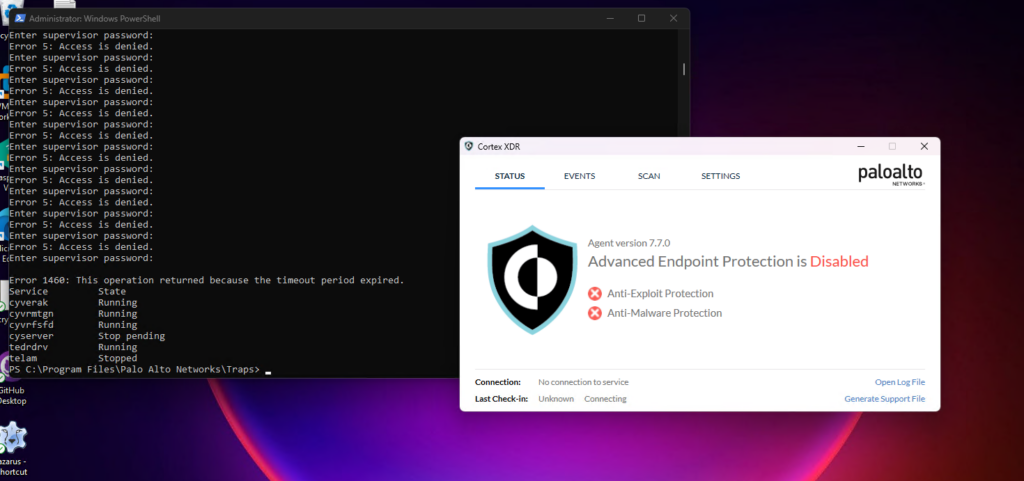
below is a working PoC which allows such an attack and successfully disables tampering and protection.
- Navigate to c:\programe files\palo alto networks \traps
- Initiate the PowerShell
- Execute the following PoC supplied with a list of your password list
after a couple of minutes, I was able to disable the tampering protection for all services, processes, registry, which easily can allow me to uninstall the agent or modify some registry settings to completely disable or suspend the node.
Disable the Cortex XDR
yup, there is another way to do that, there is a possible way to stop service cyvrfsfd using cytool.exe also. (.\cytool.exe runtime stop cyvrfsfd), so we can initiate the same brute force attack vector to successfully disable the whole protection service.
Remediation
the research case has been tested on the latest version of Cortex XDR 7.7.0.59374, the issue has been reported to the Cortex XDR psirt team as they were working on a fix but there is no an official timeline or continuous follow-up by their side after around 3 months of reporting.
Bypassing Cortex XDR
Palo Alto’s security team promptly released the following advisories:
Introduction
This article was written in July 2021 but publishing was delayed to allow the security team an opportunity to fix the findings.
All the methods require administrator/root privileges unless mentioned otherwise.
Disable Cortex Agent
To disable the Cortex XDR agent one registry key needs to be modified. This works despite having tamper protection enabled.
The registry key is located at HKLM\SYSTEM\CurrentControlSet\Services\CryptSvc\Parameters\ServiceDll . Modify the DLL to a random value.

To modify the registry key using the command line, use the command shown below.
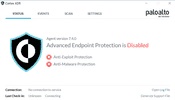
After rebooting the machine this should happen:
Default Uninstall Password (Windows/OSX/Linux)
Cortex XDR has various global settings, one of which is the ‘global uninstall password’. By default the password is Password1 and if the administrators did not change it then it’s trivial to disable the XDR agent.
Windows
Head to C:\Program Files\Palo Alto Networks\Traps and find cytool.exe . There are various commands you can run if the default password was not changed, some of which are listed below:
On Mac you would go to this path instead /Library/Application Support/PaloAltoNetworks/Traps/bin and use cytool . You can use the same commands as mentioned above.
Interestingly, inside the /bin folder there’s another executable with the name traps_uninstaller_tool which allows you to uninstall the agent if you have the uninstall password.
Linux
Cortex XDR agents on Linux have no uninstall password. If you’re root then go to /opt/traps/bin and use cytool to uninstall Cortex.
Cortex Password Hash (Windows/OSX/Linux)
In case the default password was changed, we can grab the hash and try to crack it.
Windows
Head to C:\ProgramData\Cyvera\LocalSystem\Persistence\agent_settings.db and in there you’ll find a few ldb files. You only need to focus on the largest ldb file.
Now for this to work you’ll need Sysinternals Strings64.exe. A better way would be to copy the ldb file to an offline machine and use strings there.
Run the following command:
The output file will have the password in the same algorithm but encoded differently. PasswordHash is base64 encoded whereas password is hex encoded. Feel free to use whichever one along with it’s salt value. Example values are below (The password is Password1):
I created a simple Python script with the following parameters that successfully cracked the hash.
- Hash Algorithm: PBKDF2
- HMAC: SHA512
- Iterations: 11,112
But you can use Hashcat mode 12100 to crack the hash. Thanks @k4nfr3.
Dump Hash Without Elevated Privileges (Windows)
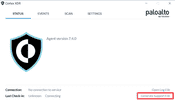
There is a way to access the persistence folder on Windows without administrator privileges. If you have GUI access, open the XDR agent’s console and click ‘Generate Support File’. This creates a dump of the persistence folder which can be accessed without administrator privileges.
Head to /Library/Application Support/PaloAltoNetworks/Traps/persist/agent_settings.db and use the strings command as shown above. The rest is exactly the same.
Linux
The uninstall password hash is available in /opt/traps/persist/agent_settings.db .
Conclusion
It’s important for security solutions to implement adequate tamper protection to avoid being targeted by attackers. Furthermore, it shouldn’t be trivial to obtain credentials or privileges that can disable the security solution.
Cortex xdr как отключить
Reddit and its partners use cookies and similar technologies to provide you with a better experience.
By accepting all cookies, you agree to our use of cookies to deliver and maintain our services and site, improve the quality of Reddit, personalize Reddit content and advertising, and measure the effectiveness of advertising.
By rejecting non-essential cookies, Reddit may still use certain cookies to ensure the proper functionality of our platform.
For more information, please see our Cookie Notice and our Privacy Policy .
Get the Reddit app
This subreddit is for those that administer, support or want to learn more about Palo Alto Networks firewalls. We are not officially supported by Palo Alto Networks or any of its employees. However, all are welcome to join and help each other on a journey to a more secure tomorrow.
Been trying to uninstall Traps and Cortex XDR using the product GUID using Powershell remotely,
Cortex XDR Prevent — Uninstall Instructions
Please call the helpdesk to obtain your uninstall password.
UNL — 402-472-3970
UNO — 402-554-4915
UNK — 308-865-8363
Anti-tampering has to be disabled to uninstall Cortex Prevent.
Windows Instructions
In windows right click on a command prompt.
Select Run as administrator.
Key in,
cd «C:\Program Files\Palo Alto Networks\Traps» press ENTER.
Type the following command to disable Anti-tampering.
cytool protect disable
It will display Enter Supervisor Password:
Key in the uninstall password obtained from the helpdesk.
If successful, it will display the following:
| Protection | Mode | State |
| Process | Disabled | Disabled |
| Registry | Disabled | Disabled |
| File | Disabled | Disabled |
| Service | Disabled | Disabled |
| Pipe | Disabled | Disabled |
Navigate to Control Panel —> Programs —> Program and Features —> Select Cortex XDR and right click on it.
Select Uninstall
MacOS Instructions
Open a terminal window.
Key in,
cd /Library/Application Support/PaloAltoNetworks/Traps/bin
Key in,
sudo ./cytool runtime stop all
It will display Enter Agent Protection Password (set by the administrator)
Key in the uninstall password obtained from the helpdesk.
Sometimes a pop-up will prompt to key in the password for the logged-in user (Key in your personal password)
If successful, it will display the following:
Name PID User Status Command
Cortex XDR Agent N/A N/A STOPPED N/A
authorized N/A N/A STOPPED N/A
pmd N/A N/A STOPPED N/A
networkextension N/A N/A STOPPED N/A
securityextension N/A N/A STOPPED N/A
Once anti-tampering is disabled, to uninstall, perform the following steps.
Download the Personal Cortex Mac Installer and Unzip it.
Locate the Cortex XDR Uninstaller application and execute it.
If prompted, select Open
When requested to key in an uninstall password, key in the password obtained from the helpdesk.
Linux Instructions
Uninstall using package manager.
Depending on your Linux distribution, uninstall the Cortex XDR agent using one of the following commands:
For RHEL, CentOS, or Oracle distributions, use the yum remove cortex-agent or rpm —e cortex—agent command.
For Ubuntu or Debian distributions, use the apt—get remove cortex—agent command.
For SuSE distributions, use the zypper rm cortex—agent or rpm —e cortex—agent command