Противостояние неравных: Palit GameRock RTX 3070Ti vs Asus Strix RTX 3070Ti
Сегодня в своей статье хочу поделиться своим впечатлением от перехода с видеокарты Palit RTX 3070Ti GameRock на Asus Strix RTX 3070Ti. Прочитав комментарии к своей прошлой «заметке», с ней вы можете ознакомиться по этой ссылке, я сделал некоторые выводы, убрал стакан со стола и решил, что сегодня никаких коробок не будет, минимум обзора, а по больше сравнительной информации и своего мнения от такого «прыжка».
реклама
�� Я не призываю полностью верить моему мнению и бежать покупать Asus Strix. Это всего лишь моё мнение, у вас оно может быть другим. Если чем-то поможет моя статья вам, то буду очень рад, значит не зря потратил вечер вместо того, чтобы играть в ПК и есть конфеты ��
�� Акустический комфорт я оцениваю, исходя из того, что системник у меня на столе, сантиметрах в 40, поэтому шум — довольно критичный параметр, потому что играя ночью с фоновыми 30дБ, слышишь даже то, как мухи смеются над тем, как ты проиграл очередную катку. Поэтому, когда я пишу про шум, имейте это ввиду ��
А пока наливаем себе чего-то попить, берём чего-то пожевать и поехали ��
реклама
Когда я стал обладателем Palit GameRock RTX 3070Ti, то спустя некоторое время стало напрягать, что она довольно шумная и горячая. Даже не факт того, что она шумит, ибо в стоке на
2000 об/мин слышно и Asus Strix, а в том, что шум этот имел фоновый лёгкий гул. Будто не смазанные подшипники. Читая отзывы (их и так мало по этой карте), бОльшая часть их сводилось к тому, что системники владельцы держали под столом и ответы «шумит, но меня не напрягает» разбавлялись ещё «я играю в наушниках» ��
Поэтому к шуму я стал относиться уже более спокойно, однако поставил его на первое место, от чего стоит избавиться. Поэтому был проделан ряд действий по его снижению, о них вы можете почитать всё в той же статье выше.
Горячий нрав памяти GDDR6X меня врасплох не застал, но любоваться цифрой в 98C’ �� я не особо и хотел (а чего ты хотел, память такая). Да, такая, только вот отзывы владельцев на конференции намекали на то, что вершину этой температуры успел покорить только я.
По снижению температур на памяти были произведены ряд действий, о которых я распишу ниже, благодаря которым удалось сбить до 88C’-90C’. В принципе, уже победа и такие температуры памяти вполне могли существовать, но «привет» всплыл там, где его не ждали. появилась возможность купить Asus Strix. Почитав обзоры я понял, что конструктивное исполнение системы охлаждения у Asus на порядок лучше. Поэтому, я долго думал (около суток) и решился на эту замену.
реклама
Что я получил в итоге
✔️ Внешний вид, конструкция системы охлаждения и печатной платы.
Сравнивая две видеокарты по внешнему виду, держа их в руках, создаётся впечатление, что Palit GameRock делали для любителей брюликов (привет «Большой куш») и по принципу «лишь бы сделать», а как она работает — вопрос другой. Asus в этом плане выглядит более сдержанно, однотонный цвет, всё это производит впечатление, что карту сделали для того, чтобы ей пользовались, а не разглядывали в системнике.

реклама
Да, фломастеры на вкус и цвет тоже разные, кому нравится красный, а кому-то зелёный, тут единого мнения не будет. Но как по мне, внешне Asus выглядит более завершённой. ��
Ещё одним плюсом в её сторону можно отнести удачное и более привычное расположение коннекторов дополнительного питания — они с краю. Плюс, удобный светодиод, сигнализирующий нам, если вдруг мы решили, что для аппетитов карты достаточно подключённых двух коннекторов.

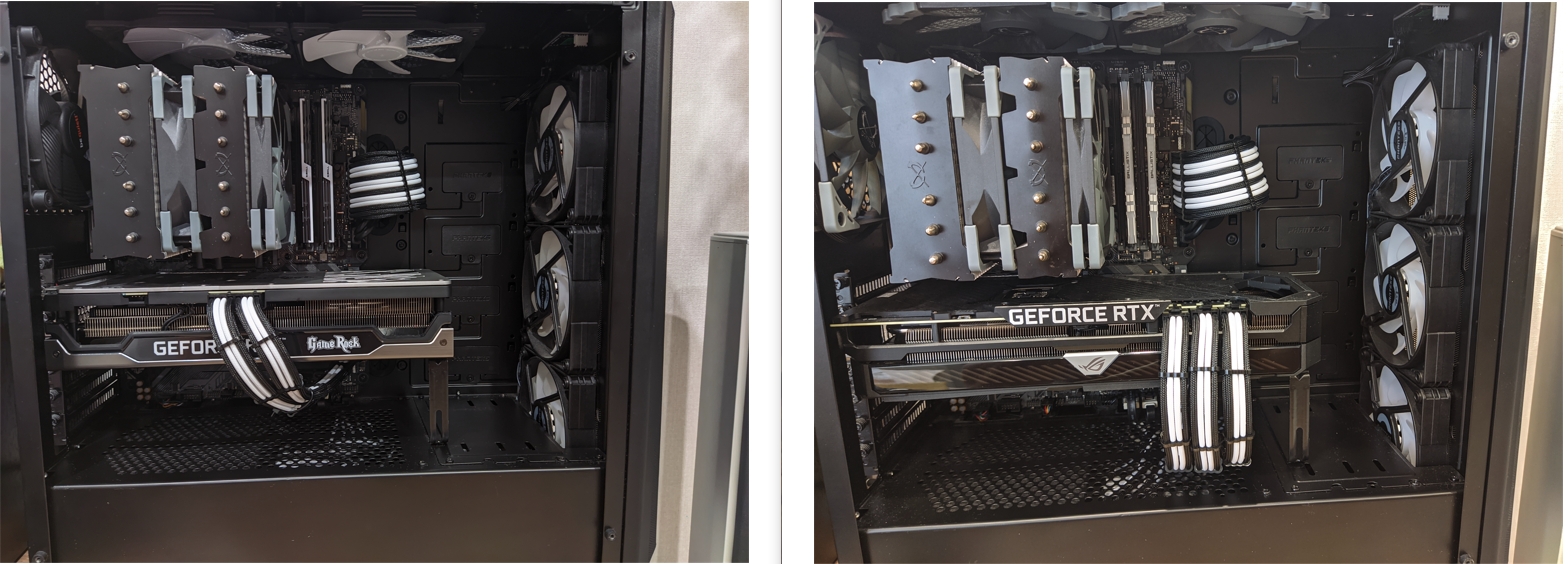
Такое расположение проводов в моём случае является наиболее практичным и эстетичным вариантом, когда их не нужно тянуть через половину корпуса, а сразу вывести и подключить.
Но, хватит любоваться, пора уже и карты в системник.
Подсветка. Днём не сильно бросается в глаза, однако в темноте «Здравствуй, ёлка, Новый год».

Palit GameRock RTX 3070Ti тут, конечно, уделывает Asus Strix, «засветляя» своими цветами всё вокруг. Действительно ярко. Ночью это малость отвлекает. Да, есть фирменная утилита Thunder Master, с помощью которой можно легко настроить цвета, яркость, тип подсветки или вовсе перевести в режим OFF и завершить эту дискотеку, но мы сравниваем подсветку, а не её возможности.
В этом плане у Asus она более тусклая и строгая, не «раздражает» своими переливанием и поэтому нет необходимости держать в автозапуске Windows ➕ одну программу для управления ещё и подсветкой. ����♂️
Вы спросите: «И это всё? Какой смысл переплаты за Strix? Только подсветка? Да я лучше ещё одну программу поставлю в автозапуск, чем доплачивать».
Однако нет. Далее идёт система охлаждения. �� �� ��
Дело в том, что у Palit GameRock она состоит из двух частей, которые отвечают за свой «сектор» охлаждения, так сказать — зона ответственности.
У Asus Strix — это единый радиатор.
И вот тут всплывает один из самых главных минусов в этом противостоянии — это конструктивное исполнение или, иначе выражаясь, конструктивное взаимодействие этих двух частей (про GameRock пишу, если кто не понял). Итак, есть пластина, она металлическая, имеет небольшое оребрение и отвечает она за охлаждение чипов памяти:

«Так это ж хорошо» — скажите вы и отчасти будете правы, но не в данном случае.
Проблема заключается в том, что данная пластина никак не контактирует с основным радиатором и её потенциала не хватает для отвода тепла от 8 банок горячих чипов GDDR6X.
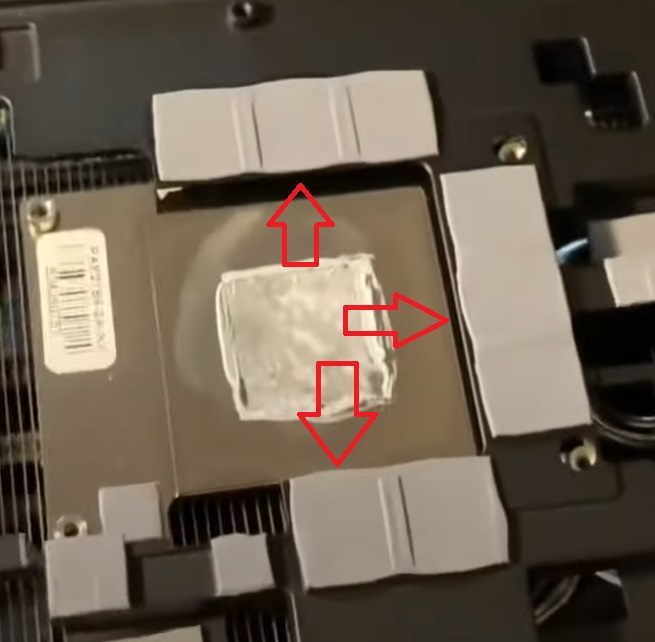
Вентиляторы же охлаждают! В теории да, но воздух, пронизывая рёбра радиатора, который нагревается от чипа, до пластины доходит уже тёплый. Что мешало инженерам Palit это скомпоновать в единую конструкцию — непонятно.
Поэтому сам радиатор охлаждает только чип. И тут надо отдать должное, он отлично справляется с отведением тепла.
У Asus же единым элементом охлаждения чипов памяти и GPU выступает радиатор:
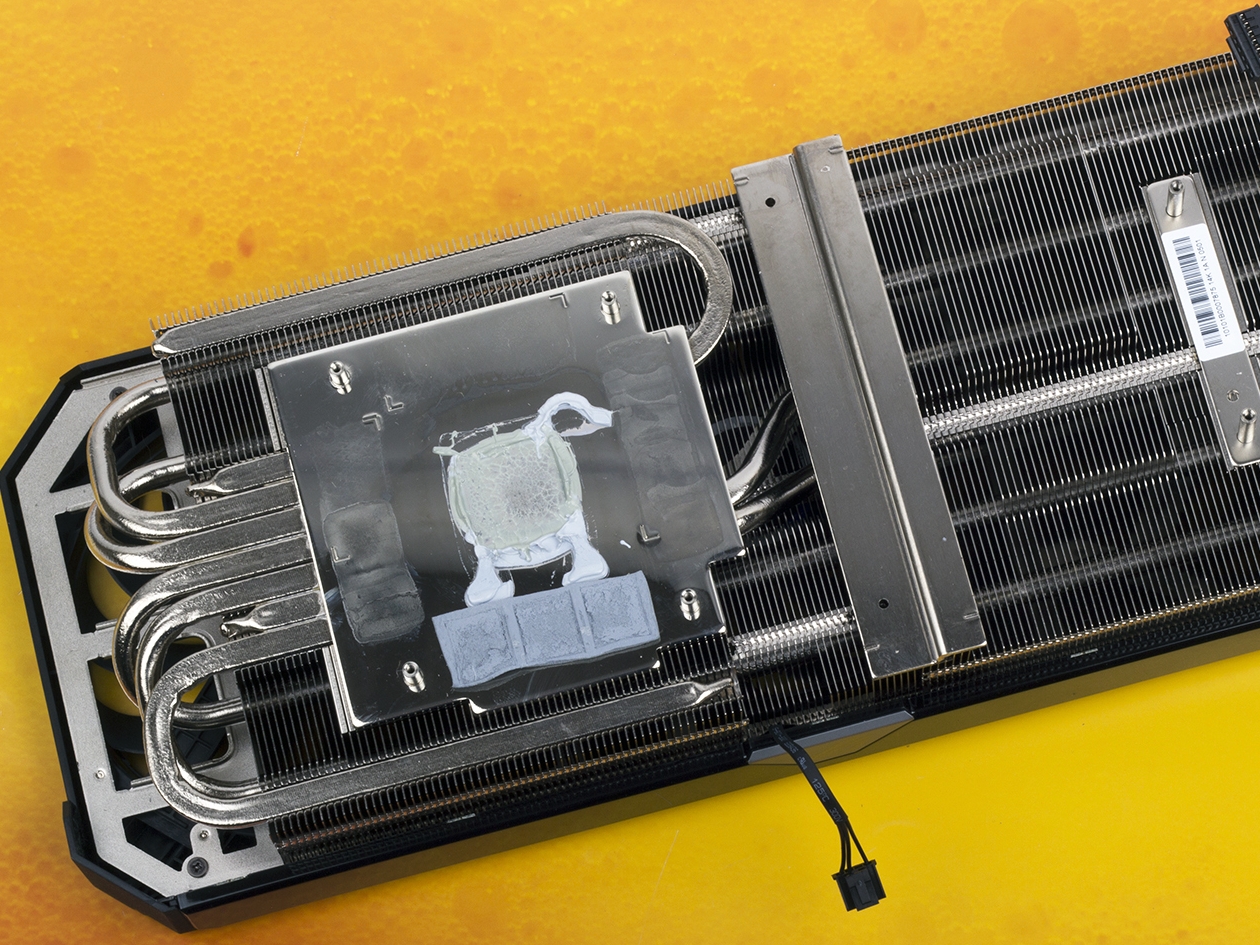 Забегая вперёд скажу, что с этой задачей он справляется так же хорошо. Об этом будет ниже.
Ну хорошо, допустим. Подсветка отключается, система охлаждения справляется с отводом тепла от чипа, а на нагрев памяти можно и забить, ведь есть гарантия! С одной стороны да, но с другой. об этом в итогах.
Но доплата строится не только на этом, ведь дальше речь пойдёт про подсистему питания ⚡️ ⚡️ ⚡️
Если вы вскроете GameRock и Asus Strix, то отличия можно увидеть невооружённым глазом:
Печатная плата Palit:
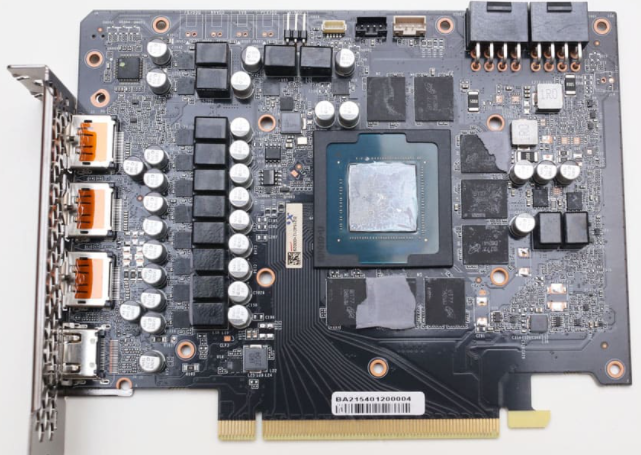
И печатная плата Asus:

Для наглядного сравнения отличия в подсистеме питания я постарался скомпоновать всё в небольшую таблицу:

К сожалению, информации про сборки в составе VRM у Asus Strix я найти так и не смог. В принципе, если PCB её от старшей сестры в лице RTX 3080 отличается только урезанным количеством фаз, то можно предположить, что в VRM RTX 3070Ti применяются те же транзисторные сборки DrMOS CSD95481RWJ (Texas Instruments), рассчитанные по 60A каждая, что используются в RTX 3080.
В данном случае уже видна разница в силовой части наших видеокарт и снова не в пользу Palit GameRock.
Перед тем, как перейти к небольшому сравнению в играх подведём небольшой итог по всем пунктам.
Что по факту выходит? За что я должен заплатить в случае с Asus? �� �� ��
В моём случае — это внешний вид. Да, вещь это субъективная и я уверен, что есть сторонники такого дизайна как у Palit GameRock. Нет, я не скажу, что он не красивый. Выглядит в живую это действительно красиво, когда разные цвета переливаются по дну корпуса. Но мне это быстро как-то приелось и наскучило. Может, я уже на столько стар �� , что мне ближе строгие и выдержанные варианты подсветки как в случае с Asus Strix?
Что же касается инженерного исполнения, то тут «просчёт» в системе охлаждения видеокарты привёл к тому, что температура памяти греется как печка, а отсюда и увеличение скорости работы вентиляторов.
Ну и вишенкой на торте — улучшенная PCB, усиленный VRM. Что может положительно сыграть и на разгоне, если вдруг стока покажется мало или захочется поиграться в цифры в разных бенчмарках.
На этом теоретическое сравнение закончим и перейдём к практической части (да неужели ��♂️)
Тестовый стенд:
✅ Материнская плата Asus TUF Z490-Gaming Plus (WiFI)
✅ Видеокарта Palit GameRock RTX 3070Ti и Asus Strix RTX 3070Ti
✅ Процессор Core i9 10850K (использовался в стоке)
✅ Система охлаждения Scythe Fuma 2
✅ ОЗУ Crucial Ballistiх BL2K8G30C15U4W RGB 32Gb
✅ Корпус Phanteks P400A (фронт — вентиляторы Phanteks, выдув на крышке корпуса — Sctyhe Flex KF1425FD18-P 140mm, тыл — Scythe Flex SU1225FD12M-RHP 120 mm), все вентиляторы работают на 650-700 об/мин.
✅ Блок питания Fractal; Design Ion+ 750p
✅ Накопители — SSD Samsung
✅ Шумомер — ухо правое, почищенное.
Методика тестирования:
В тестировании принимали участие две игры: Metro Exodus Enhance Edition и Days Gone.
Для каждого прогона игра запускалась с одного и того же места и игровой процесс длился 15 минут, после чего фиксировались результаты.
На момент тестирования в комнате была температура
Как всегда сравнение начинать будем со стоковых параметров. Т.е., те параметры, какие были установлены с завода и доставленные к нам в коробке.
Metro Exodus
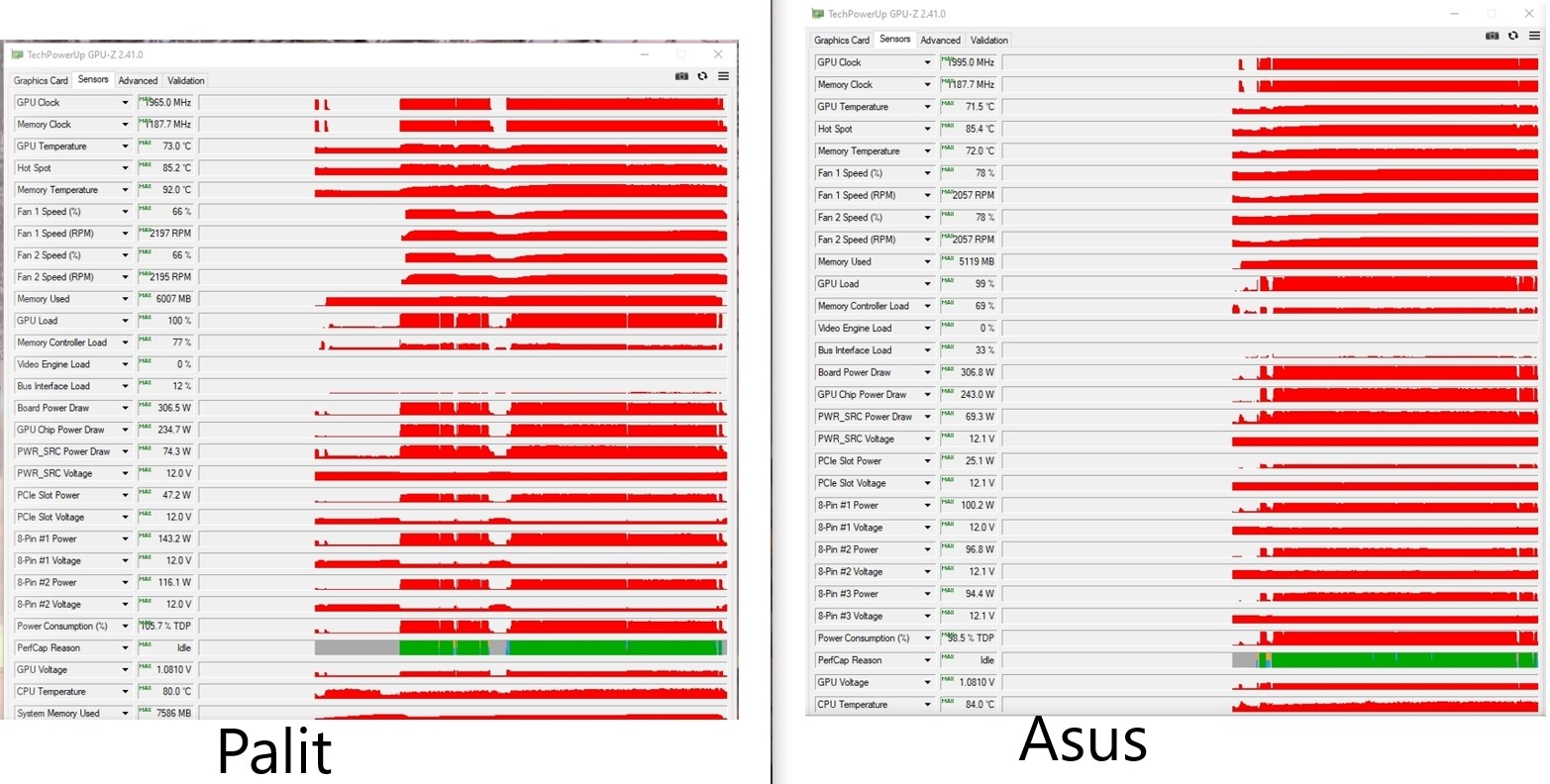
Ну что ж. Вот тут и вылезают конструктивные отличия в системе охлаждения видеокарт этих вендоров.
Первое, на что обращаешь внимание — это температуры чипа и памяти. В случае с GameRock — 73C’ и 92C’ соответственно. Если с первым можно жить, ведь у Asus Strix не намного и меньше — 71C’, то вот с температурой чипов памяти я мириться уже не хотел. Более того, такие температуры задаются при довольно высоких оборотах вентиляторов: 2197 об/мин, что составляет 66% оборотов. Это шумно, друзья �� �� ��
В случае ж с Asus температура памяти составляла всего 72C’ и это при 2057 об/мин, что составляет уже 78% оборотов. Нет, это не тихо. Вентиляторы тоже слышно довольно отчётливо. Однако тут следует упомянуть одну тонкость. Дело в том, что шум от вентиляторов на GameRock сопровождался каким-то еле еле уловимым гулом, в то время как у её оппонента это был шум от потока воздуха и он не так раздражает.
Внимательные читатели уже заметили, что GameRock в отличии от Strix’а не упирается в PL и наверняка скажут: «Ну так оно и понятно. поэтому и такие температуры, если бы не эти 105Вт, а 98Вт (Asus Strix), то было бы намного ниже». Возможно, вы правы и эти 7Вт разницы отбили бы разницу в
20C’ на чипах памяти и температура GPU была бы куда ниже и скорость вертушек была бы тоже ниже �� , но, повторюсь, мы рассматриваем вариант «из коробки», когда работает принцип «Поставил карту и Слава Богу, что работает».
Ну да ладно, вылезаем из Московских тоннелей и перемещаемся в зомби-апокалипсис — Days Gone

Ну что ж. Ситуация тут сильно не меняется и расстановка сил так же на стороне Asus Strix.
Особо комментировать тут нечего, поэтому давайте уровняем наших героинь тестирования к одному параметру частоты/напряжение. В моём случае я выставил 1950Mhz@0.925v. Это та частота, которая была стабильна на Palit GameRock, поэтому на этой же частоты решено было прогнать и её оппонента. Кто-то спросит: «Зачем тогда куча фаз и навороченных транзисторных сборок, если ты гоняешь на таких малых частотах?». Отвечаю, чтобы приблизить видеокарты максимально в одно целое.
Итак, настраиваем кривую в MSI AB, и лезем в катакомбы Metro Exodus
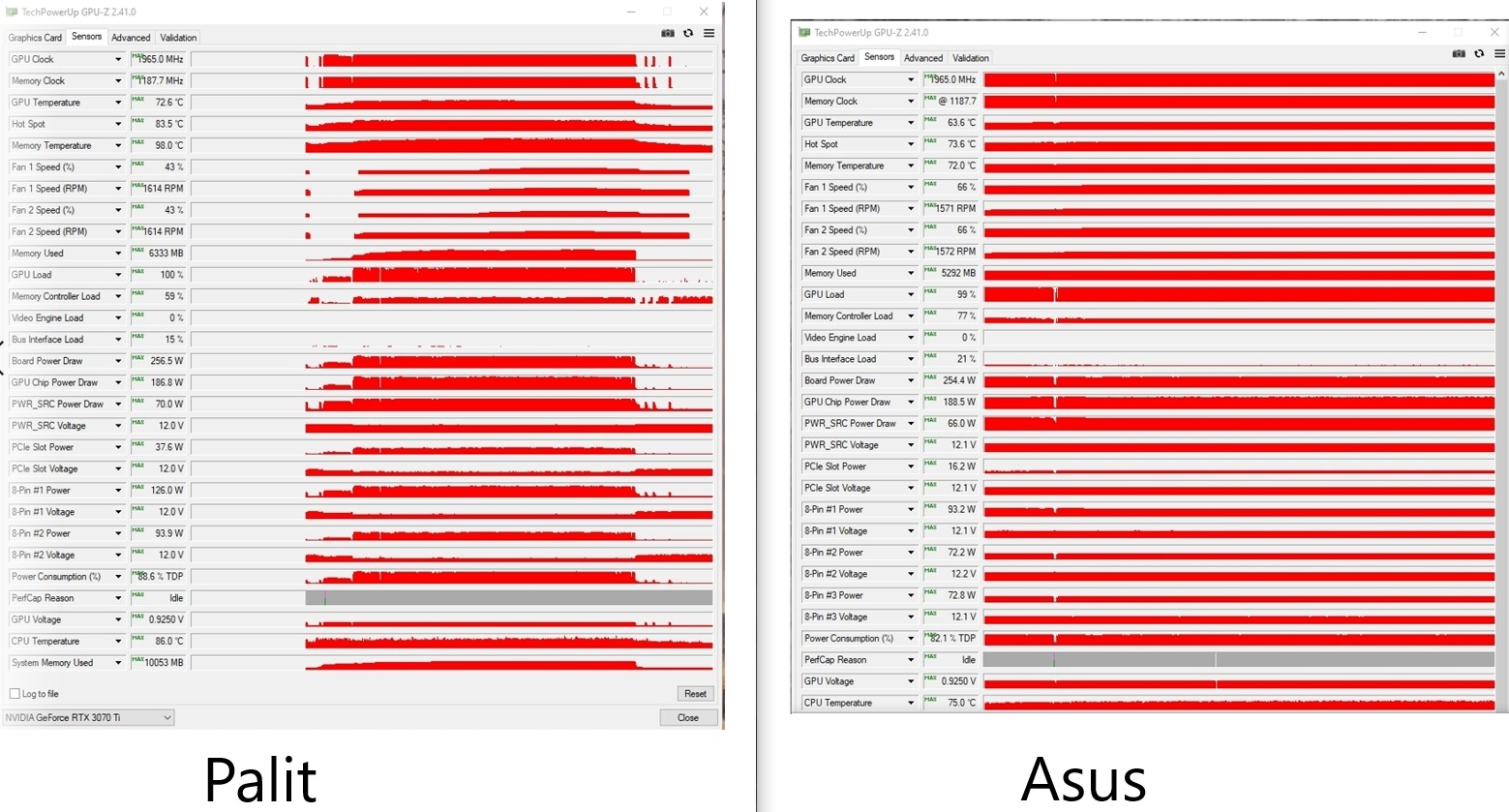
Вообще, изначальная цель андервольта на Palit GameRock заключалась в снижении температур и шума, об этом я писал в статье уже. Настройки кулера по-прежнему остаются в автоматическом режиме в обоих случаях.
По итогу мы видим, что произошло только снижение шума и совсем чуть чуть упала температура GPU: 73C’ и 72C’ после андервольта. Температура памяти из-за снижения скорости вентиляторов до 1600 об/мин повысилась и составляет уже 98C’. Тише? Тише. Зато припекает ��
Что мы имеем у Asus? Снижением стокового напряжения дало спад температуры на GPU с 71C’ до 63C’, как вам такое? Температура чипов памяти осталась без изменений. Скорость вентиляторов удалось сбить до 1572 об/мин, а это на порядок тише, чем 1600 об/мин в случае с Palit.
Окей, врываемся в мир Days Gone с этими настройками

Ну, комментировать особо и нечего. Примерно такой же расклад как и в случае с Metro Exodus.
Но, уважаемые, мы были бы не оверы-энтузиасты, если бы оставили Palit в таком виде, не позволив ей максимально отбить свои позиции перед более дорогой версией RTX 3070Ti.
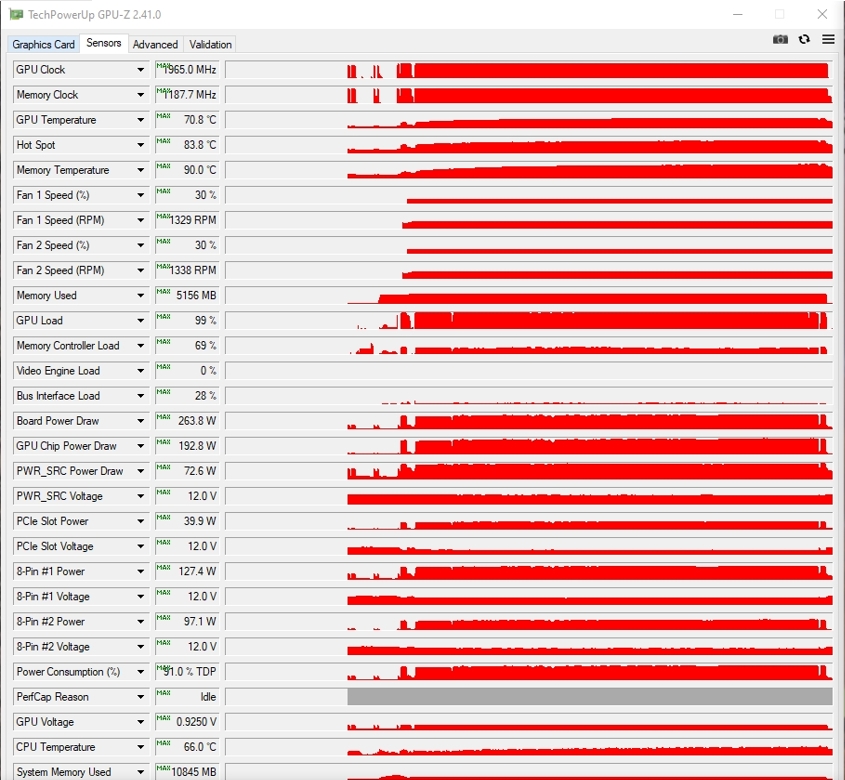
После проведения определённых манипуляций имеем вот такую картину.
Ну что ж, определённо лучше стало. Температура памяти и чипа хоть заметно выше, чем на Asus Strix, но нам удалось удержать скорость работы вентиляторов на 1300 об/мин, что составляет 30%. Это, я вам спешу сообщить, нижний порог работы вентиляторов, ниже выставить уже никак не получится через MSI AB, но это по уровню шума примерно так же как и 1500 об/мин на Strix.
Но, как говорится, «красота требует жертв» и в этом случае пришлось пойти на некоторые доработки со стороны системы охлаждения видеокарты Palit GameRock, а именно был улучшен прижим, заменены термопрокладки, термопаста и доработан контакт между металлической пластиной и радиатором. Я не призываю вас к таким действиям! Это приводит к потере гарантии!
Вот на этой ноте ��мы и завершаем наше сравнение, противостояние двух видеокарт от компании Palit, модель GameRock RTX 3070Ti и Asus Strix RTX 3070Ti.
Что по итогу мы имеем? Если посмотреть в интернете стоимость этих видеокарт, то на 16 сентября 2021 года она составляет 125 т.р. за Asus Strix RTX 3070Ti и 115 т.р. за версию GameRock RTX 3070Ti. Разница в 10 т.р. Мне Asus досталась с такой же доплатой и я не жалею, что доплатил. Т.е., на выходе я получил видеокарту, не требующая каких-либо доработок, вмешательств в конструктивную составляющую видеокарты, чтобы получить в итоге качественный продукт. За эту переплату мы получаем тихую и качественную систему охлаждения даже в стоке, усиленную подсистему питания. Стоит ли оно того? Решать вам.
Palit GameRock же видеокарта не плохая. Если настроить её, то можно получить в целом не плохие результаты. Здесь уже каждый решает для себя, что ему важно, где располагается системный блок, возможно, кто-то в наушниках играет и на этот шум вообще без разницы. Я же сужу со своей точки зрения.
Вот как-то так. На этом я заканчиваю своё сравнение. Надеюсь, что оно было полезным и интересным.
8 Best RTX 3070 Ti Graphics Cards: Aftermarket AIB Models Compared

Nvidia’s RTX 3070 Ti is a bit of a weird one for the brand, being a GPU that attempts to bridge the gap between the highly popular RTX 3070 and the powerhouse that is the RTX 3080. With 6,144 CUDA cores and 8GB of GDDR6X memory at a 256-bit memory interface, it falls quite short when compared to the RTX 3080, but at MSRP prices, it’s also a bit cheaper, too if you can get your hands on one. Therefore, we have carefully curated this list of the best RTX 3070 Ti Graphic cards.
When compared to the RTX 3070, you’re looking at 5-10% improvements with a slightly higher price difference, but considering the GPU availability and pricing situation in the world, picking an RTX 3070 Ti card might be a better choice for some. Oh, and to add to this, it also falls short of AMD’s RX 6800 at both 1440p and 4K gaming, a GPU that you can sometimes find for cheaper prices. The RX 6800 also consumes significantly less power though it lacks Nvidia’s more refined DLSS.
That being said, there are some rather phenomenal RTX 3070 Ti AIB card models out there, with varying levels of performance, and some prettier than the others, so below we’ve reviewed some of the best options. Let’s not waste any more time, and check out what your choices are if you’re in the market for an RTX 3070 Ti GPU.
Best RTX 3070 Ti Graphics Cards
1. ASUS ROG Strix RTX 3070 Ti OC Edition

Verdict
With very low temperatures and excellent performance, the ROG Strix 3070 Ti is a great choice for every gamer. The only downside is the need for an additional 8-pin connector, even though the TDP is the same as the competition.
Specifications
Benefits
- Consistent, high boost clocks
- Great performance at 1440p
- Stunning design with plenty of RGB
Drawbacks
- Requires a third 8-pin connector
- Overpriced
Buying Options
When it comes to beautiful GPU designs, the ROG Strix models seem to be constantly at the top. The RTX 3070 Ti is no exception, with a slightly complicated, but great-looking design. The backplate has the ROG logo, and there is plenty of RGB at the side and the front to make this a bit more personal. The industrial design is rather nice overall.
In terms of performance, the ROG Strix variant was pretty consistent in terms of maintaining the high clock speeds it’s boosting too, which results in pretty good in-game performance. Depending on the title, you’re looking at 60 to 70 FPS at 1440p with ray tracing and DLSS, and comfortably over 120 FPS in e-sports titles. And to further sweeten the pot, the GPU stays remarkably cool.
2. EVGA RTX 3070 Ti FTW3 ULTRA

Verdict
If you like RGB designs, the FTW3 ULTRA will be right up your alley. It’s vibrant, performs well at 1440p, and stays fairly cool under load while being less overpriced than the competition.
Specifications
Benefits
- Very clean design with cooling-optimized backplate
- EVGA’s iCX3 triple-fan cooling is excellent
Drawbacks
- Overpriced, but less than some competitors
Buying Options
Things haven’t changed too much with EVGA’s FTW3 design over the years, and the RTX 3070 Ti is still a beautiful-looking card, if not a bit too basic. The carbon black shroud is rather stealthy, and it’ll blend in with just about any build aesthetics, and you can always turn on the RGB to add a bit of flare. It’s fairly thick, though, which is something to keep in mind.
Performance-wise, the FTW3 ULTRA is good, but nothing to write home about. Thanks to a reasonably high clock speed, it checks all the boxes for 1440p gaming, and we like the fact that the iCX3 triple-fan design keeps the GPU cool under load.
Last but not least, we must give kudos to EVGA for attempting to keep the pricing reasonable, as this is a GPU that’s a bit less overpriced than most of the competitors.
3. GIGABYTE AORUS RTX 3070 Ti Master

Verdict
If you’ve got a case with enough room in it, the AORUS RTX 3070 Ti Master is a solid choice for 1440p gaming. Keep in mind that it does draw quite a lot of power, though.
Specifications
Benefits
- Stunning design with plenty of customizable RGB and LCD display on the side
- Alternate spinning fans for increased air pressure
- Dual-BIOS for Silent and OC modes
Drawbacks
- Draws a lot more power than the TDP suggests
- Massive 3.5 slot size
Buying Options
If you’re into thick graphics cards, you’ll love GIGABYTE’s AORUS Master variant. At 3.5 slots, this is one of the thickest GPUs out there with a massive overall size in weight. It does, however, come with a nice-looking design and an LCD display on the side, as well as a clean metal backplate. You get a bit of RGB that you can customize, too.
Looking at the performance, the AORUS Master has no problems achieving over 120 frames per second in various AAA titles, but that does depend on the title. Power draw isn’t too good, however, with the GPU frequently drawing over 420 watts under load, which is way higher than the 290W TDP. It does remain cool, though, with temperatures under load hovering around 56 degrees – GIGABYTE has done a great job with cooling.
4. MSI RTX 3070 Ti SUPRIM X

Verdict
With top-notch performance and incredibly low noise levels, the SUPRIM X is a great choice for anyone who doesn’t mind the increased power draw and massive size.
Specifications
Benefits
- Arguably the most beautiful RTX 3070 Ti AIB card
- High and very consistent boost clocks
- Silent Mode keeps GPU near-quiet when not gaming
Drawbacks
- Increased power draw compared to the competition
- Extremely big, especially in terms of length
Buying Options
In line with any other SUPRIM X variant, the RTX 3070 Ti is a massive GPU. At 3 slots and over 13 inches in length, not all cases can fit this behemoth. It does look rather nice, though, with a remarkably clean design and a tasteful amount of RGB at the side and the front, which we like.
Performance is where it excels, with the GPU hovering between 110 and 160 FPS at 1440p, depending on which title you’re playing. The GPU does come with an increased TDP of 310W, and we frequently saw its peak at about 433W while gaming, which is quite a bit. Temperatures are good, though, at about 68 degrees under load, and we have to give kudos to MSI for the cooling – this is almost inaudible both under load and in idle.
5. GIGABYTE Vision OC RTX 3070 Ti

Verdict
The Vision OC is great for people who want a very nice-looking card, especially those who have a white-themed build, as it fits beautifully. And with reasonable performance, the only downside is the high price.
Specifications
Benefits
- The all-white design stands out from the competition
- GIGABYTE’s tried and tested WINDFORCE 3X cooling system is great
Drawbacks
- RGB Fusion 2.0 software is buggy
- Overpriced by quite the margin
Buying Options
The Vision OC has always been a design-first GPU, and the RTX 3070 Ti is no exception. The card comes with a magnificent all-white design that truly stands out from the competition, and is remarkably elegant in every possible way. If you’ve got an all-white build, the Vision OC will feel right at home. We’re also fans of the boxy design which is incredibly clean when compared to the angular mess of some of the competitors.
Performance-wise, the GPU is good, falling somewhere in the middle when it comes to AIB cards and their clock speeds. It’s slightly worse than top-notch models that boost a bit higher (and a bit more consistently), but it still achieves reasonable framerates at 1440p. The RGB Fusion 2.0 software, though, which controls the RGB lights can be buggy and inconsistent, but overall this is a good performing GPU with amazing aesthetics.
6. ZOTAC RTX 3070 Ti AMP Holo

Verdict
If you don’t mind the staggering noise levels, and the high prices, the AMP Holo is a reasonable choice for an RTX 3070 Ti. It doesn’t draw too much power, it remains cool, and it looks rather nice, too.
Specifications
Benefits
- Subtle black and grey design with extensive configurable RGB
- Temperatures are excellent
Drawbacks
- The cooling solution is quite loud, even though it performs well
- Very overpriced
Buying Options
ZOTAC has come a long way with its GPU designs, and the RTX 3070 Ti AMP Holo is a beautiful way of showcasing that. With a black and grey design that fits every build’s aesthetics and well-placed RGB lights to spice things up, the AMP Holo looks beautiful. The backplate is as clean as they come, and it has vents to help with cooling. It’s also not that big when compared to the competition, which we like.
When it comes to gaming performance, the AMP Holo is slightly better than the Founders’ Edition, but it does trail behind custom cards like the SUPRIM X. Depending on which titles you’re playing, you could expect to get from 110 to 160 frames per second, which does drop a bit if you turn on ray tracing. You still get reasonable performance, though. We aren’t fans of the cooling noise, though, which is remarkably high and definitely audible, even in a closed-off case.
7. GIGABYTE Eagle OC RTX 3070 Ti

Verdict
Design-wise, this is an interesting choice with the blue accents, and the Eagle OC does look nice. But when it comes to the performance, it fails to deliver, especially when you compare it to competitor RTX 3070 Ti AIB card models.
Specifications
Benefits
- Beautiful all-black design with blue accents
- Quiet, yet efficient WINDFORCE 3X cooling solution
Drawbacks
- Boost clocks could’ve been better
- Not that overpriced when compared to the competition
Buying Options
We don’t see too many brands opt for blue accents on their components, but GIGABYTE is a bit of an exception to this. The Eagle OC RTX 3070 Ti comes with an all-black design that’s rather subtle, and adds a blue touch here and there, such as the Eagle logo on the backplate and front, and the rings on the fans. There is only a small amount of RGB, configurable with RGB Fusion 2.0, but it does the job.
Unfortunately, the GPU fails to deliver on the performance front. The clock speeds are only 1800MHz when boosting, which is quite a bit slower than most of the other RTX 3070 Ti AIB card models on our list. Consequently, the performance isn’t that great, which is a shame. We do like the fact that the GPU has great cooling, thanks to the tried-and-tested WINDFORCE 3X cooling solution, but that and the design are all the GPU has going for it.
8. ASUS TUF RTX 3070 Ti

Verdict
Even though it is definitely built like a tank, and looks rather nice, the ASUS TUF RTX 3070 Ti AIB card fails to deliver in terms of performance. The only thing that it does have going for it, is the fact that you can get it at MSRP, which is better pricing than any other AIB card out there.
Specifications
Benefits
- Very durable build with metal all around
- Alternate spinning fans for increased air pressure and reduced noise
- Only RTX 3070 Ti that sells for MSRP
Drawbacks
- Performance is lacking compared to the competition
Buying Options
The TUF series by ASUS focuses on durability, rather than performance, and that’s still true in the case of the RTX 3070 Ti AIB card. It comes with a metal build that’s something we haven’t seen before, and an overall subtle design that’s made to blend in, rather than stand out. There are minimal RGB lights on the side, and nothing on the front or the backplate, and overall, ASUS wants you to know that this is a card that means business.
But in reality, it doesn’t. The clock speeds are lower than the competition, which results in somewhat worse performance at 1440p. The alternate spinning fans are rather quiet and keep the GPU cool, averaging about 63 degrees and at reasonable noise levels. There is a BIOS switch that moves it from quiet mode to performance mode, but even that doesn’t get you the performance levels of the competitors.
Final Thoughts
When everything is said and done, the RTX 3070 Ti certainly has some people questioning whether or not this GPU should even exist. We are, of course, talking about the fact that it offers small improvements over the RTX 3070 while being priced almost 20% higher at MSRP.
Now, take into consideration that RTX 3070s are almost impossible to come by, let alone at reasonable prices. With this, the RTX 3070 Ti could very well be a great choice for many gamers looking for a GPU that can satisfy a 1440p, 144Hz monitor. This does depend on the title, but in most benchmarks, the game gives satisfying framerates.
It’s all up to you and your expectations, but if the RTX 3070 Ti seems like a solid choice, all that’s left is to choose the right RTX 3070 Ti AIB card for your needs.
Best RTX 3070 Ti (The Ultimate Choice For 2K Gaming)
The Nvidia RTX 3070 Ti came out on February 1st of 2021, and it made quite the statement for the future of gaming. This card falls in between the RTX 3070 and RTX 3080, making it a performance beast while remaining under the budget of a specific class of gamers.
Due to the global shortage of silicon chips, the supply of this modern piece of tech was also disrupted; however, things seem to be settling down now, and according to Nvidia, it is very likely that the graphic card shortage issue might be solved by quarter 2 of 2023.
If you want to buy this GPU after the shortage ends and haven’t made up your mind about which version of the card you want to get your hands-on, then you have come to the right place.
In this article, I will comprehensively compare all the versions of the RTX 3070 Ti and choose the best one for you. So let’s jump in to have a closer look.
A Quick Look At The Best RTX 3070 Ti
- Boost Clock: 1875 MHz
- V-RAM: 8GB GDDR6X
- CUDA Cores: 6144 Units
- Dimensions: 12.5 x 5.5 x 2.2 in
- Boost Clock: 1860 MHz
- V-RAM: 8GB GDDR6X
- CUDA Cores: 6144 Units
- Dimensions: 11.8 x 5.3 x 2.7 In
- Boost Clock: 1830 MHz
- V-RAM: 8GB GDDR6X
- CUDA Cores: 6144 Units
- Dimensions: 12.5 x 4.8 x 2.3 In
- Boost Clock: 1815 MHz
- V-RAM: 8GB GDDR6X
- CUDA Cores: 6144 Units
- Dimensions: 11.2 x 4.3 x 2.2 In
- Boost Clock: 1800 MHz
- V-RAM: 8GB GDDR6X
- CUDA Cores: 6144 Units
- Dimensions: 12.5 x 4.6 x 2.3 In
- Boost Clock: 1830 MHz
- V-RAM: 8GB GDDR6X
- CUDA Cores: 6144 Units
- Dimensions: 12.7 x 5.5 x 2.2 In
- Boost Clock: 1830 MHz
- V-RAM: 8GB GDDR6X
- CUDA Cores: 6144 Units
- Dimensions: 12.5 x 5 x 2.1 In
- Boost Clock: 1815 MHz
- V-RAM: 8GB GDDR6X
- CUDA Cores: 6144 Units
- Dimensions: 11.81 x 5 x 2.04 in
Best RTX 3070 Ti Graphics Cards
As you know, RTX 3070 Ti is one of the most demanding and most common graphics cards nowadays because of the impressive results these cards are providing.
So, in this guide here are some of the best ones for you!
#1- ASUS ROG Strix RTX 3070 Ti OC
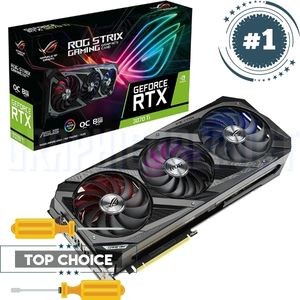
Specifications
- Boost Clock: 1875 MHz
- CUDA Cores: 6144 Units
- Video Memory: 8GB GDDR6X
- Power Draw: Around 300W
- Recommended PSU: 750W
- Power Connectors: 3x 8-pin
- Ports: 3x DisplayPort 1.4a / 2x HDMI 2.1
- Dimensions: 12.5 x 5.5 x 2.2 Inch
Highlights:
- Its thermal performance and the sheer power it packs in the form of 22.67 Tflops.
- Heating problems and bottlenecks will become a thing of the past for you.
- One of the fastest 3070 Ti variants with a boost clock of 1875 MHz.
- New Asus Axial-Tech fans are very exceptional.
Drawbacks:
- It’s a triple-fan 2.9 slot GPU which makes it a beefy card because of this you might need a bigger PC Case.
The ASUS ROG STRIX RTX 3070 TI GAMING OC is a card that everyone refers to as the benchmark of modern GPUs. It is the definition of balance and power, and like its predecessors, it is expected to have a significant impact on the market. I hope it performs as expected and is soon seen in the hands of each and every gamer.
Design And Clock Speeds:
The ASUS ROG Strix brand has always been one of the most reputable when it comes to GPUs. It tends to bring the best of both design and performance , and the same is the case for its RTX 3070 ti variant.
The design speaks for itself with its classiness and the RGB aesthetic on the side panel; however, the backplate has been given a simple look. Regardless, It will add an extra spark to your PC’s overall look and match with almost any setup design as long as it is black.
Coming on to the main stuff, this version, just like all other versions, has a base clock speed of 1575 MHz, apart from that, it has a boost clock of 1875 MHz and a memory clock of 1188 MHz. These are some numbers to surely make heads turn around.
Cooling, Temperatures, And Thermals:
In terms of cooling, this card once again exceeds everybody’s expectations. It comes with ASUS’s triple axial-tech fan design making the airflow as good as possible. Moreover, the 2.9 slot design provides the GPU with even more surface area to dissipate heat , and lastly, the backplate also adds to improving the cooling efficiency.
The temperature stats are proof of its exceptionally well-built cooling architecture as the GPU was maintaining 65-70 degrees Celsius under heavy load during my tests, and at idle, it was sitting well below 31 degrees celsius. All this means you are going to have no issues with temperatures and can game smoothly on this beast
My Findings:
After using this GPU for around a month, I can assure you that it is totally worth the hype; it balances well between performance and looks and has no thermal issues; the feel of this GPU is also premium.
It justifies its price tag by delivering to its expectations as the best companion for a 1440p gamer. So if you find this card on shelves near you, I would advise you to go for it.
#2- EVGA RTX 3070 Ti FTW3 Ultra
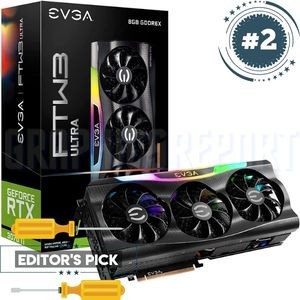
Specifications
- Boost Clock: 1860 MHz
- CUDA Cores: 6144 Units
- Video Memory: 8GB GDDR6X
- Power Draw: Around 300W
- Recommended PSU: 750W
- Power Connectors: 2x 8-pin
- Ports: 3x DisplayPort 1.4a / 1x HDMI 2.1
- Dimensions: 11.8 x 5.3 x 2.7 Inch
Highlights:
- The main benefit which will make you pick this version of the 3070 Ti over others is its cooling capabilities.
- It’s one of the best, if not the best among all, in terms of cooling and will also be beneficial when you render or edit stuff on your pc.
- The Backplate is specially designed for better airflow.
- Boost clock speed is tremendous running at 1860 MHz.
Drawbacks:
- The over-inflated price tag set by scalpers means that it doesn’t justify its features for the current price
The EVGA RTX 3070 Ti FTW3 Ultra targets consumers that look for the best design in a GPU. The design of this thing is certainly beautiful, but more on that later. Apart from this, the GPU also has some decent performance numbers , and we all can hope that it will maintain the level of reliability as seen in former EVGA cards.
Design And Clock Speeds:
The EVGA RTX 3070 Ti also has a triple fan and ARGB aesthetic design, making it a tough competitor for other cards in the market. Looks-wise it’s one of the stand-outs and will catch the eye even from a far distance, but what about its clock speeds.
Well, the base clock is the same as all the other GPUs of its class; however, the boost clock goes up 1860 MHz, just 15 MHz short of the ASUS ROG STRIX version of the card. It is to be noted that the 15 MHz difference won’t make a big difference in the performance.
Cooling, Temperatures, And Thermals:
In the cooling department, many cards don’t even come close to what EVGA has done with this version. They have introduced their new iCX3 (interactive cooling) architecture which aims to maximize thermal contact area with key graphic card components.
They have also introduced a new 180 degrees Heatpipe design to increase the area of fin contact by 65%. The silent triple fans have been counterbalanced by 10 mm for a 15% increase in airflow, plus there are certain cutouts on the backplate to improve the already exceptional cooling.
As a result, this GPU managed to run at around 65 degrees and mostly under the 70 degrees Celsius mark when put on a heavy load. This low-temperature stat also helps in overclocking because the temperatures don’t skyrocket like other GPUs whose cooling systems are not as advanced as this card.
My Findings:
After spending considerable time playing and rendering on this GPU, my verdict is that it is value for money. The cooling architecture is just commendable, and the amount of technology used in this GPU is also mind-blowing; it also performs well in the performance aspect, and the looks are also pretty decent, so overall, hats off to EVGA!!
#3- ZOTAC Gaming RTX 3070 Ti AMP Holo
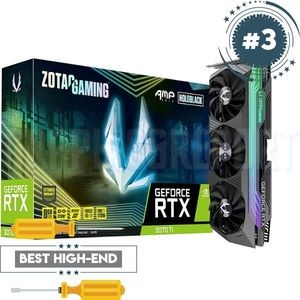
Specifications
- Boost Clock: 1830 MHz
- CUDA Cores: 6144 Units
- Video Memory: 8GB GDDR6X
- Power Draw: 310W
- Recommended PSU: 750W
- Power Connectors: 2x 8-pin
- Ports: 3x DisplayPort 1.4a / 1x HDMI 2.1
- Dimensions: 12.5 x 4.8 x 2.3 Inch
Highlights:
- For me, it’s all about the design; it looks like a GPU from the 2070s future era, if there would be GPUs at that time and cloud gaming wouldn’t have taken over.
- Even though you give up a tiny bit on performance for the looks, it’s not too much of a sacrifice.
- The overall cooling is out of this world it performs great under extreme loads.
Drawbacks:
- Due to the triple-fan design, it can “sometimes” get noisy under extreme loads.
- The size might create issues for some buyers so please check the dimensions.
The AMP HOLO is one of the top-tier GPUs of ZOTAC; the manufacturers aim to provide a smooth gaming experience along with an enchanting design and unmatched reliability . History indicates that there is absolutely no doubt that ZOTAC Gaming won’t be able to achieve these targets with its new RTX 3070 Ti Holo.
Design And Clock Speeds:
The Design, as the name suggests, has a holographic look to it, and it’s simply magnificent. This is the reason why its design won the 2021 Red Dot Design Award.
It just catches your eye; whether you want to look at it or not, it’s so pleasing that you can look at it for hours and still not be bored. Your setup looks incomplete without it, just like the sky looks incomplete without the stars.
Enough talk about the Design, now it’s time to talk about the real business; its clock speed after boost is 1830 MHz which is not bad but lesser than its competition. It might slightly affect your performance, but only when you start noticing in-depth and have played on all other versions of the GPU.
Cooling, Temperatures, And Thermals:
For cooling this monster, ZOTAC has introduced the Icestorm 2.0 cooling system in order to keep the temperatures low. In addition to that, their new 11-blade fan design enhances the airflow by 10% , and their active fan control system lets the user customize each of the 3 fans according to their own cooling preferences.
Last but not least, ZOTAC has also made changes to their heatsink and heat pipes to make them more efficient. Overall, ZOTAC has done an exceptional job of improving their whole cooling architecture as compared to their last generation graphic cards.
With that being said, ZOTAC’s future in the market, without any doubt, is really bright. As a result, after the temperature testing, the temperature was very stable at 70 degrees for most of the time under heavy load.
My Findings:
The GPU is a good choice for you if you are a design freak like me; however, you might want to consider any other options if you are an avid overclocker or a person who might want some extra juice with lower temps.
#4- EVGA GeForce RTX 3070 Ti XC3 Ultra
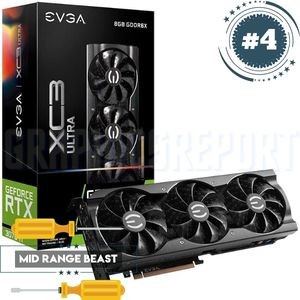
Specifications
- Boost Clock: 1815 MHz
- CUDA Cores: 6144 Units
- Video Memory: 8GB GDDR6X
- Power Draw: Around 300W
- Recommended PSU: 750W
- Power Connectors: 2x 8-pin
- Ports: 3x DisplayPort 1.4a / 1x HDMI 2.1
- Dimensions: 11.2 x 4.3 x 2.2 Inch
Highlights:
- iCX3 is one of the greatest GPU heatsink techs.
- The backplate increases the Air-Flow by a huge margin.
- The clock speed is very exceptional running at an 1815 MHz boost clock.
- The center 10mm fan increases the air-flow area by 16%.
Drawbacks:
- If you are a fan of RGBs and fancy designs, then this GPU might disappoint you.
EVGA not only targets their fancy cards-loving audience, but they also have something in store for the lovers of simplicity, and that comes in the form of the RTX 3070 Ti XC3 Ultra.
It’s a great step from the manufacturers to serve the needs of all types of gamers and let them choose from more options. I hope to see this GPU as a success in the market, but only time will tell how much it appeals to the consumers.
Design And Clock Speeds:
This Card is a lower-end version of the EVGA GeForce RTX 3070 TI FTW3 Ultra, and that is one of the primary reasons why it is much simpler in looks. It has a minimalistic design in the sense that it integrates well with any system as long as it matches its color and doesn’t look out of place or contrast.
Another notable change is that it has no RGB lights apart from a single EVGA logo LED , so this might be perfect for those who are not big fans of RGBs.
Being a version lower than the FTW3 Ultra means that it is bound to have a lower clock speed, it maxes out at 1815 MHz which is 45 Mhz lesser than its big brother.
Cooling, Temperatures, And Thermals:
Although EVGA has made compromises on performance and fancy looks for this version, they were certain about one thing, and that is to make 0 compromises on its cooling. The cooling architecture is the same without any changes at all.
It also has the new iCX3 (interactive cooling) architecture which aims to maximize thermal contact area with key graphic card components. The 180 degrees Heatpipe design increases the area of fin contact by 65% .
And the silent triple fans have been counterbalanced by 10 mm for a 15% increase in airflow, plus there are certain cutouts on the backplate to improve the already exceptional cooling.
Even though the card is lesser in performance and has the same architecture for cooling, it stands at around 68 degrees on maximum load . It is nowhere a bad figure but just a little bit surprising for a card that has a lesser performance output.
My Findings:
After having this GPU for a long time, I can conclude that it has no major performance gaps when compared to its superior version, after all, it is only 45 MHz. It is a great GPU for an all-inclusive pc look and can surely be a lifesaver for your gaming needs if you are short on the bills.
#5- ZOTAC Gaming RTX 3070 Ti Trinity OC
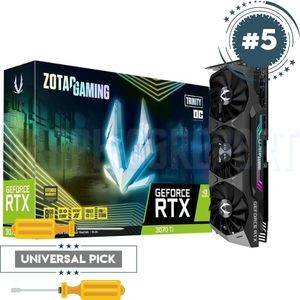
Specifications
- Boost Clock: 1800 MHz
- CUDA Cores: 6144 Units
- Video Memory: 8GB GDDR6X
- Power Draw: 310W
- Recommended PSU: 750W
- Power Connectors: 2x Dual 6-pin to 8-pin cable
- Ports: 3x DisplayPort 1.4a / 1x HDMI 2.1
- Dimensions: 12.5 x 4.6 x 2.3 Inch
Highlights:
- The best part of this GPU for me is that ZOTAC made absolutely 0 compromises on the design.
- The 11-blade fan design increases the airflow by 10%.
- Comes with a beautiful full-metal backplate.
- Heatpipes deliver an excellent level of heat dissipation.
Drawbacks:
- The major drawback of this GPU, though, is that its boost clock is lesser than many cards out there in the market.
As mentioned earlier, ZOTAC GAMING is among the few companies that target all regions of the industry, and just like this, they have also come up with the RTX 3070 Ti Trinity OC to provide you with an unmatched overclocking experience.
This way, ZOTAC is set to make its name in the market, and their recent success is evident that these offerings surely appeal to the consumers a lot.
Design And Clock Speeds:
Next up, we have another GPU from ZOTAC with a stunning design, as expected. It is a lower-end version of the ZOTAC Gaming RTX 3070 Ti Holo and stands in the middle ground for gamers who want a card that is not heavy on their pocket yet still looks incredible.
It features the same Spectra 2.0 Dynamic RGB and the beautiful ZOTAC Gaming backplate. Overall it also gets full marks for its looks; you have to give it to ZOTAC because their design game has been over the top this time.
Even though the manufacturers made no compromises on the design front, they had to cut something in order to make this GPU budget-friendly. That something comes in the form of its boost clock capabilities; it has a maximum boost clock of 1800 MHz which is a tad bit lower than its relative.
Cooling, Temperatures, And Thermals:
ZOTAC has used the same cooling architecture in this version of the GPU. The Icestorm 2.0 cooling system keeps the temperatures low.
In addition to that, their new 11-blade fan design enhances the airflow by 10%, and their active fan control system lets the user customize each of the 3 fans according to their own cooling preferences.
Last but not least, ZOTAC has also made changes to its heatsink and heat pipes to make them more efficient in heat distribution.
With the same cooling system and little performance gap, it was expected that the temperature test results would be almost identical, this GPU also sat around the 68-70 degrees Celsius mark under heavy load , which means that you are going to have absolutely 0 problems of heating with this card.
More related reading: Best CPU for RTX 3080 Ti In 2023
My Findings:
After using this GPU, I am a bit skeptical about it, you should go for it if you are in for the design and the RGBs and can bear a little bit of dip in performance; however, if you want some true performance machines, then there are many other cards in the market ticking those boxes.
#6- MSI Gaming RTX 3070 Ti Gaming X Trio
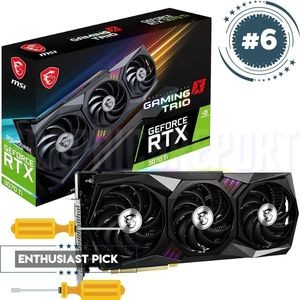
Specifications
- Boost Clock: 1830 MHz
- CUDA Cores: 6144 Units
- Video Memory: 8GB GDDR6X
- Power Draw: 310W
- Recommended PSU: 750W
- Power Connectors: 2x 8-pin
- Ports: 3x DisplayPort 1.4a / 1x HDMI 2.1
- Dimensions: 12.7 x 5.5 x 2.2 Inch
Highlights:
- Its bold design as it catches the eye from far away and gives your setup a unique look.
- Other than that, the cooling architecture is also outstanding and handles the load really well.
- MSI designed the Core Pipes for the maximum contact on main GPU components.
- There are Ball-Bearings inside the GPU fans for maximum performance.
- Zero FROZR makes the GPU silent until the card reaches a certain temp.
Drawbacks:
- It’s a humongous triple-fan card due to this it can create Case compatibility issues.
It’s almost impossible not to talk about MSI when you are talking about the best GPUs. The MSI GAMING RTX 3070 Ti GAMING X TRIO is a great GPU that promises top-notch cooling, performance, and design, topped off with reliability and exceptional customer support. There is nothing much to say about MSI because everyone is well aware of their achievements during the past years.
Design And Clock Speeds:
MSI is widely known for its unique and aggressive designs in the GPU industry. Similarly, they have gone with a bold look with their RTX 3070 Ti . The design has quite some cuts, and the use of RGBs on the front and the side adds to its already special look.
The card is thick but looks amazing when synced with all the other lights in your pc, and at the back, there is a lovely backplate, except there is one problem, the large MSI logo, it feels too huge and overdone, I think the logo should have been small, or the GPU only had MSI written on it like the old days.
Coming to the clock speed of this beauty, it has a boost clock of 1830 Mhz, which is pretty decent. It will surely perform well with a good processor and motherboard in place. MSI really gives you the best of both design and performance.
Cooling, Temperatures, And Thermals:
MSI has done a job well done on the cooling front , too, it has introduced the TORX fan 4.0 in this version which increases the airflow by a huge margin. Moreover, it has also included core pipes for maximum contact with the GPU components in order to dissipate the heat more efficiently.
All the major components also come with thermal padding to make the cooling even better. Lastly, the metal backplate provides a large cool surface for heat to escape.
As a result of all this hard work, the card holds up to 69 degrees Celsius at full load . To be honest, everything under 70 is pretty decent and means that you can overclock with ease.
My Findings:
After using this GPU for a long time, I can say that it hovers well between both the looks and the performance and is to be considered one of the most balanced versions of the RTX 3070 Ti. It is surely worth the price.
#7- GIGABYTE RTX 3070 Ti Gaming OC
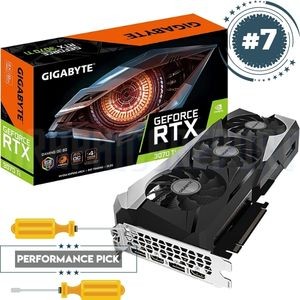
Specifications
- Boost Clock: 1830 MHz
- CUDA Cores: 6144 Units
- Video Memory: 8GB GDDR6X
- Power Draw: Around 300W
- Recommended PSU: 750W
- Power Connectors: 2x 8-pin
- Ports: 2x DisplayPort 1.4a / 2x HDMI 2.1
- Dimensions: 12.5 x 5 x 2.1 Inch
Highlights:
- Great cooling architecture that matches perfectly with its power profile, and you feel absolutely no bottlenecks or drops in fps while playing.
- The middle fans spin alternatively to increase the airflow.
- The backplate is a beauty with cutouts for better cooling.
- BIOS OC-Silent Button/Switch.
- The overclocking potential outnumbers most of its competition.
Drawbacks:
- It has fewer RGB lights, at least not as much as I would prefer.
GIGABYTE is also among the OGs when it comes to GPU; as always, GIGABYTE promises performance and reliability with its new RTX 3070 Ti GPU.
The fun part is that this GPU is overclocking capable, which means that now you can get even more out of your already powerful GPU. GIGABYTE is a name to be reckoned with and has the stage set for its success.
Design And Clock Speeds:
The GIGABYTE RTX 3070 Ti Gaming OC has a cool-looking design with a little stint of RGB lights. The design has many cuts, and the GPU is really thick but in a good way.
The metal backplate is what does it for me , it’s functional, simple, and unique all at the same time. It’s surely gonna make your setup look special.
Coming on to its max boosted clock speed of 1830 MHz, which is pretty decent and gives tough time to its MSI competition. You should have absolutely no performance issues with this creature.
Cooling, Temperatures, And Thermals:
For cooling, GIGABYTE has gone with the WINDFORCE 3X cooling system, which has two 90mm and one 80mm blade fans to increase the airflow, it has also introduced alternate spinning of fans which helps in increasing the overall air pressure.
In addition to that, it has 7 composite copper heat pipes and a large copper plate that is in direct contact with the GPU and the VRAM.
Lastly, it even has the screen cooling feature in which the heatsink is extended, allowing for more air to pass through. All these features guarantee an overall super solid thermal performance.
As a result, the GPU runs at 68 degrees Celsius under heavy load . Those are surely some numbers to have a look at, it seems like this GPU is both figuratively and literally cool.
My Findings:
After a long experience with this card, I found that it ticks all the boxes for a hard-core gamer and might be the best of all versions of the RTX 3070 Ti for you if you are not into flashy RGBish graphic cards and prefer a much simpler look.
#8- ASUS TUF Gaming RTX 3070 Ti OC
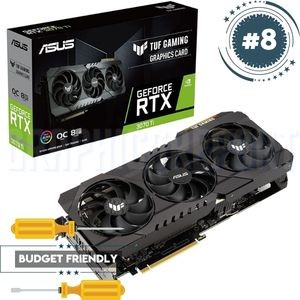
Specifications
- Boost Clock: 1815 MHz
- CUDA Cores: 6144 Units
- Video Memory: 8GB GDDR6X
- Power Draw: Around 320W
- Recommended PSU: 750W
- Power Connectors: 2x 8-pin
- Ports: 3x DisplayPort 1.4a / 2x HDMI 2.1
- Dimensions: 11.81 x 5 x 2.04 Inch
Highlights:
- What’s special about this GPU is that it has a great cooling architecture that matches perfectly with its power profile.
- Axial-tech fans are very effective in making the card stay under minimal temps.
- Comes with military-grade capacitors.
- It has Dual-Ball bearings in fans making them last for a longer period of time.
Drawbacks:
- The one thing that people like me won’t like about this card, just like the GIGABYTE RTX 3070 Ti, is that it has fewer RGB lights
The ASUS Tuf Gaming RTX 3070 Ti is a great match for any gamer, it performs well in its form factor and is always on the choices list when buying a new RTX 3070 Ti.
The ASUS Tuf brand is already well reputed among all gamers, and the manufacturers have a lot of customer loyalty to them. There is no doubt about the potential of this card , and it’s set to make a solid statement in the market.
Design And Clock Speeds:
The ASUS TUF Gaming RTX 3070 Ti OC has a simple and minimalistic design , it will fit in with almost any system and looks like a solid block. There is a hint of RGB lights on the side panel and some imposed patterns on the front.
Coming on to the backplate, ASUS has shown consistency with the simplicity, and the backplate also has some imposed patterns on it. It’s overall good for people who are not fans of sparky and fancy designs.
Coming on to the clock speed, this GPU has a boost clock of 1815 MHz which is less than most of its competitors, but this doesn’t make a huge performance difference. It still means that you can game smoothly at the best quality without any issues of lags, bottlenecks, or fps drops.
Cooling, Temperatures, And Thermals:
In order to improve the cooling of its GPU, ASUS has come up with some incredible technology. The fans now have an axial-tech design and rotate counterclockwise in order to solve the issue of turbulence.
Besides, the smoothness of the heat spreader has been improved at the microscopic level for as much contact as possible. Lastly, the 2.7 slot design and a dedicated heatsink for the VRAM also enhance the efficiency of cooling.
As a result, the temps remain between 68 and 70 degrees under heavy load , which means that all the hard work ASUS did in order to make this card cool paid off.
My Findings:
After using this card for a long time, I would say it is well-balanced and pretty decent overall. The performance is good, and so is the design, it stays under the radar most of the time, if that is something you like, and the fan noise is also pretty low. Overall, It’s nothing too much over the top but does its job perfectly.
What Factors Should You Check While Purchasing The Best RTX 3070 Ti?
Before you buy any version of the RTX 3070 Ti, you should consider a few things:
Price:
Price is a factor that you must check before buying any GPU. Due to the global shortage and scalping, all the GPUs are being sold way over their original Price Tag. Even though it is expected that everything will get normal by Quarter 2 of this year, there can’t be any guarantees.
When you lookout for a 3070 Ti, compare the price with the features it provides , if according to your preferences it is worth it, then you should go for it, but if not, then you should consider another option.
You should not overspend on your GPU too much because then you will be left with less budget for other parts in your build.
Recommended PSU:
As every Graphic Card has different features, similarly, it also has different power requirements.
Before buying your GPU, just have a look at the recommended power supply told by the manufacturer and cross-check that with your PSU; if there is an increase, then it’s time to say goodbye to your PSU or to look for another option with a lower power rating.
Cooling Architecture And Temps:
To save yourself from future trouble regarding cooling and heat-ups, you should examine the cooling architecture and max temps of every GPU . Well, I have made that job easy for you by telling you about both these things in detail above.
You should also consider the climate of the conditions you are living in; for example, if you are living in an area that is too hot in the summers, then you won’t want to opt for a GPU that already runs over 70 Degrees Celsius.
Brand Warranty:
Brand Warranty is also an important factor in order to make your decision. You should be on the lookout for the brand that gives maximum local and international brand warranty ; this way, in the future, if you have any issues with the GPU, you can claim your warranty and save your pocket from heavy spending.
Overclocking Capabilities And Boost Clock:
Overall, most of the specs of all variants are the same, so the only things that can make a performance difference are overclocking and max boost clock.
If your GPU has OC in its name, then this means that the GPU can be overclocked beyond its Maximum boost Clock, and this can give you a big performance hike.
However, if your GPU has no OC in its name, then this means you can’t go past the max boost, you could go past it if you like, but then there are high chances of damage to your card.
In a nutshell, you should be on the hunt for a card that is OC and has a greater boost clock than others.
Size:
You should also check the sizes of all variants and check the ones which fit into your case beforehand because If you buy it before checking, then there may be a problem, and you might have to return the GPU.
These are all the factors you should keep your eyes on before buying the perfect RTX 3070 Ti for yourself.
What General Benchmarks Says About 3070 Ti?
The following benchmarks were carried out on RTX 3070 Ti founder’s edition so that you can get a general performance estimate for all the other models. The test bench was as follows:
- Procesor: Intel Core i9-11900K
- CPU Cooler: Corsair H150i PRO RGB
- Motherboard: Asus ROG MAXIMUS XIII HERO
- RAM: Corsair Vengeance Pro 32GB (2 x 16GB) DDR4-3200
- Storage: Corsair MP600 2TB
- Case: Corsair Crystal 570X
- PSU: Corsair HX1000W
The testing was done on both 1440p and 4k resolutions at ultra game settings to get to know about the maximum performance of the card.
The benchmarks were tested on many games, namely:
- Microsoft Flight Simulator.
- WatchDogs Legion.
- Shadow of The Tomb Raider.
- Assasins Creed Valhalla.
After that, I tested the same games on some other GPUs to show a comparative analysis. Now with everything crystal clear and sorted, let’s begin:
Microsoft Flight Simulator:
At 1440p resolution.
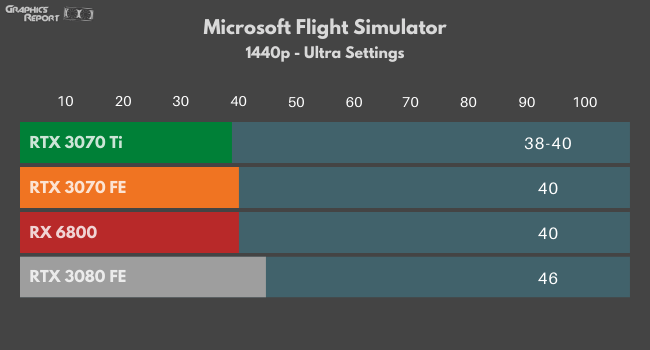
Our Graphics Card was running the game at 38-40 fps, the 3070 founder’s edition and AMD RX 6800 were also on the 40 fps mark, whereas the 3080 FE was running slightly higher at 46 fps.
At 4k.
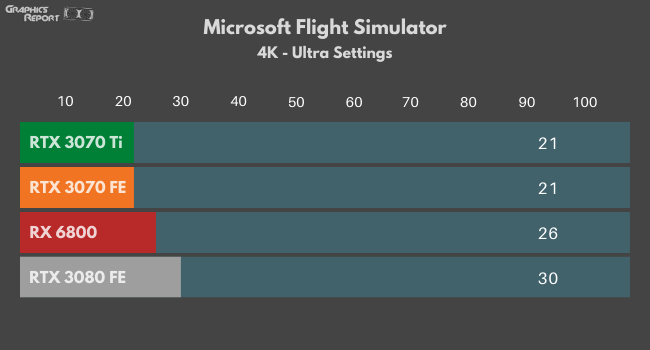
The 3070 and the 3070 Ti both were running at 21 fps, and the AMD RX 6800 at 26 fps, followed by RTX 3080’s 30 fps.
WatchDogs Legion:
At 1440p.
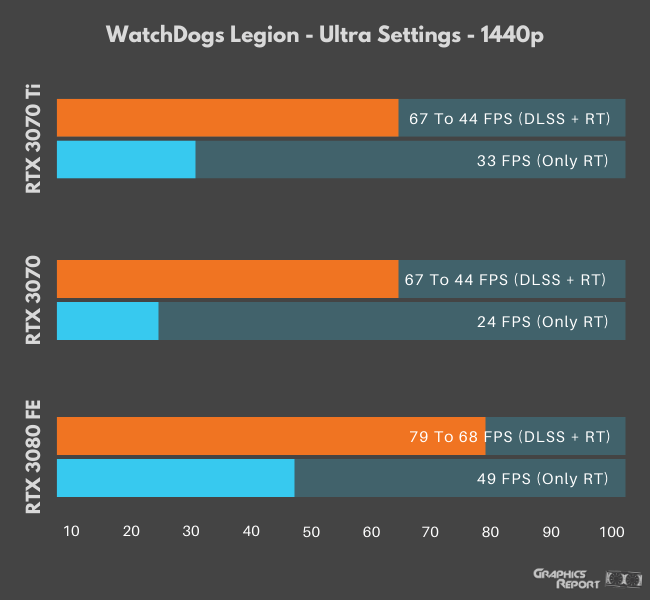
WatchDogs Legion was giving 67 to 44 with different DLSS + RT settings, and 33 RayTracing fps, respectively. The other cards, like the 3070, also had somewhat similar stats, except with only Raytracing on it was giving 24 fps, and the 3080 FE was giving 79, 68 with different DLSS + RT modes or settings, and 49 RT fps, respectively.
At 4k.
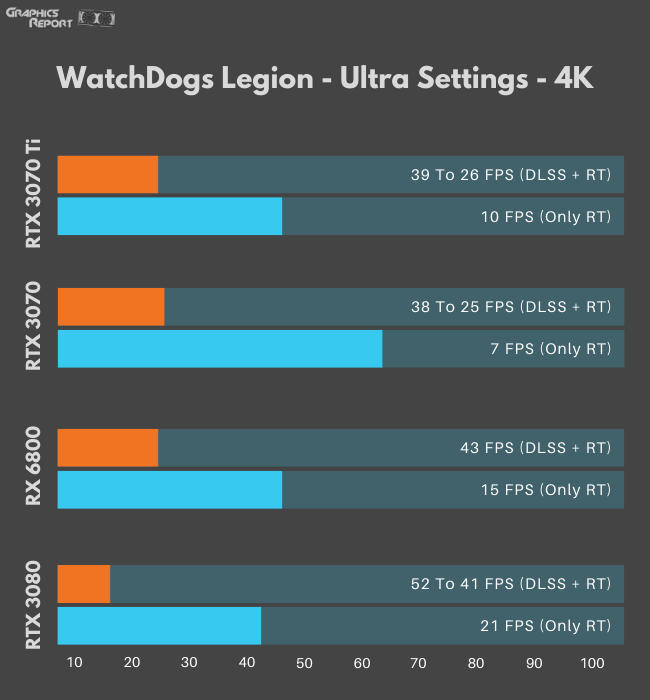
The game was running at 39, 26 in different DLSS + RT modes, and 10 RT fps, the 3070 founders edition was giving 38, 25 in different DLSS + RT settings, and 7 RT fps, the RX 6800 was giving 43 and 15 fps RT and the RTX 3080 FE was running at 52, 41 in different RT + DLSS modes and 21 RT fps respectively.
Shadow of The Tomb Raider:
At 1440p.
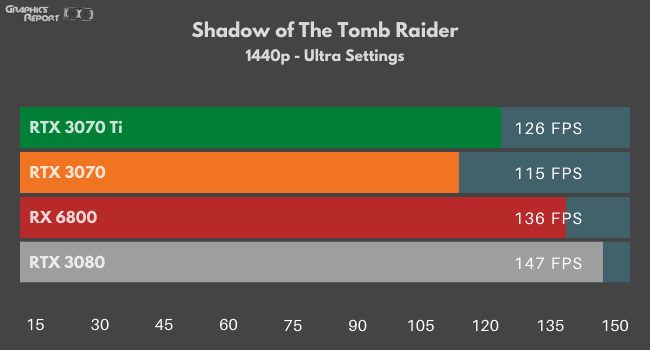
Shadow Of The Tomb Raider was running at 126 fps on the RTX 3070 Ti, 115fps on the 3070, 136 fps at RX 6800, and 147 fps on the 3080.
At 4k.
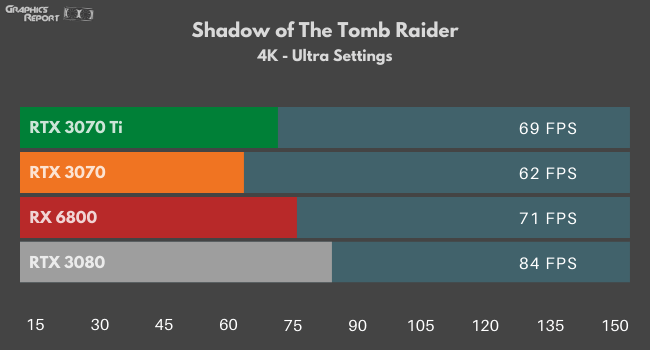
Shadow Of The Tomb Raider was running at 69 fps on the RTX 3070 Ti, 62 fps on the 3070, 71 fps at RX 6800, and 84 fps at the 3080.
Assasins Creed Valhalla:
At 1440p.
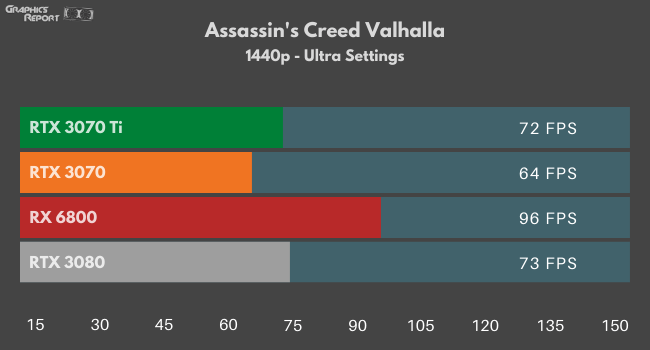
Assassins Creed Valhalla was running at 72 fps on the RTX 3070 Ti, 64 fps on the 3070, 96 fps at RX 6800, and 73 fps at the 3080.
At 4k.
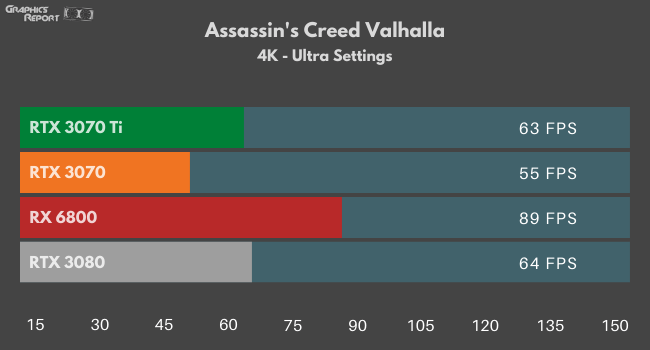
Assassins Creed Valhalla was running at 63 fps on the RTX 3070 Ti, 55 fps on the 3070, 89 fps at RX 6800, and 64 fps at the 3080.
These were the results of all the tests carried out, and as you can see that it is mostly close with RX 6800 and 3070 founder’s edition in terms of performance.
Which RTX 3070 Ti Card Should You Get?
It was really tough to decide a winner because all the cards were so good, but after a lot of thought and analysis, the winner has been decided as the ASUS ROG STRIX RTX 3070 Ti Gaming OC.
There are multiple factors that make it my top pick. First of all, it has the highest boost clock of all cards on the list, and after that, it is also OC. Both these factors mean that it will have the best all-around performance out of all the other cards.
Coming on to the design, it looks really sleek and classy; the RGB lights add more specialty to its design, and only from the looks, too, does it appear like a true beast ready to be unleashed. The design is so exquisite that it looks like a one-of-a-kind GPU and will make everyone a fan of your Build.
Lastly, when you look at its cooling stats that stay between 65-70 degrees even under extreme load, you get to know that it is its money’s worth.
This was my list for the best RTX 3070 Ti, I hope it will clear all your confusion and reservations regarding the different models of this card and will help you in picking the right card for your build.
If you have any other queries, then please let me know in the comments section below. That’s it from my side, I will see you again with another series of the best GPUs.
Frequently Asked Questions (FAQs)
How good is the RTX 3070 ti?
The RTX 3070 Ti is a great GPU for all the gamers who don’t want to spend tons of money only on a Graphics card and still want mid-range budget next-gen RTX gaming.
It performs really well in the 1440p form factor with RTX on and is considered as one of the best next-gen graphics cards.
Can RTX 3070 ti run 4k?
RTX 3070 Ti is optimized for 1440p gaming, so its runs best on that resolution; however with a few tweaks and compromises, you can run on 4k but not as good as the RTX 3080 or RTX 3090.
Which is the best motherboard for RTX 3070 ti?
Asus ROG Crosshair VIII Dark Hero X570 (AMD) and Gigabyte Z690 Aorus Pro(intel) are the best motherboards for RTX 3070 Ti.
Which is the best RTX 3070 ti?
As discussed earlier, the ASUS ROG STRIX RTX 3070 Ti Gaming Oc is the best of the lot due to its extraordinary performance, design, and cooling architecture.
Which is the best PSU for RTX 3070 ti?
Corsair RM750 is the perfect PSU for the RTX 3070 Ti as it is fully modular, 80+ gold rated, and extremely silent.
Is it worth it to buy an RTX 3070 ti card in 2023?
Currently, I would advise you to wait for the prices to get normal and then buy the GPU at MSRP. This way, you will also discourage scalpers and save tons of money.
Douglas Crawford
A hardcore gamer who plays games 24/7 just decided to share his gaming passion on this platform. Meet your best friend and a nerd gaming buddy. I mostly write anything related to graphics cards, monitors, and games.
Какая версия rtx3070ti лучше всего?

Подскажите пожалуйста собираюсь брать rtx 3070ti какую версию посоветуете ? Боюсь за то что будет сильно грется.Сейчас рассматриваю эту версию gigabyte gaming oc rtx 3070ti .Корпус сейчас такой ZET GAMING Rare M1 но одна вертушка по середине отключена так как трещит и нужно менять

Eloi
https://www.dns-shop.ru/product/7f65939fb4862eb1/videokarta-gigabyte-geforce-rtx-3070-ti-gaming-oc-gv-n307tgaming-oc-8gd/
https://www.dns-shop.ru/product/03737a51c8cf2ff2/videokarta-asus-tuf-gaming-geforce-rtx-3070-ti-oc-edition-tuf-rtx3070ti-o8g-gaming/
https://www.dns-shop.ru/product/e627d5cabf792ff1/videokarta-msi-geforce-rtx-3070-ti-gaming-x-trio-rtx-3070-ti-gaming-x-trio-8g/
У всех с охлаждениям порядок! просто смотри какая дешевле из этих фирм попадется, и бери ее.
- пожаловаться
- скопировать ссылку
Kartonkratos
Вот как раз та которую написал до 102 опустилась цена . Не знаю даже стоит ли ещё ждать снижения цен?
- пожаловаться
- скопировать ссылку
Eloi
Ну в принципе цена более менее, можно брать! я не думаю что еще ниже опустится! так как другие версии минимум на 30k дороже!.
- пожаловаться
- скопировать ссылку
Kartonkratos
Вот только почему именно на неё цена снизилась, вчера она 120 с чем то стоила
- пожаловаться
- скопировать ссылку
Eloi
Цены прыгают на все видеокарты! просто в каждом магазине по разному!
- пожаловаться
- скопировать ссылку
Kartonkratos
А так если не смотреть на цену то в этих версиях нет особой разницы?
- пожаловаться
- скопировать ссылку

Eloi
https://www.dns-shop.ru/product/03737a51c8cf2ff2/videokarta-asus-tuf-gaming-geforce-rtx-3070-ti-oc-edition-tuf-rtx3070ti-o8g-gaming/
Вот эта самая лучшая, надежная и тихая.
- пожаловаться
- скопировать ссылку
Pirat13666
Да а то что цена на 34k больше! чем https://www.dns-shop.ru/product/7f65939fb4862eb1/videokarta-gigabyte-geforce-rtx-3070-ti-gaming-oc-gv-n307tgaming-oc-8gd/ то это не смущает? совет конечно не очень!
- пожаловаться
- скопировать ссылку

Eloi
Все они одинаковые в плане производительности, нет лучших или худших, если прям трясешься за каждый децибел или за каждый градус, то выбор оверпрайснутых MSI либо Asus, в остальном любая, они в производительности все одинаковые с точностью до фипиеса, на это не как не влияют кол во фаз или заводской супер разгон на 50mhz =) .
- пожаловаться
- скопировать ссылку
И стоит ли вообще брать 3070ti или лучше 3060ti взять просто слышал типо 3070ti какие то проблемные
- пожаловаться
- скопировать ссылку
Вообще хотел 3060ti но цены упали и теперь есть возможность 3070ti взять
- пожаловаться
- скопировать ссылку
Eloi
Ну то что они проблемные ничего не могу сказать! так что хз?
- пожаловаться
- скопировать ссылку
Kartonkratos
И почему у gigabyte версии 3070ti которая за 102 в характеристиках указана только штатная частота? 1575 а в остальных указана штатная и до какой разогнать можно
- пожаловаться
- скопировать ссылку
Eloi
Не полное описание значит, так как даже у референсных моделях написана частота в бусте, и в обще в реале она выше чем пишут в магазине!
- пожаловаться
- скопировать ссылку
Kartonkratos
уже в dns 87 стоит
у меня нет слов
если так и дальше пойдет то может и 3080 смогу взять
- пожаловаться
- скопировать ссылку
rx6600xt за 96к взял просто рука лицо, теперь продать не могу(
- пожаловаться
- скопировать ссылку
Eloi
Кроме Aorus Master, гигу лучше не брать. Я бы не стал. Палит RTX 3070 Ti GamingPro в список, ASUS ROG Strix GeForce RTX 3070 Ti .
- пожаловаться
- скопировать ссылку
01001000 01101001
Почему?
- пожаловаться
- скопировать ссылку

Bratulia
Охлаждение лучше.В иных случаях с Гигой может быть так, что придётся интерфейс менять.Можно, конечно, подшаманить, но вертушки крутить придётся на полную.
- пожаловаться
- скопировать ссылку
Bratulia
Вот тебе список карт (под спойлером) бес проблемных.

Гига худший производитель, плохая реализация охлаждения, компоновка платы, отношение к покупателю. Можешь ремонтников погуглить. Карты горячие, на ранних ревизиях прокладки текли. Гига не умеет делать электронику. Вот этот бред, конечно печалит особенно:

Эта фигня только у гигабайт. Можешь купить лучше — купи, в противном случае любая карта на гаранти сойдёт.
- пожаловаться
- скопировать ссылку

Статистика за 2020 год от крупнейшего немецкого магазина Mindfactory
Посмотреть — https://geekville.ru/vybor-i-sravnenie/5-hudshih-proizvoditelej-videokart-statistika-vrat-ne-budet/
- пожаловаться
- скопировать ссылку

На твоём бы месте я вообще продал комп))))
- пожаловаться
- скопировать ссылку
Скажи это моей карте и ещё тысячи пользователям)))) Вперёд, покажи, где температура лучше с прокладками по умолчанию у всех твоих карт, лол)))))
- пожаловаться
- скопировать ссылку

Ребятки из Гиги ошарашены мнением эксперда) Думают, наверно, ооооо, блиииин, как же наша корпорация ещё не закрылась, раз такие косяки мы натворили с картами)
- пожаловаться
- скопировать ссылку

ASUS TUF Gaming GeForce RTX 3070 Ti OC Edition
купил и не парюсь, при 100% нагрузки всего 65 градусов
- пожаловаться
- скопировать ссылку
The Great Troll
Температуру видео памяти глянь��
- пожаловаться
- скопировать ссылку

01001000 01101001
Как владелец RTX 3070 Gigabyte Vision, согласен — брать не стоит, если есть выбор, у меня его не было в декабре 2020. Ну как, либо 56 эта, либо 80+ даже Palit уже, чуть не про. пустил возможность взять до дикого повышения цен.
Через полтора года использования могу сказать следующее — вначале все в порядке, потом медленно, но верно температура ползет вверх, пусть ненадолго, но у меня и 105 градусов в hot spot выдавала в HWMonitor. Играть с настройками типа ограничения до 60 кадров, врубать вентиляторы на полную — как-то не особо и быстро надоедает. Термопасту сменил недавно — стало лучше, температура упала на 12 градусов, термопрокладки, кстати, не потекли, но сделаны они там из жвачки, походу. Буду менять.
Но при этом в защиту Gigabyte скажу, GTX 260 и 580 служили годами, после профилактики продавались и жалоб от покупателей не было. 770 у брата тоже живая, как и моя 970. Видимо, разучились делать только несколько лет назад.
- пожаловаться
- скопировать ссылку

у Гиги Аорус — топ охлад с испарительной камерой, но дешманский текстолит и отсутствуют предохранители.
Хотя на более младших версиях от гиги преды есть.
MSI Suprime — топ во всем. Питальник, охлад, преды.
MSI Ventus — младшая в линейке MSI, без предов
MSI Gaming x Trio — преды есть.
А лучшая переработанная плата со всеми плюшками есть у EVGA.
- пожаловаться
- скопировать ссылку

чем выше частота, тем лучше!
- пожаловаться
- скопировать ссылку
Вот только не надо кидаться такими заявлениями.
Если бы любая корпорация электроники халтурила так, как ты описываешь, то она давно бы обанкротилась.
Нет плохих фирм. Есть хорошая или неудачная конструкция конкретной вещи.
И ещё одно — не надо сравнивать товар средней ценовой категории одной фирмы с топовыми вариантами от другого производителя.
Всё.
- пожаловаться
- скопировать ссылку
shahVkit
Это майнингист, у него всегда где-то что-то прогорает/подгорает.Выкинуть 80 кило и получить прогар — это ещё те должны быть "очумелые ручки"
- пожаловаться
- скопировать ссылку
Всё, что нужно знать за бездумное и извращённое потребительство. Где здесь логика, при чём тут SSD (стоит HDD спокойно), при чём тут Асус (MSI куда то делся), почему гига (где пояснение?), вообще непонятно. Ну, кто то же должен брать, как и кингстоны, аэркулы, термалтейки, асус дуал. А ты один из тех, кто разводит людей на это.
А ведь себе купит другое (а так и есть). Бухарь во всей красе.
shahVkit
Это заявление ремонтников. Не моё, я на него не претендую.
Кингстон, Аеркул, Пали Дуал и гига — берут те, кто не разбирается, и не знает ничего другого. Лично таких встречал кучу, включая хвалебные статьи про палит дуал на оверах. Где карты от Палит Дуал? К сожалению в ремонте. Хотя, наверное не все. Где кингстоны? Не гонятся и жалобы на показатели.
Колорфул, EVGA даже Асус, включая дуал. Досвидос.
Denis Kyokushin
Лелик и Болик снова провоцируют и тратят моё время. Не стоите того в принципе. Денис! Может мозгов и не видно, но когда не хватает — заметно. Гугл в помощь на все фейки, коих целый состав из вагонов. Конструктивизм напрочь отсутствует.