Ошибка java.net.SocketException: Conection reset – как исправить
Сразу сообщу, что если у вас проблема с игрой майнкрафт, то листайте в самый конец статьи, а пока информация для разработчиков и программистов.
В этом примере мы поговорим о java.net.SocketException. Это подкласс IOException, поэтому это проверенное исключение, которое сигнализирует о проблеме при попытке открыть или получить доступ к сокету.
Настоятельно рекомендуется использовать самый «определенный» класс исключений сокетов, который более точно определяет проблему. Стоит также отметить, что SocketException, выдаётся на экран с сообщением об ошибке, которое очень информативно описывает ситуацию, вызвавшую исключение.
Простое клиент-серверное приложение
Чтобы продемонстрировать это исключение, я собираюсь позаимствовать некоторый код из клиент-серверного приложения, которое есть в java.net.ConnectException. Он состоит из 2 потоков.
- Поток 1 – SimpleServer, открывает сокет на локальном компьютере через порт 3333. Потом он ожидает установления соединения. Если происходит соединение, он создает входной поток и считывает 1 текстовую строчку, от клиента, который был подключен.
- Поток номер 2 – SimpleClient, подключается к сокету сервера, открытого SimpleServer. Он отправляет одну текстовую строчку.
Получается, что 2 потока будут в разных классах, запущенных двумя разными основными методами, чтобы вызвать исключение:
Как вы можете видеть, я поместил в SimpleClient 15-секундную задержку, прежде чем попытаться отправить свое сообщение. К тому моменту, когда клиент вызывает sleep(), он уже создал соединение с сервером. Я собираюсь запустить оба потока, и после того, как клиент установит соединение, я внезапно остановлю клиентское приложение.
Вот что происходит на стороне сервера:
Мы получаем исключение SocketException с сообщением «Сброс подключения». Это происходит, когда один из участников принудительно закрывает соединение без использования close().
Конечно, вы можете сделать оперативное закрытие соединения, не закрывая приложение вручную. В коде клиента, после ожидания в течение 15 секунд (или меньше), вы можете выдать новое исключение (используя throws new Exception ()), но вы должны удалить finally, иначе соединение будет нормально закрываться, и SocketException не будет сброшен.
Как решить проблему с SocketException
SocketException – это общее исключение, обозначающее проблему при попытке доступа или открытия Socket. Решение этой проблемы должно быть сделано с особой тщательностью. Вы должны всегда регистрировать сообщение об ошибке, которое сопровождает исключение.
В предыдущем примере мы видели код сообщения. Это происходит, когда один из участников принудительно закрывает соединение без использования close(). Это означает, что вы должны проверить, был ли один из участников неожиданно прерван.
Также может быть сообщение «Слишком много открытых файлов», особенно если вы работаете в Linux. Это сообщение обозначает, что многие файловые дескрипторы открыты для системы. Вы можете избежать этой ошибки, если перейдете в /etc/sysctl.conf и увеличите число в поле fs.file-max. Или попытаться выделить больше стековой памяти.
Конечно, можно встретить много других сообщений. Например, «Ошибка привязки», где ваше соединение не может быть установлено, поскольку порт не может быть привязан к сокету. В этом случае проверьте, используется ли порт и т. д.
Если у вас проблема с minecraft, то чтобы решить проблему попробуйте сделать следующее:
- Обновите джаву, скачайте по ссылке https://www.java.com/ru/download/ новую версию и установите;
- Возможно блокирует антивирус или брандмауэр. Отключите антивирус и добавьте minecraft в список исключения в брандмауэре (или его можно выключить на время).
- При запуске игры, в правом нижнем углу отображается версия игры, если у вас не последняя версия, то обновите.
- Если у вас много расширений и модов, то это может приводить к багам, удалите последние установленные моды – это может решить проблему.
- Если вы используете платный сервер и у вас закончилась подписка, то опять же у вас будет такая ошибка.
Средняя оценка 2.1 / 5. Количество голосов: 104
Спасибо, помогите другим — напишите комментарий, добавьте информации к статье.
Или поделись статьей
Видим, что вы не нашли ответ на свой вопрос.
Помогите улучшить статью.
Напишите комментарий, что можно добавить к статье, какой информации не хватает.
Minecraft: Fix Internal Exception java.net.socketexception Connection Reset
With this guide, you can check out how to Fix Internal Exception java.net.socketexception Connection Reset in Minecraft.
 By Shreyansh Shah On Jul 18, 2022
Although one of the most famous games in the sandbox genre, Minecraft is no stranger to bugs and issues. While it is still highly rated and enjoyed by players, the classic dungeon crawler faces a lot of bugs that have frustrated players. Nevertheless, the nature and the entertainment it brings to its fan base covers up for it. However, errors need to be fixed. Recently players came across a new error, Internal Exception java.net.socketexception Connection Reset in Minecraft, and are looking for a fix. If you are here looking for the same, look no further as this guide has you covered.
Table of Contents
How to Fix Internal Exception java.net.socketexception Connection Reset in Minecraft
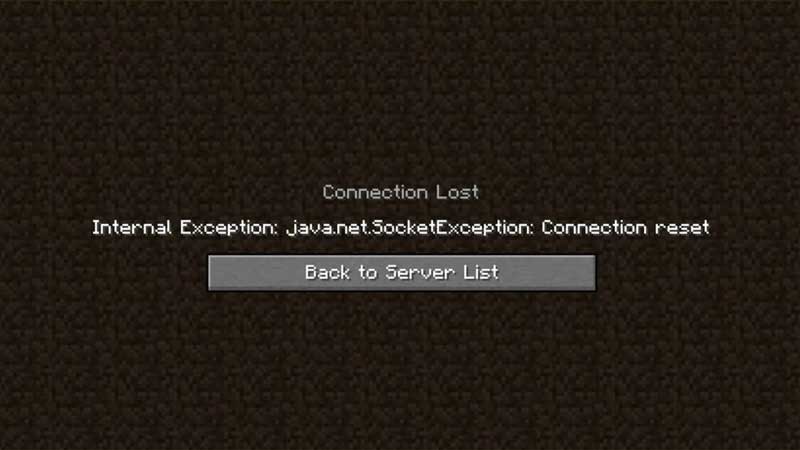
To fix the Internal Exception java.net.socketexception Connection Reset in Minecraft you will have to try and test a few things that might work for you. Additionally, before you start we recommend you check your Internet Connection. Since the error corresponds with Connection Reset, it might be related to your Internet.
Avoid large downloads on any other device to provide the game with sufficient Bandwidth. While you are at this, you can also restart your router and modem just to clear up some cache and cool them down. Once you know that this is not the reason, move on to the fix we have provided for Internal Exception java.net.socketexception Connection Reset.
The following methods involve a lot of technical know-how and it might alter other settings on your device. We recommend you go for it if and only if you know how to revert back to your original settings.
Change DNS Server Settings
Changing your DNS Server may enable you to fix the error in Minecraft. Since it is quite technical and changes other Internet Settings on your devices, write down your old settings somewhere to remember. If you are confident about getting this done, here’s what you need to do:
- Open Settings from Start Menu and Click on Network and Internet.
- While in the new window, under Advanced Network Settings click on Change Adapter Options.
- Double Click on your internet connection type (Usually Ethernet for PCs) and select Properties.
- As soon as the new window pops up, double click on Internet Protocol Version 4 (TCP/IPv4).
- Select Use the following DNS server addresses option.
- In the preferred DNS field, use 8.8.8.8, and in the alternate DNS field use 8.8.4.4.
- Tick the Validate Settings upon exit option and save changes before you exit.
Windows Firewall Settings
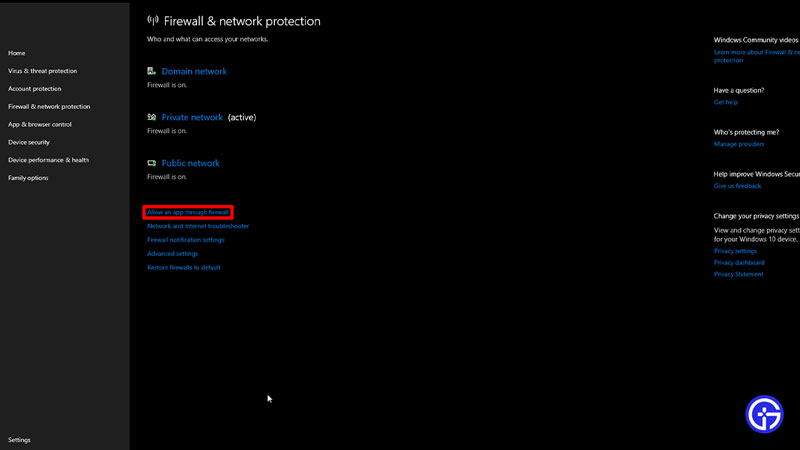
You might face this error if Minecraft is not added to the list of apps allowed through the firewall. Here’s what you need to do:
- Go to Settings from Start Menu and click on Update & Security.
- In the new window look for Windows Security from the options on the left.
- Once you click on it, navigate and click on the Open Window Settings tab.
- As soon as the new window opens, click on Firewall and Network Protection.
- Toggle to the Allow an app through the firewall option and click on it to open the new window.
- Click on Change Settings at the top and then click on Allow Another App.
- Search for Minecraft from the browse option and add it to the Firewall.
Java Settings
Since a version of Java is added with your installation since the Minecraft 1.12 version, you may need to update your Java to continue. Here’s what you need to do:
- Search Java and click on Check for Updates.
- In the new window, open the Update tab.
- While in the new tab, click on Check Now and install any update if available.
- Restart your PC after the process is complete.
If none of these work, you may have to use a VPN or proxy to play the game. Although it does not guarantee a fix, you may be able to solve this issue by reinstalling the game. But before you do that, check in with Minecraft Support to get a better understanding and a chance to solve the issue.
java.net.SocketException: Connection reset
I am getting the following error trying to read from a socket. I’m doing a readInt() on that InputStream , and I am getting this error. Perusing the documentation suggests that the client part of the connection closed the connection. In this scenario, I am the server.
I have access to the client log files and it is not closing the connection, and its log files suggest I am closing the connection. So does anybody have an idea why this is happening? What else to check for? Does this arise when there are local resources that are perhaps reaching thresholds?
I do note that I have the following line:
just prior to the readInt() . There is a reason for this (long story), but just curious, are there circumstances under which this might lead to the indicated error? I have the server running in my IDE, and I happened to leave my IDE stuck on a breakpoint, and I then noticed the exact same errors begin appearing in my own logs in my IDE.
Anyway, just mentioning it, hopefully not a red herring.
15 Answers 15
There are several possible causes.
The other end has deliberately reset the connection, in a way which I will not document here. It is rare, and generally incorrect, for application software to do this, but it is not unknown for commercial software.
More commonly, it is caused by writing to a connection that the other end has already closed normally. In other words an application protocol error.
It can also be caused by closing a socket when there is unread data in the socket receive buffer.
In Windows, ‘software caused connection abort’, which is not the same as ‘connection reset’, is caused by network problems sending from your end. There’s a Microsoft knowledge base article about this.
Connection reset simply means that a TCP RST was received. This happens when your peer receives data that it can’t process, and there can be various reasons for that.
The simplest is when you close the socket, and then write more data on the output stream. By closing the socket, you told your peer that you are done talking, and it can forget about your connection. When you send more data on that stream anyway, the peer rejects it with an RST to let you know it isn’t listening.
In other cases, an intervening firewall or even the remote host itself might «forget» about your TCP connection. This could happen if you don’t send any data for a long time (2 hours is a common time-out), or because the peer was rebooted and lost its information about active connections. Sending data on one of these defunct connections will cause a RST too.
Update in response to additional information:
Take a close look at your handling of the SocketTimeoutException . This exception is raised if the configured timeout is exceeded while blocked on a socket operation. The state of the socket itself is not changed when this exception is thrown, but if your exception handler closes the socket, and then tries to write to it, you’ll be in a connection reset condition. setSoTimeout() is meant to give you a clean way to break out of a read() operation that might otherwise block forever, without doing dirty things like closing the socket from another thread.
Fix: Internet Exception java.net.SocketException Connection Reset [MiniTool Tips]
Some people meet this connection lost error – Internal Exception: java.net.SocketException: Connection Reset – in Minecraft. So what does that mean? To fix this error, this article on MiniTool Website has issued some available methods and you can refer to that.
Internal Exception java.net.SocketException Connection Reset
Have you ever seen this connection lost error in Minecraft – Internal Exception java.net.SocketException Connection Reset? It is an annoying issue interrupting your attention and destroy the gaming experience when you are playing Minecraft.
The reasons that trigger this error are complicated and varied but don’t panic, you can try some easy tips to see if this java.net.SocketExeption Connection error can be fixed.
-
.
- Try using a VPN.
- Uninstall the Hamachi VPN if you are using it.
Fix the java.net.SocketException Connection Reset error
Fix 1: Change the DNS Server
The java.netsocketexeption error is probably made by the connection issue, so you can try to change the DNS sever and see if the issue can be resolved.
Step 1: Press the Win + S key to open the Search box and input control panel to open the result of Best match.
Step 2: Switch View by: to Small icons and choose Network and Sharing Center.
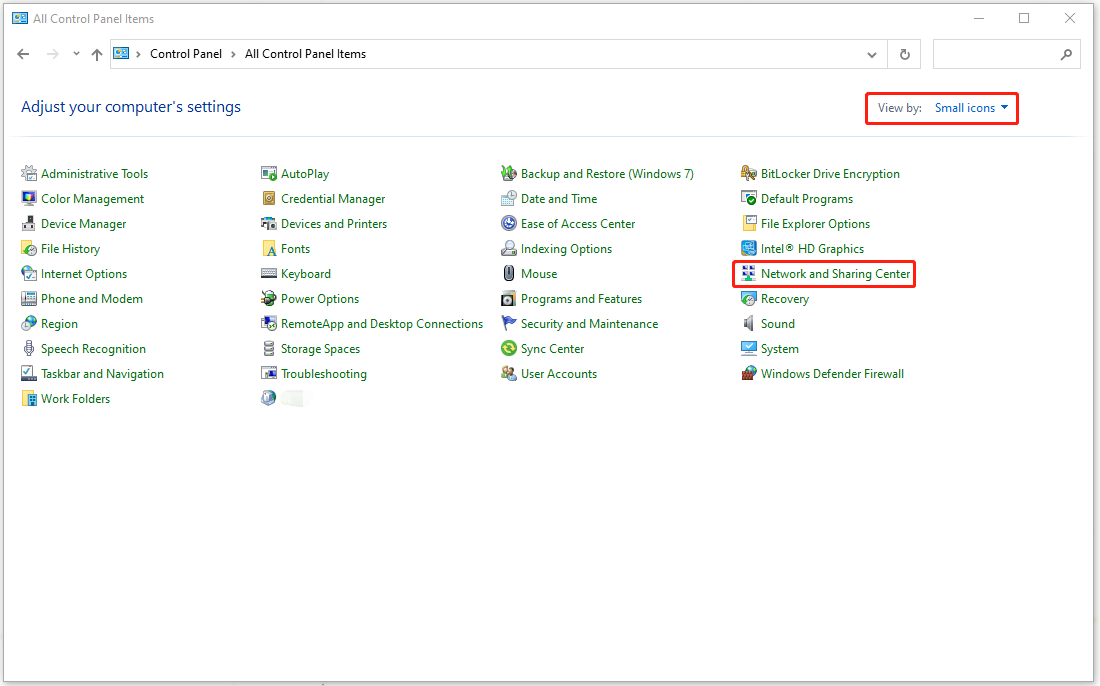
Step 3: Click on your Internet connection (Usually Ethernet) and choose Properties.

Step 4: In the next page, double-click on Internet Protocol Version 4 (CTP/IPv4) and check the options of Use the following IP address and Use the following DNS server addresses.
Step 5: Then input 8.8.8.8 for the box next to Preferred DNS server and 8.8.4.4 for the box next to Alternate DNS server.

Step 6: Check the box for Validate settings upon exit and choose OK to save your choice.
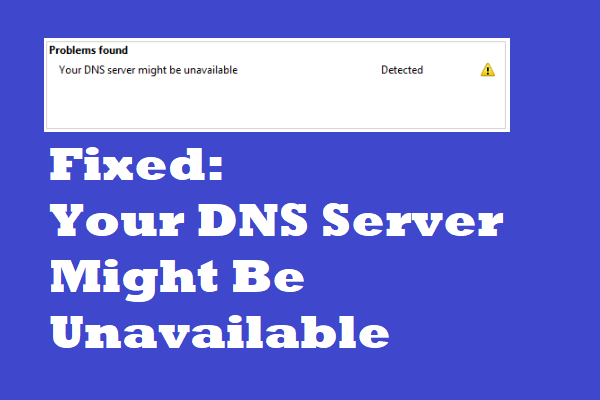
If you meet the DNS server unavailable error, then you can’t connect to your Internet. Thus, you can read this post to get some methods to fix it.
Fix 2: Renew Your System IP Address
To fix the java.net.SocketException Connection Reset error, another way is to release and renew your system IP address. Here is the way.
Step 1: Type cmd in Search and run Command Prompt as an administrator.
Step 2: When the Command Prompt window opens, you can enter the following commands and press Enter after every one of them.
- ipconfig /release
- ipconfig/flushdns
- ipconfig/renew
When the command is finished, a new line appears at the bottom of the Command Prompt screen that contains an IP address. Then you can close the window and relaunch Minecraft to see if the issue is resolved.
Fix 3: Allow Minecraft though Windows Firewall
Your Windows Firewall may block Minecraft from running normally for its security consideration. You can try to disable Windows Firewall temporarily and see if the error message “Internal Exception: java.net.SocketException: Connection Reset” appears again.
Then you can add Minecraft to the white list so that Windows Firewall will allow Minecraft to run.
Step 1: Go to Start > Settings > Update & Security > Windows Security > Firewall & network protection.
Step 2: Then choose Allow an app through firewall and in another window, select Change settings and Allow another app….
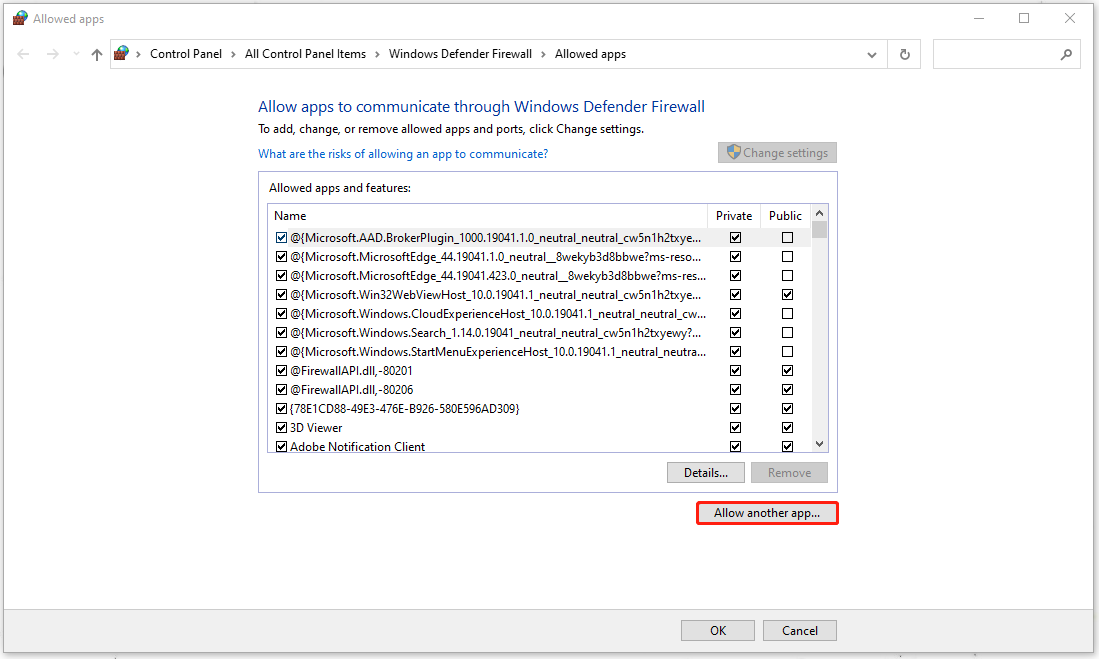
Step 3: Click Browse… to choose Minecraft EXE file and select Add to add it to the Firewall.
Bottom Line:
To fix the Internal Exception: java.net.SocketException: Connection Reset, the above methods will be helpful. Hope this article can resolve your issue.
About The Author
Anna is an editor of the MiniTool Team. She worked in this big family since her graduation. Her articles mainly focus on data backup and recovery, disk cloning, and file syncing, committed to resolving the data loss issues users may encounter on their PCs. Besides, more related computer articles are shared here. In her leisure time, she enjoys reading and watching movies. Travel can also be a good choice for her.