How to delete BeNaughty account in few easy steps
In this post, we will share how you can delete benaughty account, stop BeNaughty Email subscription and cancel the premium subscription as well. Online dating on sites like benaughty.com is the word which will tempt all youngsters, especially boys. Even though there are thousands of online dating websites out there, many of them end up being fake. Joining such online dating websites may possess potential threats to your online identity. At times it even risks sensitive information like your bank account details and more.

BeNaughty.com, which is one of the worst online dating websites out there. If you did create an account there and want to cancel the BeNaughty subscription or BeNaughty delete account, then follow these steps.
How to delete BeNaughty account
- First of all, login to your BeNaughty account from any web browser.
- After successfully logging in, click on the profile icon on the top left, and select Settings.
- Scroll till the end, and click on the “Remove Account” button at the bottom of the page.

- To confirm the removal of your account, you will now be asked to enter your login password again.
- You will now be provided with a list of options. From the list, choose the “Remove my profile, contacts, and personal information” option.
- Make sure that you do not select or check mark anything else. Then click on Continue.

- The next screen will offer you the option to unsubscribe from emails, hide your profile, or remove everything. If you wish to remove the account altogether, then choose to delete everything to delete your account from BeNaughty. Click on Continue.

- The next screen will ask you the reason to remove your account from BeNaiughty.
- The final screen will offer you to remove your account. Here you can only choose to cancel the subscription, or you can choose to delete BeNaughty account.

- The next screen will take the registered email id, and then share a Thank You message. Along with this, BeNaugty will share a cancellation code over email within an hour. It will be valid for 24 hours. This code is unique and can be used only once.
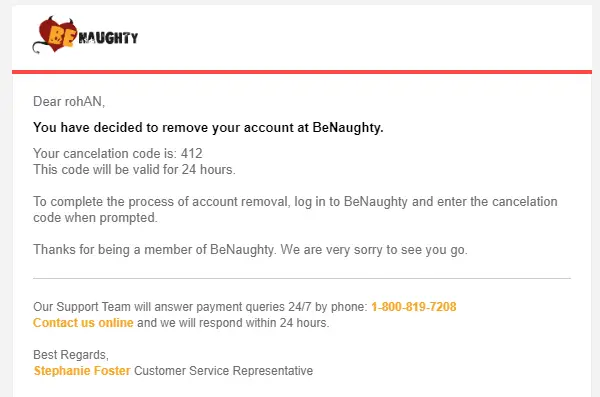
- Once the email arrives, it will have the cancellation code. Login to the account again, and click on Remove account
- Here it will ask you to enter your account password again. Enter and click on Continue.
- Next screen will prompt you to enter the BeNaughty cancellation code. Enter and click on the Continue button.

- After clicking the “Continue” button your account will be removed. You will receive an account removal confirmation email at: xxx@xxx.com. Please note that it can take up to 1 hour for the email to arrive at your email address.
- The last screen is the final confirmation. Once you click on it, you will be logged out, and the account will be removed permanently.

At any point, if you wish to reactivate your BeNaughty.com account, it’s simple. You can do the same by logging in again to the website using your old account username and password. You will receive an email with a confirmation link.
How to cancel BeNaughty Email Subscription
One of the most annoying features of this online dating website is the never-ending spam emails that sent on to your mail account almost every day. And unsubscribing from the BeNaughty online dating website seems impossible. Even if you unsubscribe to avoid emails from BeNaughty, somehow you will still receive emails from BeNaughty.com.
There are three ways of managing it.
1. It is best if you can connect to them directly over support@benaughty.com. You will have to verify, and once done, the emails will stop.

2. Go to B eNaughty my account or Account Settings > Email, SMS, and push notifications. Here you can uncheck the options for which you do not wish to receive emails.

3. Every email you receive, there is an unsubscribe from all option at the end. Click on it, and choose to remove yourself from BeNaughty emails.
While it should help, but it is one of the major issues with creating an account on an online dating website. Once you register using your email address, there is no secrecy in using the online dating platform. Many of the online dating websites out there will irritate you.
You will get regular emails every day to your registered email address. They would share BeNaughty site reviews; they will try to take your money by showing your fake photos of hot girls/boys. It makes me wonder if I should delete a dating site account every time I create it?
How to cancel BeNaughty Subscription or Membership?
If you have used your credit card for benaughty.com premium subscription or membership, and do not wish to continue, you can cancel it. However, it will depend on where the subscription was activated.
1] If you did from the website, then go to your Account > Premium Membership and then cancel the subscription. However, you will have to do that three days before the next billing cycle else you will be charged again. It is the best way to cancel repeat billing from BeNaughty.
2] If you subscribed from Google Play or iTunes, then check the subscription section in those apps. You should be able to find BeNaughty listed. Cancel the subscription.
How To Delete Benaughty Account
If you’re reading this article, you’re probably wondering how to delete Benaughty account. Maybe you’ve found love or you’re simply looking for something different, but either way, deleting your Benaughty account is a straightforward process. In this article, we’ll guide you through the steps you need to take to delete your Benaughty account.
Step 1: Log in to your Benaughty account
The first step to deleting your Benaughty account is to log in. Once you’re logged in, you’ll need to navigate to your account settings. You can do this by clicking on your profile picture in the top right-hand corner of the screen and selecting ‘Account Settings’ from the dropdown menu.
Step 2: Find the ‘Remove Account’ option
Once you’re in your account settings, you’ll need to find the option to remove your account. This should be located near the bottom of the page. You’ll need to click on this option to start the process of deleting your Benaughty account.
Step 3: Confirm your decision
When you click on the ‘Remove Account’ option, you’ll be taken to a page asking you to confirm your decision. Here, you’ll need to enter your password and select a reason for why you’re deleting your account. Once you’ve done this, you can click on the ‘Yes, I want to remove my account’ button to proceed.
Step 4: Wait for confirmation
After you’ve confirmed your decision to delete your Benaughty account, you’ll need to wait for confirmation. This can take up to 48 hours, so be patient. Once your account has been deleted, you’ll receive an email confirming this.
How long does it take to delete my Benaughty account?
It can take up to 48 hours for your Benaughty account to be deleted. However, you’ll receive an email confirmation once your account has been deleted.
What happens to my data when I delete my Benaughty account?
When you delete your Benaughty account, your data will be deleted as well. This includes any messages, photos, and other information you’ve shared on the site.
Can I reactivate my Benaughty account after deleting it?
No, once you’ve deleted your Benaughty account, you won’t be able to reactivate it. If you want to use Benaughty again in the future, you’ll need to create a new account.
Do I need to contact customer support to delete my Benaughty account?
No, you don’t need to contact customer support to delete your Benaughty account. You can do this yourself by following the steps outlined in this article.
Conclusion
Deleting your Benaughty account is a straightforward process that can be completed in just a few steps. By following the steps outlined in this article, you can ensure that your account is deleted and your data is removed from the site. If you have any further questions or concerns, be sure to check out Benaughty’s help center for more information.
How to Delete BeNaughty Account Successfully?

Are you a regular user of the BeNaughty online dating website? Do you want to delete your account at BeNaughty services? Have you tried a lot but haven’t yet succeeded in it? Just relax and put all of your worries aside, as we are here to help you to delete BeNaughty account.
The world is quite vast and so are the interests of people residing here. When it comes to love, everyone does have their preferences. BeNaughty is a wonderful online dating website that is specially designed to help single people connect all across the world.
Table of Contents
What is BeNaughty Online Dating Website?
It would regardless say BeNaughty is a website that provides unlimited fun and services to those who prefer spending their time on online dating websites.
It is one of the most popular online dating platforms that are being designed by millions of people and that too from different age groups globally. On this platform, you will get the opportunity to meet with people all across the world.
At BeNaughty platform, you can easily find your partner of any age group and category. Accessing is quite easier. You simply have to create your profile here first and then have to upload your photos.
Users here are easily free to search people by age, sex, group, and location. The servers of BeNaughty search out the best options for you and enlist the different profiles that are well matching your queries.
Moreover, users of BeNaughty can also know who is online or not. Connecting with people on this platform is very easy, you just need to press the like button on their profile and start chatting directly. It is a free platform that you can easily upgrade to the premium one for sending unlimited messages.
How to delete BeNaughty Account?
As I said earlier the preferences of every person differ a lot. It is not always necessary that if you are loving some dating website others will love it too. Or what to do with a dating app if you already have found your life partner.
For any reason, if you are now willing to delete BeNaughty Account, we are here to serve you with the best solutions.
- Step 1. To delete your account, the first thing you need to do is just sign in to your BeNaughty account. Launch your web browser and make a successful sign-in to your BeNaughty account from there.
- Step 2. Now move towards the home feed section and then tap on your profile picture. If you are not able to find it then just check out at the right corner of your screen.
- Step 3. Once done, now select the My Settings sections from the menu option. You can also find this option under the My Profile > My Settings section.
- Step 4. You will be provided with a list of different options there. Just scroll down your list to find out the option Remove Account. You will find this option at the bottom right corner of your screen.
- Step 5. On the successful completion of this process, a pop-up message will appear on your home screen. You simply have to proceed with fewer steps here.
- Step 6. Enter your password to confirm your account at BeNaughty.
- Step 7. Once done, tap on the Next button to proceed further.
- Step 8. It will provide the list of all of the activated notifications on your BeNaughty account.
- Step 9. If you have got fed up with frequent email notifications and are now looking forward to the way to get rid of those, you can simply disable them one by one.
- Step 10. On the successful completion of the process, now tap on the option of ‘Take me off the mailing list’. It will help you in unsubscribing from different types of notifications.
- Step 11. If you are willing to delete your account and remove every information you have stored here such as your personal information, contacts, photos, profile, and much more, you have to select the last option being provided there in the list.
- Step 12. Next, you have to tap on the Continue button to go further with the process.
- Step 13. The servers of BeNaughty will provide you with a list of different possible reasons for your account deletion.
- Step 14. You next have to choose the reason and tap on Continue to proceed further.
- Step 15. Once done with it, select the ‘Yes, I want to remove my account option. It will confirm all of the changes you have added and will delete your BeNaughty Account successfully.
- Step 16. On the successful deletion of the BeNaughty account, you will be logged out from your dashboard automatically.
- Step 1. Bingo! You have successfully deleted your BeNaughty account. For ensuring, you can try making a secure login to your BeNaughty account again using the same login credentials.
When you try this, you will find the message ‘This email is not registered here. If you are seeing it, it is a clear indication that your account is not more active now.
Conclusion
BeNaughty is for sure one of the finest online dating websites. This website is a way that has helped a large number of people out there to meet singles from every age group and sex there. The guide is specially designed for all those who are currently looking forward to deleting BeNaughty Account but are currently facing some issues out there.
It is never advisable to keep an online dating website account always alive. I mean, what to do with an app if you already have met your soulmate?
We have added up a detailed procedure here in this article so that one could easily make a successful attempt. The only thing you have to work out is to follow the given procedure very carefully. If you still don’t have any queries, you are free to ask them in the comment section.
Jacob Brown is a Senior Writer and editor with fabulous writing skills. He is passionate about technology and loves to explore how it works to solve problems. With a geeky nature, he also loves to travel mostly hill stations. We believe, he has the brightest talent to craft the techie process in words.
Benaughty как удалить профиль
Have you had enough of Benaughty.com? Are you sick and tired of being played for a sucker? Do you realize that Be Naughty creates their own "staff profiles"(check out section 6.b) which are nothing more than bogus profiles that they used to dupe people.
If you don't know what's going on here it is. Benaughty.com isn't a real dating site, it may look like one but it's not! If you're here to find out how to cancel your paid membership we have that info for you. We also have the information to show you how to delete your free profile from the site please follow the directions below.
If you want to get your money back because you feel like you've been ripped off please contact your bank and your credit card company they should be able to help you out. Also contact the FTC, you can also call them at (202) 326-2222 and complain to them. This is a clear-cut case of a site misleading people into upgrading to worthless memberships that don't enable you to meet anyone since the profiles are for the most part fictitious.
How To Delete / Remove Your Benaughty.com Profile
- Go to Benaughty.com and login to the site.
- You need to click on your profile photo,found on the top right of the web page.
- Click on the "My Settings" page.
- Then go down n to the bottom of that page and look for "remove account", then click it.
- Enter your password, click continue.
- Go to the bottom of the page and click "remove my profile", click the continue link.
- Give a reason why you want to remove your Benaughty profile.
- Then a question pops up, "Are You Sure You Want To Leave?". Click on the "Yes, I want to remove my account" link.
- Then you need to click on "confirm removal".
- All done your profile will be removed from the site.
How To Cancel Your Monthly Membership
If you want to cancel your paid monthly subscription to this site you need to contact them either through email or through their toll-free phone number. Follow the instructions below to cancel your subscription package.
- Their email to cancel your paid membership is support@benaughty.com, or call them toll free at 1-800-489-6091. In order to cancel your membership send them your Benaughty user name and the email you used to join the site.
Cancel Subscription On Your Android Device Tablet (Samsung Tablet, Galaxy etc)
- Open Google Play Store app.
- Touch Menu.
- then My Apps.
- Then Subscriptions .
- Then tap on the Benaughty app of the subscription you’d like to cancel.
- Tap “Cancel” and “Yes” to confirm the cancellation of the app on your Android.
Cancel Monthly Membership On Your iPhone / iPad
- Go to Settings, then iTunes & App Store.
- Touch your Apple ID which is located at the top of your screen.
- Touch View Apple ID.
- Touch Subscriptions.
- Touch the Be Naughty membership.
- Use the options to cancel your monthly membership.
How To Reach Their Customer Service
Email support at support@benaughty.com, or call them at 1-800-489-6091 or 1-212-796-6946. Their address if you want to send them mail is Together Network Limited P.O box 146 , Trident Chambers, Road Town, Tortola, British Virgin Islands.
Find Legitimate Women Here:
Posted in scam | Tags: Be Naughty, Benaughty.com, Cancel Benaughty.com
31 responses on How To Cancel Your Benaughty.com Account & Delete Your Profile
If you don't quit sending emaails I going to report you the police
I agreed to a 3 day trial for less than $5, yet was also chgd. Premium for $21.99 which I did see approval on that amount on the 3 day trial for less than $5. Yet on third day called to cnl. and while viewing billing history to send request of cnl. with the billing details, realized was also chgd. $21.99. was told to email support@together.com for reply on refund. Basically just stated web show you what ur accepting payment for, and it shows I approved payment for 3 day and premium with $21.99 fee. But that is bogus I now what my screen showed me and it stated approved payment for $4.?….will dispute this chg. for sure with card company….
I wanted to cancel please
I don't want is very noise thanks
Absolute racket of company
con sign up trail and then keep quiet about you actually sign for monthly
then on top that makes it impossible to cancel close account
CON DO NOT SIGN UP USE
I have just called them. The call center is scam too! F@ck them all!
So this happened to me and this is how I got a refund. When you canceled the BeNaughty subscription they actually automatically put u up on one of their other sites called QulckFlirt which I didn't know when I cancled my subscription before my trial ran out. So about 2 days after I canceled I saw a $36 charge pending on my bank account and I knew it had to be them because the $36 was charged by something calle"payeld.com". So I called my bank and was on the line with one of the reps, they asked me a couple of questions and they found the phone number to these people and called them and put us on a threeway call that included me, the bank lady, and the "payeld" people. So after we called they asked me for my account info, then they told me about the "QuickFlirt" website that I had no clue about and how I signed up for this website when I signed up for be Naughty. Then he said he can't give me a refund but instead will give me a free one month on "quickflirt". I pretty much said fuck that and told him to cancel my subscription on quickflirt and give me a refund. Then he told me he cancled the quickflirt subscription but still refused to give me a refund. But after about five mintues of me yelling at him and telling him how this was fraud, he gave me a full refund. And after the guy hung up my bank rep told me that they were going to file an inquery on my behalf on the company. So that's how I got my money back. But beware, do not sign up to this company because they are full of snakes.
Im the guy who posted in the post before about getting a refund. So they tried to charge me again today by putting my info on another website called "I want hotties". But my bank was able to catch it so I was not charged the money. Then I told the bank to cancel my card and send me another so this will stop forever.
I stress, DO NOT SIGN UP WITH THESE PEOPLE. they will trap you into a shithole of infinite charges.