FIO Crypto Handles & Domains
FIO Crypto Handles (aka FIO Addresses) act as the human-readable wallet identifier for users on the FIO Protocol. They are necessary for users to utilize all the capabilities of the FIO Protocol, but also serve as a replacement for complicated public addresses across all tokens and coins in the user’s wallet.
FIO Crypto Handles have the construct of [email protected] Examples of a FIO Crypto Handle include:
Registration of a FIO Crypto Handle is done directly through a FIO-enabled application, or through a hosted registration site that is open to the community.
The FIO Crypto Handle itself and all subsequent interactions with the FIO Protocol are controlled via a FIO private key. Loss of access to this private key suffers the same consequences as with any crypto asset — the FIO Crypto Handle will no longer be usable by the original owner, nor can it be retrieved.
Format of a FIO Crypto Handle
A FIO Crypto Handle consists of a username and a domain delimited by an @ symbol, there are not specific requirements around a FIO Crypto Handle username, but there are format restrictions around the FIO Crypto Handle as a whole, and then separate requirements for a FIO Domain in particular.
| FIO Crypto Handle ([email protected]) | FIO Domain | |
|---|---|---|
| Min. Chars | 3 | 1 |
| Max Chars | 64 (including FIO Domain) | 62 |
| Characters allowed | ASCII a-z 0-9 — (dash) with single @ (at sign) | Domains may contain ASCII a-z 0-9 — (dash) |
** The dash can not be the first or last character of the crypto handle or domain
FIO Crypto Handle validation using regex
Regex validation may be used. For example, the following regex may be used to validate a FIO Crypto Handle:
Mapping a FIO Crypto Handle to crypto public addresses
See Mapping Public Addresses in the Integration Guide.
FIO Crypto Handles Do Not Expire
After FIP-31 was implemented, FIO Crypto Handles no longer expire and are only burned if the FIO Domain they are on expires.
FIO Domains
FIO Crypto Handles consist of a username and a domain. While having a FIO Crypto Handle is necessary to use the FIO Protocol, users do not need to own their own FIO Domain. By default, many applications (especially wallets and exchanges) have a domain available as a default for their users. For example, the mobile wallet, Edge Wallet, has @edge domain as a default for their users. Users which desire their own unique FIO domain may register one that is available as a non-fungible token that they control and own.
Outside of centralized services (which own all user private keys, including FIO Crypto Handles), users are not obligated to use a specific domain for their FIO Crypto Handle, regardless of the wallet they choose to use.
Domain Owner Abilities
A domain owner has several unique actions that are specific towards their management of a domain and any subsequent registrations of FIO Crypto Handles.
- Public/Private Flag — by default, a FIO Domain can only be used for a FIO Crypto Handle registration from the domain owner themselves. If chosen, the domain owner can change their domain to public, which would allow anyone with a FIO private key to register a FIO Crypto Handle on their domain. This functionality is inherent to the mechanics of the FIO Protocol, though whether a particular wallet provides that option through their UI may differ.
Importantly — a domain owner is NOT able to control FIO Crypto Handles on their domain, decrypt any data associated with transactions made by any registered FIO Crypto Handles on their domain, nor are they able to change the fee structure of FIO Crypto Handle registration/renewal as that is dictated by the block producers (this is separate from running a registration site, which allows for various other economic choices).
For a list of public domains see the FIO Grafana Public Domains report.
Storing, Transferring, and Selling FIO Domains
All FIO Domains are non-fungible tokens, which means they can be freely transferred between accounts, users, and wallets as with any other crypto asset.
Future functionality will enable selling a FIO Domain through the use of a built-in escrow smart contract, in which both the domain owner and the buyer deposits their respective NFT and payment before transfer of the domain to the new owner is executed.
FIO Domains and Decentralized Domain Efforts
A number of projects are underway with the goal of creating a decentralized domain name space system for the World Wide Web. Should any of those projects become recognized in the community as the primary decentralized domain space, then the Foundation’s vision is that the FIO Protocol will hopefully endeavor to work collaboratively with them, though such a decision will be up to the protocol Block Producers. Specifically, FIO domains do not currently have the concept of a Top Level Domain (e.g., .com, .org, .net, .io) but such a construct could be added in the future to the notion of a FIO Crypto Handle and a unique TLD for FIO Crypto Handles registered for the FIO Protocol enabling FIO Crypto Handles to work seamlessly with a decentralized domain name space.
FIO Domain Expiry
If the renewal fee for a FIO Domain is not paid by its expiration date, the following restrictions will be placed on the domain and addresses on that domain:
Note: FIO Crypto Handles are referred to as “fio_address” in the calls.
| Days after expiration date | Domain actions disallowed | Address actions disallowed |
|---|---|---|
| 0 — 30 | setdomainpub xferdomain |
regaddress |
| 31 — 90 | setdomainpub xferdomain |
regaddress renewaddress addaddress newfundsreq (Payee FIO Crypto Handle only) rejectfndreq (Payer FIO Crypto Handle only) recordobt (Payer FIO Crypto Handle only) regproducer regproxy voteproxy bpclaim |
| On day 90 | Domain is burned and can be re-registered by any user. | All addresses on that domain and associated data are burned. |
It’s important to note that anyone can renew a domain as long as they are willing to pay the renewal fee. This ensures that users with FIO Crypto Handles on abandoned domain, can continue to use it.
FIO-адреса и Block Production в FIO Protocol: что это такое и для чего используется
FIO Protocol разработал платформу все участники которой взаимодействуют между собой при помощи удобных FIO-адресов. В этом обзоре мы поговорим о том, что такое FIO-адреса и Block Production, для чего они нужны и как получить собственный FIO-адрес.
Что такое FIO-адреса и для чего они используются
FIO-адрес – это единый идентификатор для всех криптокошельков FIO Protocol. Это позволяет быстро и удобно отправить любую криптовалюту другим пользователям, используя один простой идентификатор вместо стандартных неудобочитаемых адресов.
Также FIO-адреса предоставляют доступ к FIO-запросам и FIO-данным, которые содержат всю необходимую информацию о транзакциях пользователей. Эти данные зашифрованы между контрагентами, и их могут видеть только отправитель и получатель платежей. Далее мы рассмотрим получение FIO-адресов.
Как получить FIO-адрес
Для начала вам нужно скачать и установить один из этих кошельков:
- Guarda Wallet;
- Edge Wallet;
- Midas Protocol.
Далее мы опишем процесс получения FIO-адреса на примере популярного криптокошелька Guarda.
- Перейдите на сайт и нажмите «Sign In», чтобы войти или создать новый кошелек.
Примечание . Пока FIO-адреса доступны только в веб-версии кошелька Guarda. Позже разработчики планируют их добавить в мобильные кошельки.

2. Для создания нового кошелька нажмите «Create a new wallet».

- Введите и подтвердите пароль для входа в онлайн-кошелек. Указывайте только надежные пароли для лучшей безопасности и следите за тем, чтобы параметр Password Security показывал значение «well done». После этого нажмите «I’ve written it down».

- Подождите, пока кошелек создается. Это займет менее минуты.

- Создайте резервную копию вашего кошелька, нажав «Download backup». Guarda – некастодиальный криптокошелек. Это значит, что компания не хранит приватные ключи пользователей и сохраняет конфиденциальность.

- Кошелек успешно создан. Теперь проскрольте страницу вниз до упора – там вы увидите опцию «FIO addresses». Нажмите кнопку «Buy address» для создания нового FIO-адреса.

- Откроется страница с доступными опциями. Вы можете игнорировать название предыдущей кнопки и получить адрес FIO бесплатно. Нажмите «Get free FIO address».

- Кошелек перенесет вас на другую страницу для создания нового FIO-адреса. Введите в поле имя и нажмите «Check Availability», чтобы проверить доступность адреса.

- Если после проверки адрес оказался доступен, то нажмите «Register».

- Теперь подождите указанное время, пока новый FIO-адрес не зарегистрируется на блокчейне.

- Поздравляем! Ваш FIO-адрес доступен для использования, и он отображается в кошельке Guarda.

Теперь вы можете удобно переводить или делегировать токены производителям блоков (валидаторам).
Кто такие производители блоков и почему они нужны
Производители блоков играют важную роль в управлении блокчейном FIO Protocol. Как следует из названия, они добавляют новые блоки. Каждый цикл блок добавляется одним производителем. Другие участники сети голосуют за производителя блоков, делегируя ему свои токены FIO и получает вознаграждение за стейкинг.
Чем лучше развит производитель блоков, тем стабильнее работает его сеть, что влияет и на размер вознаграждений голосователей. Поэтому важно выбрать достойного стейкинг-провайдера, такого как, например, Everstake, который выступает в роли производителя блоков в FIO Protocol с самого начала, а его пул заручился поддержкой комьюнити.
Everstake также активно участвует во всех тестах блокчейн-сети и разрабатывает решения, облегчающие токенхолдерам работу со стейкингом.
FIO-адрес валидатора Everstake: bp@everstake
Больше информации об Everstake и о том, что мы сделали для токенхолдеров, можно найти на нашем блоге или в соцсетях.
What is FIO protocol
The FIO protocol is designed to simplify crypto transfers, making it easy for everyone. This is a decentralized integrated into wallets and exchanges service that allows you to get your own readable identifier for most of your assets, the FIO themselves called it an e-mail for your cryptocurrencies.
What is the FIO address?
The FIO address is a human-readable identifier to which you can link your crypto wallets to Guarda and use it to send and receive transactions. This address has a username and domain that you can choose yourself.
What do I need to know about FIO addresses?
- Creating an address is paid
- The address is given to you for a year, after which you need to pay the address annually
- You can have only one wallet of a specific blockchain linked to your FIO address. However, you can change the address at any time.
- After creating your FIO address, you can make about 100 transactions without fee! After this package ends, you can pay for the address again or pay for each transaction
How to create an FIO address?
First, you need to go to the «FIO address» tab under the list of your wallets and click the «Get free FIO address » button.Then you will be redirected to the FIO site, where you will need to create a username for your FIO address.

After you come up with a username and enter it, click on the «check availability» button. If the username you entered is available, you will see the «Register» button. After clicking on this button you will need to wait a few minutes and your address will be registered.

After your address is created and you see the message that you can close the window, you need to go to your Guarda Wallet and open the «FIO address» tab again. Now you can manage your FIO address. To manage it, you need to click on your FIO address and click «manage linked addresses».

In the window that opens you need to select your wallets, which will be linked to your FIO address. After selecting the wallets you want, you need to click on the «link» button, which is at the bottom of the page.

Done! Now you can use your FIO address!
What is FIO request
FIO requests are in-application requests for funds. This can be a bill, a request for a deposit, etc. This is an easy and secure way to tell someone that you expect payment from them.
This function is available in the FIO protocol system, so you can send requests only if you have your own FIO address and you know the FIO invoice. But you can always choose any address for the payment in your Guarda wallet, even if it is not linked to your FIO ID. The recipient can accept or reject the request, the status of the request will be shown in the transaction history.
To send FIO request open your FIO wallet.
- Choose «Request»

- In the ‘To your address’ field, you can choose any wallet that you have in Guarda, even if it is not linked to your FIO ID
- Enter the required amount
- Enter the invoiced FIO ID

And just press «Next» and «Create request» to send your request.
Thanks for the feedback There was a problem submitting your feedback. Please try again later.
FIO Address Guide
1. What is a FIO Address?
FIO Addresses are the universal identifier to the FIO Protocol — a usability standard being built by the Foundation for Inter-wallet Operability and supported by 25+ blockchain wallets, exchanges, and crypto payment processors. FIO Protocol (FIO) is a decentralized blockchain protocol that aims to allow easier and more convenient digital asset payment. FIO Addresses are human-readable wallet identifier (such as alice@bitmaxfio or john@edge) which eliminates the need to see, or even know of, blockchain public addresses.
2. How Does FIO Address Work?
A. Create Your FIO address
Steps:
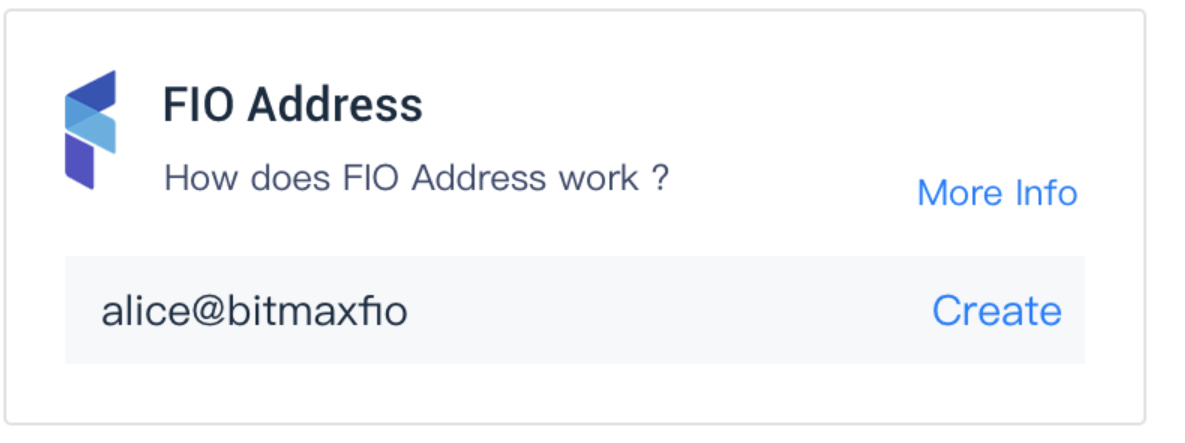
A. Visit [Homepage] — [My Asset] — [Deposit]
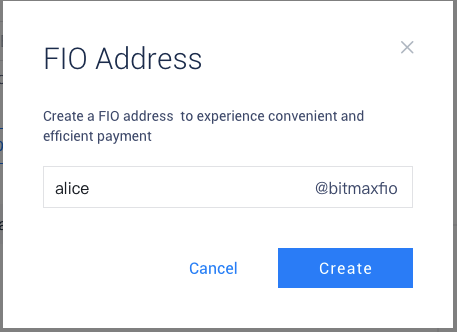
B. Select any asset and click on [Create] under [FIO Address]
C. Enter a unique username to create your FIO address on AscendEX
D. If the username has already been registered, please enter a new one and try again
B. Link Your FIO Address with Token Addresses
Steps:
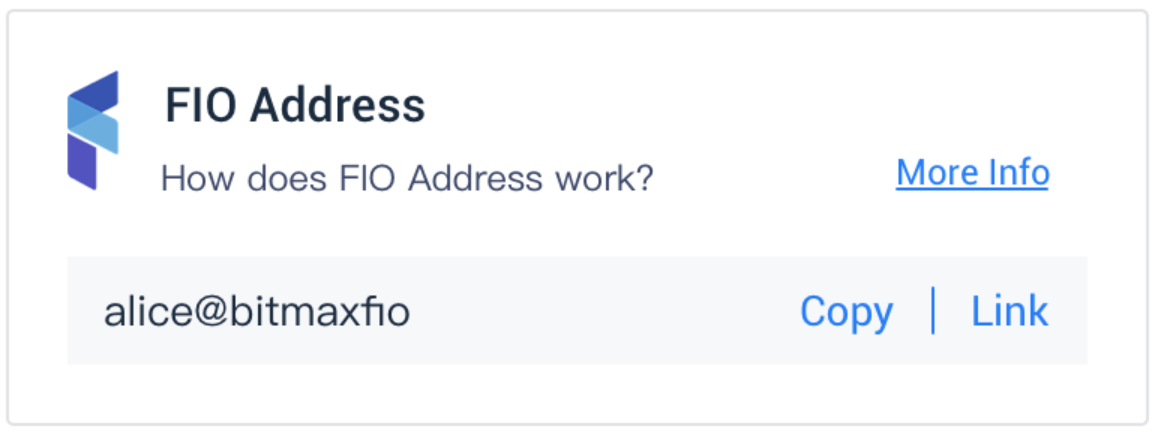
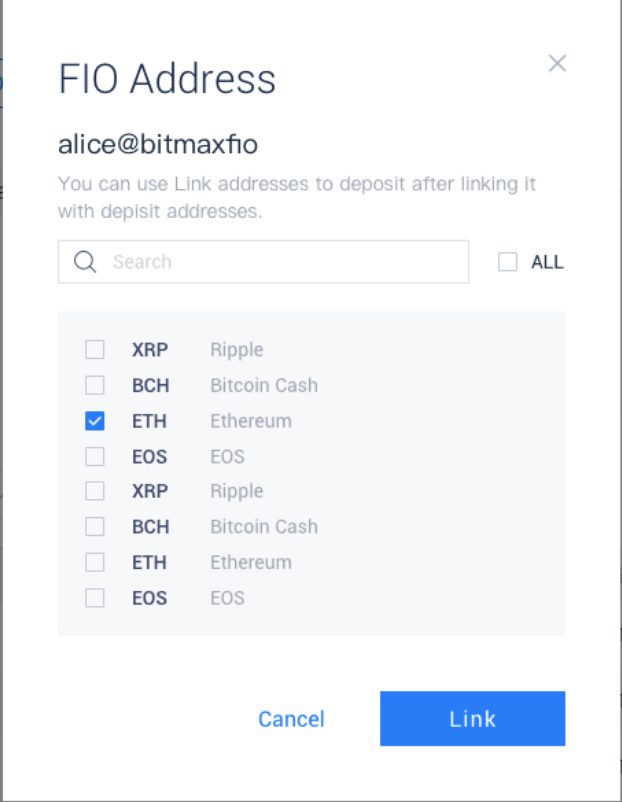
A. After the FIO address is created successfully, click on the [Link] button to link the FIO address with your current token addresses
B. For example, check the BTC box and link it with your FIO address, then you will be able to deposit and withdraw BTC with the FIO address (like alice@bitmaxfio) going forward
C. Deposit with FIO Address
You can deposit tokens from external wallets to AscendEX with the FIO address.
Steps:
A. The wallet (non-AscendEX wallet) you want to withdraw from must support FIO addresses
B. You have already created a FIO address on the external wallet and completed linking
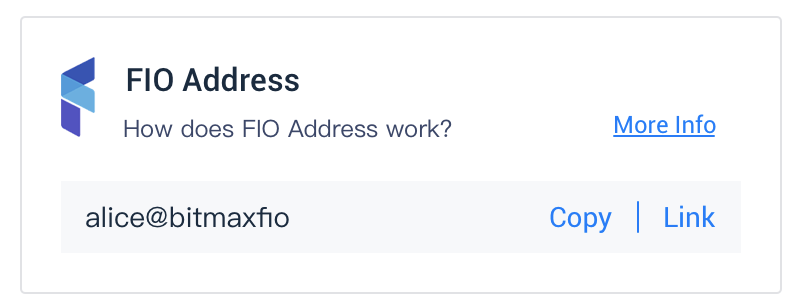
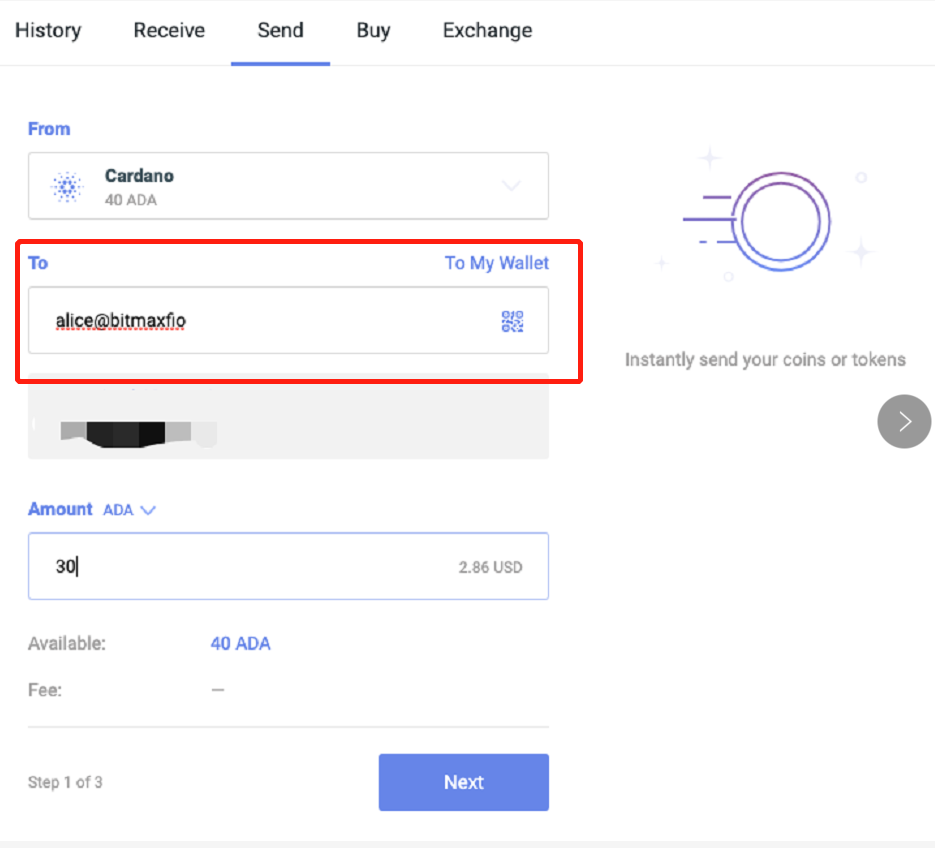
C. Copy your FIO Address and enter it in the withdrawal address field on the external wallet
D. Select token and public chain type to complete deposit
D. Withdraw with FIO Address
Steps:
A. You have already created a FIO Address on AscendEX, and have linked it to the token you want to withdraw
B. The wallet (AscendEX wallet or external wallet) you want to deposit into must support FIO address
C. Enter the FIO address for the token to proceed with withdrawal