Add WETH to MetaMask
Summary: The best way to add the WETH contract address on any network to your MetaMask Wallet is with the Coingecko platform. Their WETH Page has a list of all contract addresses for the token on Ethereum, Polygon, Arbitrum and other networks. With this feature, DeFi users can easily add the WETH token to their MetaMask at the click of a button.
How to Add Wrapped Ethereum (WETH) to MetaMask
As mentioned above, the best way to add Wrapped Ethereum (WETH) to your MetaMask Wallet is through Coingecko. Their website aggregates all of the contract addresses for the WETH token and provides them to users in a user friendly way.
You can get it done in less than 10 seconds with this simple guide:
- Visit the CoinGecko WETH Page.
- Click the 'Contract' button underneath 'Info' on the top right of the page.
- Find the network that you want to add the WETH token to on your MetaMask Wallet.
- Select the MetaMask logo icon and it will automatically add it to your MetaMask Wallet.
What is WETH vs ETH?
WETH (Wrapped Ethereum) is an ERC-20 token that represents Ethereum on Ethereum's blockchain. It is "wrapped" in the sense that it is a standard ERC-20 token that can be easily traded on decentralized exchanges (DEXs) and used in smart contracts, but it is backed 1-to-1 by actual Ethereum. This means that one WETH is equivalent to one ETH. Wrapping Ethereum in this way allows it to be easily used in the same way as other ERC-20 tokens in decentralized finance (DeFi) applications.
ETH, short for Ethereum, is the native cryptocurrency of the Ethereum blockchain. It is used to pay for transactions and computational services on the network. It can also be traded on cryptocurrency exchanges, and used in smart contracts and decentralized applications (dApps) built on Ethereum.
Is WETH Safe?
Yes, WETH is safe and fully backed 1:1 by Ethereum (ETH). It is always redeemable for ETH through decentralized, non-custodial trading platforms like Uniswap and Sushiswap. This means that users can easily convert their wrapped ETH back to regular ETH if they choose.
Final Thoughts
In conclusion, Coingecko is the most efficient and user-friendly platform for adding the verified contract for Wrapped Ethereum (WETH) to your MetaMask Wallet. With an easy-to-use interface and access to contract addresses across various networks, you can quickly add WETH to your wallet in just a few clicks. WETH is a safe, fully-backed ERC-20 token that simplifies DeFi interactions, making it an essential component for anyone involved in the decentralized finance ecosystem.
How to Add Wrapped Ether (WETH) to MetaMask on Multiple Chains
Wrapped Ethereum (WETH) is a wrapped version of one of the most popular crypto coins – Ethereum. That means that the WETH price is pegged to ETH 1:1, and it exists to make it easier to trade within various decentralized applications on different networks since WETH can be used not only on the ETH chain but also on BNB Smart Chain. So wrapped ETH is not the same ETH but can be swapped one to one.
Once you make your trades, you can unwrap your wrapped Ether and exchange it for the same quantity of Ethereum. But you have to add WETH to MetaMask first.
This article will show you how to quickly add Wrapped Ether (WETH) to your MetaMask wallet on two different chains. Let’s dive in!
How to Add WETH to MetaMask
Add WETH to MetaMask on the Ethereum Network
There is no extra step needed to add WETH to MetaMask on the Ethereum Network since the Ethereum chain comes pre-configured with your MetaMask installation. Let’s take a look!
Set up your MetaMask wallet and Unlock it
The first step is to create a MetaMask wallet or unlock it if you already own one.
Download the browser extension from the official website and follow the instructions. If you need help, we have a step-by-step guide on our website to set up your MetaMask wallet.
Once you have your wallet installed and configured, you can unlock it using your password. If you have forgotten your password, you can reset it as long as you know your seed recovery phrase.
Ensure you are Using the Right Network
What chain you need depends on what you want to use your WETH tokens for. If you got the BNB chain imported, you can also add WETH using these steps. Otherwise, we will guide you through adding the Smart Chain to MetaMask in just a moment.
But now, to ensure you are using the Ethereum Network on MetaMask, open the network selector drop-down menu and switch your network to Ethereum.
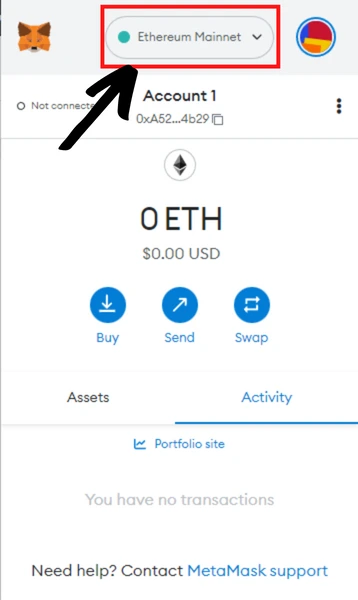
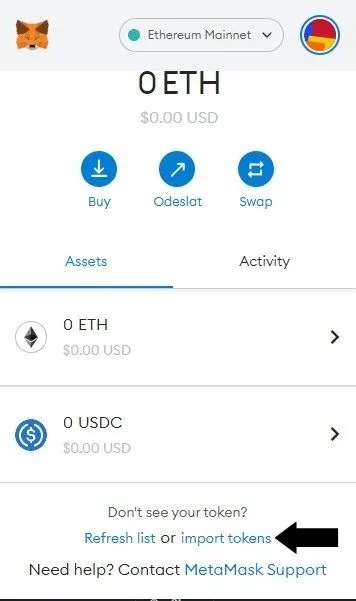
Select “Import Tokens” and then “Import Custom Token”
Once Ethereum Network is selected, scroll down in the Assets list and select “Import Tokens.”
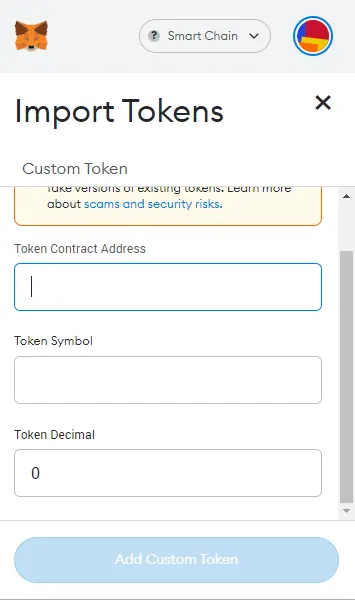
Then switch to the “Import custom tokens” view.
Copy the WETH token Contract Address
Now head to the WETH (Wrapped Ether) page on CoinMarketCap. It is crucial to ensure that you get Token information from a credible source. And doing it through CoinMarketCap is one of the easiest and most reliable ways to obtain the contract address.
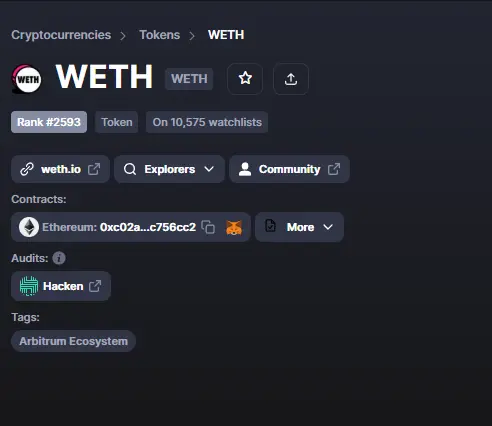
Find the section called “Contracts.” Here you can either copy the Contract address and paste it into Metamask or have WETH imported to Metamask automatically by clicking the little MetaMask logo.
Import WETH to MetaMask as Custom Token
Once you’ve copied the WETH contract address, open the MetaMask extension again and paste it into the “Token Contract Address” field.
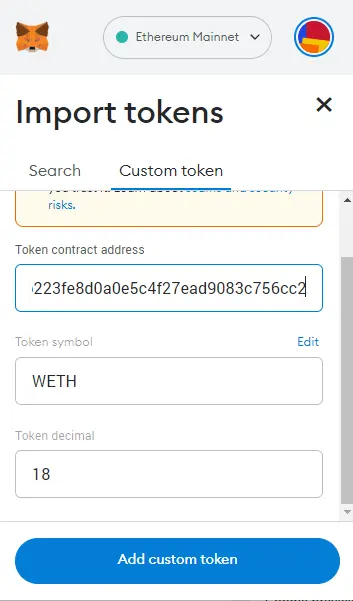
If you’ve pasted the correct contract address, other windows should be auto-filled, and WETH should appear as a token symbol.
Finish by pressing the “Add custom token” button. Once you’ve successfully imported WETH to your MetaMask wallet, it should appear as one of your tokens under the Ethereum network.
Add WETH to MetaMask on the Binance Smart Chain
Since most of the steps are the same as when importing WETH on the Ethereum Network, it would be pointless to repeat ourselves. But there, you need to add BNB Chain first.
Add BNB Smart Chain as Custom Network
First thing first, it is time to add the Binance Smart Chain to Metamask. BNB chain doesn’t come prepacked with your wallet. That’s why we need to do it manually. To do so, open your Metamask extension, click on your profile picture, and tap “Add network”.
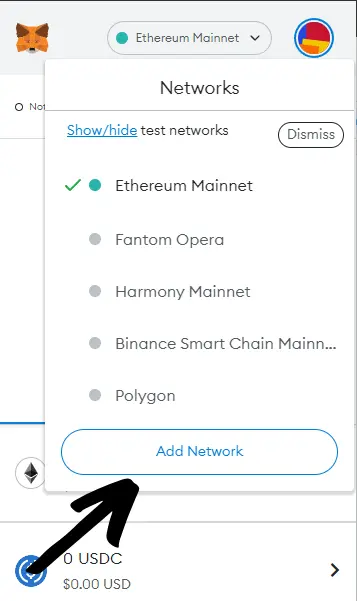
- Network Name: Smart Chain
- New RPC URL: https://bsc-dataseed.binance.org/
- ChainID: 56
- Currency Symbol: BNB
- Block Explorer URL: https://bscscan.com
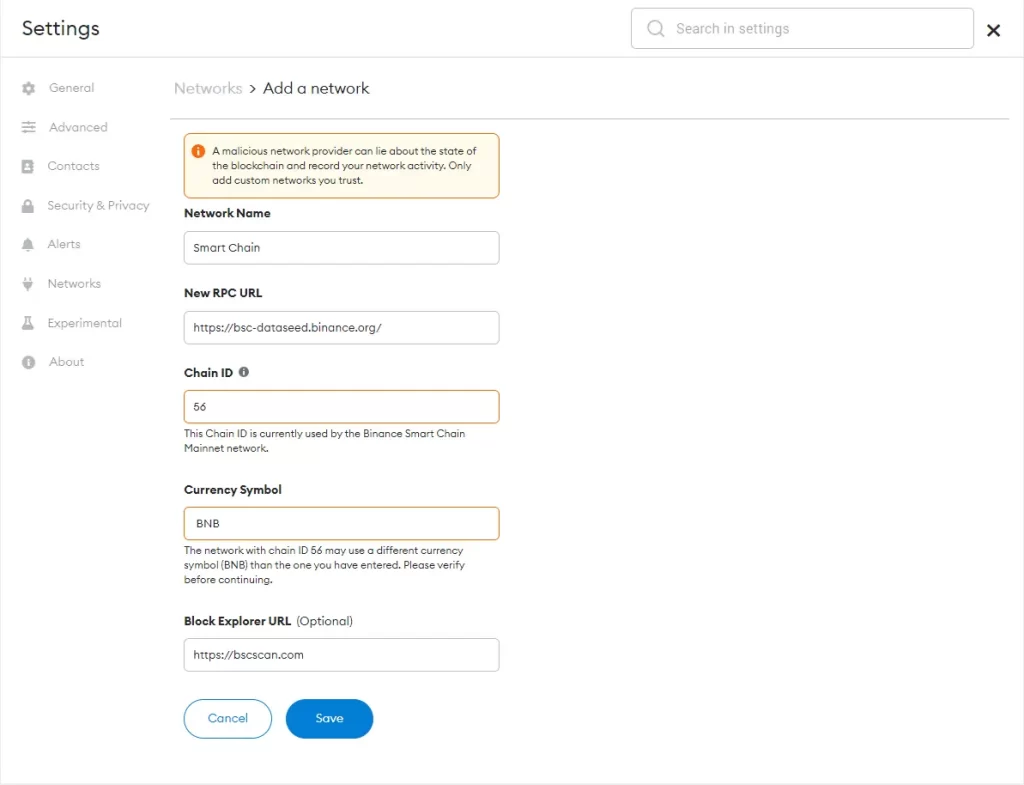
These details can be found in the official Binance guide, here.
After hitting Save BNB chain was successfully imported. Now what is left to do is to add AVAX itself to Metamask.
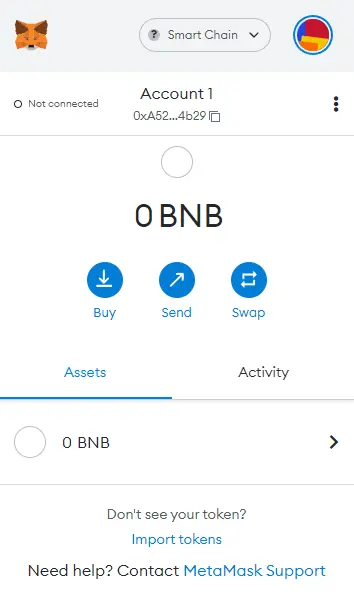
Add WETH as Custom Token
To add wrapped ether on the BNB Smart Chain, the steps are the same as on Ethereum Network.
- Select BNB Chain in your Wallet
- Tap “Import Tokens”, then “Import Custom Token”
- Once again, visit the WETH page on CoinMarketCap. But instead of copying the Ethereum contract address, click on the button “more” and copy the BNB Smart Chain address
- Paste the contract address into your wallet and finish importing WETH
Conclusion
Congratulation! You’ve successfully added the WETH token to your MetaMask wallet. By following the few steps outlined in our article, you can now quickly start using the WETH, or wrapped ethereum on multiple chains. Once you are done doing your stuff, you can unwrap your tokens and exchange them one to one for Ethereum.
Now go ahead and start exploring all the possibilities that WETH token has to offer, or visit one of our other articles to become a crypto pro!
How To Add Wrapped Ether (WETH) To Metamask

Wrapped Ether or WETH is simply the Wrapped version of the Ether (ETH) token. WETH is pegged to the native Ether token on a 1:1 ratio and you can convert ETH to WETH through a process known as Wrapping.
While Ether (ETH) is the native token for the Ethereum network, it has limited capabilities and can only be used to cover gas fees in most cases. Since ETH doesn’t follow the ERC-20 standard, WETH is used in place of ETH on many platforms and DApps for trading directly with ALT tokens, NFT trading, providing liquidity, and crypto lending amongst others.
Metamask on the other hand is unarguably the most popular non-custodial cryptocurrency wallet right now. The wallet is available on a wide range of devices and can be used to store, trade, send, and receive various cryptocurrencies and crypto assets across multiple (compatible) blockchains.
The WETH token is available on the Ethereum blockchain and a handful of other networks including Polygon, Fantom, BSC, and more for use in their various ecosystems.
If you’re a Metamask user who’s currently searching for how to add WETH to your Metamask wallet, you’re on the right page. In this article, you will learn how to add WETH to Metamask easily on Ethereum and other EVM-compatible networks.
How To Add WETH To Metamask (Quick Guide)
- Launch the Metamask extension or mobile app and unlock your account.
- Scroll down to the bottom of the page and click on [import tokens].
- Search for WETH and select the correct option from the search results.
- Click on [Next].
- Finally, click on [Import token] to add WETH to your Metamask wallet.
How To Add WETH To Your Metamask Wallet (Step By Step Guide)
The Ethereum DeFi ecosystem is the largest in the crypto space and WETH on the Ethereum network is the most popular version of the WETH token.
We generally recommend you add Wrapped Ether (WETH) to your Metamask wallet on the Ethereum network unless you intend to use WETH on Metamask via other networks due to specific reasons.
To add the WETH token to your Metamask wallet on Ethereum, you first need to ensure that the Ethereum Mainnet is selected as the default network on your wallet.
Once your wallet is connected to the Ethereum mainnet, you can then import the Wrapped Ether token to your wallet directly on the Metamask interface.
Below is a step-by-step guide on how to add WETH to your Metamask wallet easily.
Step 1: Launch Metamask and unlock your wallet.
First, launch the Metamask extension on your web browser by clicking on the Metamask icon, then enter the account password to unlock your wallet.

If you’re on mobile, launch the Metamask mobile app by tapping on the Metamask app icon, then enter your account password or biometrics information to unlock your wallet.
Step 2: Ensure Ethereum is the selected network.
Since we’re adding the WETH token to Metamask on the Ethereum Network (ERC-20), you want to make sure that the Ethereum Mainnet is selected as the default network on your wallet.
By default, the Ethereum mainnet should be the selected network on your wallet, but if you have switched networks in the past, then click on the network dropdown box and select “Ethereum Mainnet” from the list of available networks.

Step 3: Click on [Import tokens].
Now that your wallet is connected to the Ethereum Mainnet, scroll down to the bottom of the Metamask main window and click on [Import tokens].

Step 4: Search for “WETH” and select it from the list, then click [Next].
On the token import page, search for the WETH token by typing in “WETH” in the search field and then selecting [Wrapped Ether (WETH)] from the search results. The correct WETH token is usually the first one on the search results list.
After that, click on [Next].

Step 5: Click on [Import tokens] to add WETH to your Metamask wallet.
Finally, click on [Import tokens] to add the Wrapped Ether (WETH) token to your wallet on the Metamask browser extension.

Once the token has been added, you can go back to the Metamask home window to view your WETH balance.

With this, you have successfully added the WETH token to your Metamask wallet on the Ethereum network (ERC-20).
How To Add WETH To Metamask On Other Networks.
There are many versions of the Wrapped Ether token (WETH) available for use across different blockchains not just on Ethereum.
Some of these blockchains are compatible with the Ethereum virtual machine meaning that WETH can be added to your Metamask wallet via a handful of these blockchains where the token is available on.
Below, you will find out how to add WETH to Metamask on EVM-compatible blockchains including Polygon (formerly, MATIC), and the Binance Smart Chain (BSC).
How To Add WETH To Metamask On The Polygon Network
The Wrapped Ether token (WETH) is available on the Polygon (MATIC) network.
To add WETH to Metamask on Polygon, simply copy the contract address of Polygon WETH then input the address in the token import window and click on [Import tokens] to import the token to your wallet.
Below is how you can add WETH To Metamask on the Polygon Network.
1. Copy the WETH token contract address for the Polygon network.
To add the WETH token to your Metamask wallet on Polygon, you first need to get the contract address for the Wrapped Ether token on Polygon.
To do this, go to the WETH token page on CoinMarketCap. On the page, click on [More], then scroll down on the dialog box until you find the contract address for WETH on the Polygon network.
Now, click on the Copy icon next to the WETH Polygon contract address to copy it to your device clipboard.

2. Launch Metamask, unlock your wallet, and ensure Polygon is the selected network.
Launch the Metamask extension by clicking on the Metamask icon in the extensions area of your browser. Enter your account password and click on [Unlock] to unlock your wallet.
Since we will be adding the Wrapped Ether token (WETH) to Metamask on the Polygon network, you will want to ensure that the Polygon network has been added to your Metamask wallet and selected as the default network
If you haven’t added the Polygon Mainnet to your Metamask wallet, we have a good tutorial on how to add the Polygon network to Metamask on both the extension and mobile app. You will need to follow the steps in that guide to add the Polygon (MATIC) network to your Metamask wallet before moving ahead with this guide.
Once you have added the Polygon network to your wallet, select it as the default network as illustrated in the screenshot below.

3. Scroll down and click on [Import tokens].
Now that you have added (and selected) the Polygon network as the default network on your Metamask wallet, go back to the Metamask main window and scroll down.
At the bottom of the page, click on [Import tokens].

4. Paste the Contract Address and click [Add Custom Token].
On the token import window, paste the WETH contract address that you copied earlier from the CoinMarketCap website in the contract address field and wait a few seconds for Metamask to fetch the Token Symbol and Decimal automatically.
Once that’s done, click on [Add Custom Token].

5. Click on [Import tokens] to add WETH to Metamask on Polygon.
Finally, click on [Import tokens] to add WETH to your Metamask wallet on the Polygon network.

With this, you have successfully added WETH to Metamask on Polygon.
How To Add WETH To Metamask On The Binance Smart Chain (BSC)
WETH is available on the Binance Smart Chain and since the BSC is an EVM-compatible network, you can add easily add WETH to your Metamask wallet on the Smart Chain once you have the network configured on your wallet.
Below is how you can add the WETH token to Metamask on the BSC network.
1. Copy the WETH contract address for the Binance Smart Chain (BEP-20 WETH).
To add the WETH token to your Metamask wallet on the Binance Smart Chain, you first need to get the contract address for the WETH token on BSC.
To do this, go to the Wrapped Ether (WETH) token page on CoinMarketCap. On the page, click on [More], then scroll down on the dialog box until you find the WETH contract address for the BNB Smart Chain (BEP20) network.
Now, click on the Copy icon next to the WETH BEP-20 contract address to copy the address to your device clipboard.

2. Launch Metamask, unlock your wallet, and ensure the Binance Smart Chain is the selected network.
Launch the Metamask extension by clicking on the Metamask icon in the extensions area of your browser. Enter your account password and click on [Unlock] to unlock your wallet.
Since we will be adding Wrapped Ether (WETH) to Metamask on the Binance Smart Chain, you will want to ensure that the BSC Network has been added and selected as the default network on your Metamask wallet.
If you haven’t added the Binance Smart Chain to your Metamask wallet, we have a comprehensive tutorial on how to add the BSC network to Metamask on both the extension and mobile app. You will need to follow the steps in that article to add the BSC network to your Metamask wallet before moving forward with this guide.
Once you have added the Binance Smart Chain to your wallet, select it as the default network as illustrated below.

3. Scroll down and click on [Import tokens].
Now that you have added and selected the Binance Smart Chain network as the default network on your Metamask wallet, go back to the Metamask main window and scroll down to the bottom.
At the bottom of the page, click on [Import tokens].

4. Paste the Contract Address and click [Add Custom Token].
On the token import window, paste the WETH contract address you copied earlier from CoinMarketCap and wait a few seconds for Metamask to fill in the Token Symbol and Decimal automatically.
Once that’s done, click on [Add Custom Token].

5. Click on [Import tokens] to add WETH to Metamask on the BSC Network.
Finally, click on [Import tokens] to add WETH to your Metamask wallet on the Binance Smart Chain network.

With this, you have successfully added WETH to Metamask on the Binance Smart Chain.
How Does One Convert From ETH to WETH on MetaMask?
Converting ETH to WETH is a process known as “wrapping” and it can be done directly on your Metamask wallet.
Wrapping simply means locking some ETH tokens in a smart contract and then getting Wrapped ETH back. Both ETH and WETH have the same value and you can convert from one to another on Metamask easily.
To convert ETH to WETH on Metamask, you must first ensure that you have added WETH to your wallet using the guide above. You also need to have some ETH on your wallet which will be converted to WETH i.e “wrapped”.
Once WETH is added to your wallet and you also have some ETH available, launch Metamask and select the “Ethereum Mainnet” as the default network on your wallet.
Now, click on [Swap].

Next, search for “weth” in the “Swap To” section and select the correct Wrapped Ether (WETH) token from the search results.

Input the amount of ETH you intend to convert to WETH and click on [Review Swap] to review the transaction.

Finally, review the quotes and estimated gas fees then click on [Swap] to complete your transaction.

Once the transaction completes, go back to the Metamask main window and refresh your balances to view your newly converted WETH balance.
Can You Send WETH to Your Metamask ETH Address?
On Metamask, your ETH address and WETH address are the same so yes, you can send WETH to your Metamask ETH address.
Metamask provides only one default wallet address to be used across all the different blockchains you add to your wallet. For instance, your Metamask BEP-20 wallet address is the same as your ERC-20 wallet address, MATIC wallet address, and so on.
Wrapping Up
Wrapped Ether, also known as WETH is the wrapped version of the native Ether token. It holds the same value as ETH and as an ERC-20 token, WETH allows you to trade ETH for other ERC-20 tokens, purchase NFTs on platforms like Opensea, provide liquidity on various liquidity pools, and more.
There are a few ways to add the WETH token to your Metamask wallet and this depends on the network you intend to use WETH on. The token is currently available on several blockchains and some of these chains are compatible with Metamask.
You can add WETH to your Metamask wallet on the Ethereum network by simply selecting the Ethereum Mainnet as the default network on your wallet. After that, click on [import tokens] at the bottom of the page, search for WETH then add the token to your wallet.
On other networks like Polygon, and the Binance Smart Chain, you first need to copy the correct contract for WETH on the network you intend to add the token to.
Once you have the correct contract address, head over to your Metamask wallet and select your network of choice then add WETH to your wallet that network using the contract address you copied.
And that’s about it. If you were searching for a tutorial on how to add WETH to your Metamask wallet, we hope you found this guide helpful.
Что такое токен Wrapped Ether (WETH)? Как он работает и как получит?
wETH — это особый тип токена ERC-20, целью которого является облегчение различных операций обмена между различными децентрализованными платформами, являющимися частью обширной экосистемы Ethereum.

Если вы пользуетесь Ethereum, большинство токенов, которыми вы торгуете и инвестируете, скорее всего, будут использовать стандарт токенов ERC-20. Использование этого технического стандарта стало популярно среди децентрализованных приложений, кошельков и проектов, поскольку он предоставляет расширенные возможности большинству пользователей. Однако это порождает другую проблему с нативным токеном сети Ethereum — эфиром.
Эфир не следует тем же правилам, что и токены ERC-20, однако есть спрос на его использование и в децентрализованных приложениях стандарта ERC-20. Wrapped Ether призван решить эту проблему и, возможно вы уже пересекались с этим токеном. Далее мы расскажем, почему он стал полезным инструментом для инвесторов и владельцев во многих проектах и DApp.
Слово wETH происходит от «обернутого эфира», что на испанском означает «обернутый ETH» . wETH — это токен ERC-20, основной целью которого является облегчение обмена эфира на другие токены ERC-20 . Без сомнения, еще один поворот в текущей эволюции в сторону токеномики, или, другими словами, интернета денег.
В этот момент вы наверняка спросите, почему я не могу напрямую обменять эфиры на другие токены ERC-20?. Ну, это потому, что ETH не совместим со стандартным ERC-20 от Ethereum. Это связано с тем, что ERC-20 был определен намного позже существования ETH. Из-за этой ситуации ETH нельзя было напрямую торговать на платформах DEX другими токенами ERC-20. Для этого необходимо преобразовать эфир в токен ERC-20 , и именно это делает wETH.
Почему существуют токены wETH?
Как мы упоминали в начале этой статьи, токены wETH были созданы для довольно специфической цели. Однако, чтобы полностью понять причину его существования, лучше представить себе следующий случай.
Представьте, что вы владеете определенной суммой фиатных денег и посещаете парк развлечений. В парке, как правило, все, что находится в нем, доступно только через специальные жетоны, которые продаются на входе. Таким образом, даже если у вас много денег, вы не сможете использовать что-либо в парке без этих фишек. Ситуация, которая вынуждает вас обменять свои деньги на фишки. Все для того, чтобы насладиться аттракционами и услугами парка.
Это, безусловно, довольно раздражающая и нежелательная ситуация. Но правда в том, что в Эфириуме происходит именно это. У вас может быть много эфира в кошельке, но если вы хотите получить доступ к какой-либо услуге, оплачиваемой токеном ERC-20, вам придется сначала преобразовать этот эфир. Только после преобразования вашего баланса в нужный вам токен вы сможете получить доступ к этой услуге.
Ситуация еще более усложняется, когда у нас есть тысячи токенов, которые торгуются и обмениваются. Ситуация, которая затрудняет маркетинг и создает препятствия для пользователей и их опыта.
Чтобы обойти это, был создан wETH. Этот токен фактически работает как «конвертер» между эфирами и токенами. Все это благодаря смарт-контракту, который облегчает эту задачу. После этого процесса wETH преобразует любой отправляемый вами эфир в соотношение 1:1. Проще говоря, wETH — это стабильная монета из эфира, которую затем можно конвертировать в любой другой токен ERC-20, который вы хотите, на DEX.
Зачем обертывать ETH

Для начала может быть сложно понять, для чего нужен токен WETH. Разве в блокчейне Ethereum уже нет токена ETH? Сперва нужно понять, что не все токены Ethereum одинаковы с технической точки зрения. Сеть позволяет разработчикам создавать новые правила и стандарты для криптовалют.
Одним из примеров может быть формат ERC-721, который дает доступ к невзаимозаменяемым токенам (NFT). Они существенно отличаются от эфира или токенов ERC-20. У разработчиков есть множество возможностей настройки при создании этих цифровых активов. Таким образом, хотя ETH можно использовать в качестве платы за газ в Ethereum, его нельзя использовать в каждом DApp.
Большинство DApp в DeFi в настоящее время принимают токены ERC-20 для инвестиций и стейкинга. Если мы хотим добавить ETH в пул ликвидности или использовать его в качестве обеспечения, гораздо проще иметь его в версии ERC-20. Это обеспечивает полную совместимость с блокчейном и экономит время на разработку новых смарт-контрактов.
Как обернуть эфир (ETH)
Процесс создания WETH прост — вы отправляете свой ETH на смарт-контракт, который затем предоставляет вам WETH. Это означает, что все созданные WETH полностью поддерживаются резервами ETH. Ваш ETH будет заблокирован в смарт-контракте, и его можно в любое время обменять обратно на WETH. После возвращения ETH контракт сжигает предоставленный WETH.
Чтобы обернуть эфир, вы можете напрямую взаимодействовать со смарт-контрактом WETH. Он заберет ваши ETH и зачислит WETH на кошелек в соотношении 1 к 1 (вам все равно придется платить за комиссию за транзакцию). Для обратной конвертации требуется еще одно взаимодействие со смарт-контрактом, но процесс почти не отличается.
Однако гораздо проще обменять другой токен на WETH, используя криптобиржу. Давайте рассмотрим, как вы можете обменять свои ETH на WETH с помощью Uniswap DEX или напрямую через кошелек Metamask.
Смарт-контракты, DApps и wETH, триада экосистемы Ethereum

Учитывая широту и сложность экосистемы Ethereum, разработчикам пришлось создавать инструменты, облегчающие ее использование. Во- первых, смарт-контракты — это небольшие программы, которые позволяют разрабатывать приложения любого типа, работающие на Ethereum. Помимо смарт-контрактов они несут ответственность за огромную экосистему токенов ERC-20, которая существует на Ethereum. Все это потому, что токен ERC-20 — это не что иное, как смарт-контракт, обладающий необходимыми свойствами, чтобы классифицировать его как указанный стандарт.
DApps, с другой стороны, являются просто результатом взаимодействия веб-приложения или локального приложения со смарт-контрактами. Эту возможность взаимодействия со смарт-контрактами можно увидеть, например, в Dappradar. Это возможно, потому что, если смарт-контракт запрограммирован на получение токенов ETH или ERC-20, он сделает это и предоставит вам доступ к сервису или функции, с которыми он работает. На данный момент MetaMask, который является DApp, позволит вам выступать в качестве моста для прямого взаимодействия с этим смарт-контрактом.
Однако бывают случаи, когда необходим гораздо более прямой инструмент взаимодействия. Если, например, мы используем пункт обмена токенов ERC-20, все, чем мы управляем, связано со смарт-контрактом. Вот где пригодится wETH и его паритет 1:1 с эфиром. Поскольку wETH является токеном ERC-20 и имеет связанный смарт-контракт, проще, дешевле и безопаснее обменять wETH на другие токены, чем делать это напрямую из эфира. Это основная причина, по которой был создан wETH.
Задача WETH: легко торговать эфирами и токенами
Читая вышеизложенное, вы наверняка задавались вопросом: почему я не могу напрямую обменивать эфиры и токены? Это совершенно верно, и ответ прост: эфир несовместим с токенами ERC-20.
Невероятно, не так ли? Трудно поверить, что базовый токен Ethereum несовместим с токенами, которые работают на его блокчейне. Но на самом деле разработчики Эфириума сделали это специально. Его цель состояла в том, чтобы как можно меньше изменять основу блокчейна Ethereum.
Когда Fabian Birdcage разработала токен ERC-20 , глобальное видение экосистемы было больше сосредоточено на предоставлении экономических инструментов для будущих DApp. В тот момент будущие возможности были немного менее взрывоопасными, чем они оказались на самом деле. Выход токена ERC-20 все изменил. Появление DApps, массовое распространение смарт-контрактов и появление первой DEX довели дизайн этих токенов до предела.
Среди этих ограничений — невозможность напрямую обменивать эфир на такие токены или наоборот. Это никогда не принималось во внимание, потому что процедура получения этих токенов заключалась в отправке эфира на смарт-контракт. Этот смарт-контракт был тем, кто выполнил преобразование, но были недостатки. Например, отправка токенов ERC-20 на смарт-контракт, управляемый ETH, приведет к потере ваших токенов.
Чтобы справиться с этим сбоем, не изменяя работу блокчейна, был создан wETH. Особый тип токена, который позволяет преобразовать эфир в токен wETH. Оттуда вы можете торговать другими токенами, а затем конвертировать их обратно в эфир. Это был необходимый инструмент для облегчения торговых задач среди огромного количества токенов в экосистеме Ethereum.
Полезность токенов wETH
Теперь, когда вы знаете, что это такое и почему были созданы токены wETH, пришло время узнать об их полезности. Среди этих утилит мы можем упомянуть:
Позволяет торговать более легко и безопасно
Когда вы конвертируете свой эфир в wETH, вы делаете это, чтобы сохранить некоторые средства в токене, который вы можете использовать для быстрого обмена на другие токены в DEX . Обычно, когда у вас есть только эфир, он находится в вашем кошельке. Если вы хотите купить токен на децентрализованной бирже, вы должны сначала преобразовать указанный эфир в токен и оттуда участвовать в коммерциализации желаемого токена. Этот процесс усложняет процесс. Преобразовывая свой эфир в wETH, вы гарантируете, что вашему трейдеру это будет намного проще и безопаснее.
Это связано с тем, что wETH является токеном ERC-20, и поэтому его можно напрямую обменять на другие токены ERC-20. Все это без опасности совершения транзакцией ошибки, ведущей к потере токенов.

Сокращение расходов на газ в блокчейне
В то же время wETH позволяет экономить газ в блокчейне Ethereum. Это связано с тем, что wETH напрямую обменивается на другие токены ERC-20 на DEX. Это упрощает торговлю токенами ERC-20. За счет сокращения операций в блокчейне Ethereum снижаются затраты на операции и их комиссии.
Обеспечивает совместимость
Поскольку wETH — это токен ERC-20, основанный на смарт-контракте, он облегчает взаимодействие DApps и DEX от Ethereum. Ориентируясь на смарт-контракт wETH, они могут осуществлять операции обмена друг с другом в режиме реального времени без посредников. Ситуация, которая еще больше стимулирует децентрализованные платформы и сохраняет всю власть в руках пользователей.
Как обернуть ETH на Uniswap
1. Откройте Uniswap и подключите свой кошелек. Убедитесь, что у вас выбрана сеть Ethereum.


2. Выберите ETH в верхнем поле и WETH — в нижнем. Если вы нажмете [Select a token] (Выбрать токен), то над списком появится WETH.

3. Введите сумму ETH, которую вы хотите конвертировать в WETH, и нажмите кнопку [Swap] (Обменять).

4. Теперь вам нужно подтвердить транзакцию в криптокошельке. Не забывайте, что вам также нужно будет оплатить за газ, поэтому убедитесь, что у вас есть дополнительные ETH. Проверьте данные и нажмите [Confirm] (Подтвердить).

5. Теперь вам нужно дождаться подтверждения транзакции в блокчейне. Время ожидания будет зависеть от загруженности сети. Если вы спешите, то можете ускорить процесс (например, оплатить более высокие комиссии), чтобы подтвердить транзакцию быстрее.
Как обернуть ETH на MetaMask
1. Откройте кошелек MetaMask и убедитесь, что выбрана сеть [Ethereum Mainnet]. Затем нажмите [Swap] (Обменять).

2. В поле [Swap to] (Обменять на) найдите WETH.

3. Введите сумму ETH, которую хотите обменять, и нажмите [Review Swap] (Детали обмена).

4. Теперь вы увидите котировку с текущим курсом (который должен быть 1 к 1). Нажмите [Swap] (Обменять), чтобы завершить транзакцию.

Как развернуть эфир (WETH)
Как мы говорили ранее, вы можете развернуть эфир вручную, взаимодействуя со смарт-контрактом. Однако намного проще и безопаснее обменять WETH на ETH. Для этого следуйте нашим предыдущим инструкциям по Uniswap или MetaMask, но убедитесь, что меняете WETH на ETH. Вы также можете использовать Binance, чтобы конвертировать WETH.
1. Перейдите в Конвертация и OTC-портал на бирже Binance. Выберите WETH в поле «C» и ETH в поле «На», а затем нажмите «Предварительный просмотр».

2. Здесь вы сможете посмотреть детали сделки. Обязательно проверьте их перед подтверждением обмена. Обратите внимание, что Binance не позволяет обменивать ETH на WETH с помощью этого метода.
Можно ли обернуть ETH на других блокчейнах?
Другие упакованные версии ETH существуют во многих основных блокчейнах, что повышает совместимость ETH. Например, использование обернутого ETH в BNB Smart Chain (BSC) позволяет торговать или использовать WETH в экосистеме BSC DeFi. Для этого вам нужно будет вывести ETH с Binance или другой биржи на свой кошелек BSC. Перед выводом средств убедитесь, что ваша биржа поддерживает конвертацию ETH в WETH.
В качестве альтернативы можно воспользоваться услугами моста. Это сторонние DApp, которые берут криптовалюту и хранят ее в исходном блокчейне, а затем создают обернутые токены в соотношении 1:1 в целевом блокчейне.
Перевод токенов обычно работает нормально, но имейте в виду, что перемещение токенов между блокчейнами может быть сопряжено с риском. Были случаи, когда смарт-контракты некоторых мостов были скомпрометированы или взломаны. Если вы хотите перевести обернутый биткоин, Ethereum или другой токен, внимательно изучите платформу, которую вы используете, прежде чем использовать их услуги.
Как обернутый ETH сохраняет стоимость ETH?
Ключом к сохранению привязки WETH к ETH является его конвертируемость в соотношении 1 к 1. Если бы WETH был дешевле, люди покупали бы его и превращали в более дорогой ETH, чтобы получить прибыль. Такая возможность увеличила бы спрос WETH и, следовательно, цену. Если бы WETH был дороже, пользователи покупали бы ETH и конвертировали его в WETH для продажи, увеличивая предложение WETH и снижая его цену. Такой баланс спроса и предложения гарантирует, что привязка остается относительно стабильной.
В каких приложениях DeFi можно использовать WETH
У Ethereum есть много DApp в сегменте DeFi, которые принимают токены ERC-20. Один из вариантов — добавить WETH в пул ликвидности, доступный на децентрализованной бирже (DEX), такой как Uniswap. Предоставляя ликвидность, вы будете получать комиссии от пользователей, которые совершают обмен с помощью пула. Однако непостоянный убыток всегда является возможным риском, который может привести к уменьшению количества ваших депонированных токенов. Использование пула с высокой ликвидностью уменьшает этот риск.
Вы также можете начать выдавать свой WETH в качестве займа. Например, на платформе Aave. Другие пользователи могут одолжить ваши токены, но сначала должны предоставить обеспечение, покрывающее их кредит. Взамен вы будете получать проценты до тех пор, пока не решите удалить депозит.
Вывод
У блокчейна Ethereum одна из старейших и наиболее развитых экосистем DApp. Это делает необходимым использование WETH, поскольку многие владельцы ETH хотят использовать свои ETH в проектах DeFi. Если вы решили начать экспериментировать с WETH, рекомендуем покупать его за ETH или другие токены, так как это проще и удобнее, чем взаимодействовать со смарт-контрактами для обертывания.